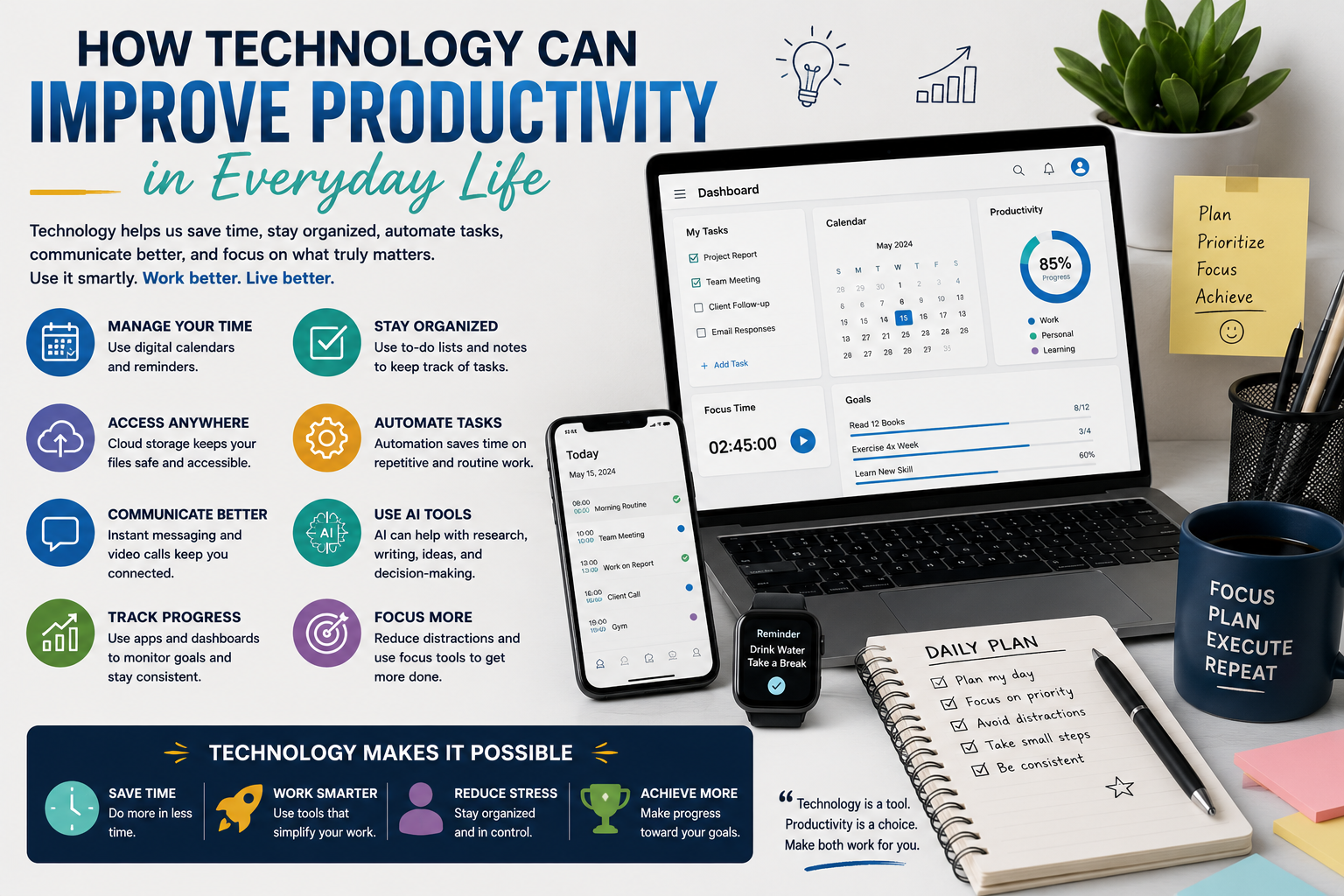
Technology has become an essential part of everyday life. From smartphones and computers to digital calendars, cloud storage, artificial intelligence, and productivity applications, technology gives people more ways to organize their time, complete tasks, communicate, and manage information.
Used thoughtfully, technology can make everyday life more efficient. It can reduce repetitive work, simplify complicated tasks, improve organization, and help people focus on activities that require creativity and human judgment.
However, having access to more technology does not automatically make someone more productive. Too many notifications, unnecessary applications, constant multitasking, and endless digital distractions can have the opposite effect.
The key is learning how to use technology as a tool rather than allowing it to control your attention.
This guide explores practical ways technology can improve productivity in everyday life, from managing schedules and organizing information to automating routine tasks, improving communication, using artificial intelligence, and creating better digital habits.
What Does Productivity Really Mean?
Productivity is often misunderstood as simply doing more work.
In reality, productivity is about using available time, energy, and resources effectively to accomplish meaningful goals.
A productive person does not necessarily spend every hour working. Instead, they find ways to complete important tasks efficiently while leaving enough time for rest, relationships, learning, and other priorities.
Technology can support productivity by helping people:
Organize tasks
Manage schedules
Reduce repetitive work
Find information faster
Communicate more efficiently
Track progress
Store important information
Automate routine activities
Collaborate with others
Make better-informed decisions
The goal is not to use the maximum number of digital tools. The goal is to use the right tools for the right tasks.
1. Use Digital Calendars to Organize Your Time
One of the simplest ways technology can improve productivity is through digital calendars.
Instead of relying entirely on memory or handwritten notes, people can use digital calendars to organize appointments, meetings, deadlines, personal activities, and important reminders.
A well-organized calendar provides a visual overview of how time is being used.
For example, you can schedule:
Work meetings
Study sessions
Project deadlines
Family activities
Exercise
Travel plans
Important appointments
Personal goals
Digital calendars can also send reminders before an event, reducing the chance of forgetting important commitments.
Make Your Calendar More Useful
Avoid filling every available space with tasks.
Leave some flexibility between appointments and activities. Unexpected calls, delays, urgent tasks, and changes in plans are part of everyday life.
A calendar should help you manage your time rather than create unnecessary pressure.
2. Create Digital To-Do Lists
To-do list applications can help turn a large collection of responsibilities into manageable tasks.
Instead of keeping dozens of tasks in your head, you can record them in one place.
A useful digital task list can include:
Task names
Deadlines
Priorities
Reminders
Subtasks
Notes
Progress status
Breaking a large project into smaller tasks can make it easier to start and maintain momentum.
For example, instead of writing:
“Prepare presentation.”
You could create:
Choose the topic.
Research information.
Create an outline.
Prepare slides.
Review the presentation.
Practice the presentation.
The second approach makes the project much easier to manage.
3. Prioritize Important Tasks
Technology can help you organize tasks, but you still need to decide what deserves your attention.
Not every task has the same level of importance.
Digital task-management tools often allow users to mark tasks as high, medium, or low priority.
A simple approach is to identify three categories:
Important and urgent: Do these first.
Important but not urgent: Schedule time for these.
Low-value tasks: Complete later, automate, delegate, or eliminate when possible.
This prevents productivity systems from becoming simple lists of everything you could possibly do.
4. Use Reminders for Small Responsibilities
Small tasks can consume mental energy because they require people to remember them.
Technology can handle many of these reminders.
You can set reminders for:
Paying bills
Renewing documents
Attending appointments
Sending important emails
Completing assignments
Buying household items
Following up with someone
Preparing for an upcoming event
Once a reminder is scheduled, you no longer need to repeatedly think about the task.
This can reduce mental clutter and allow you to focus on what you are doing now.
5. Automate Repetitive Tasks
Automation is one of the most powerful ways technology can improve productivity.
Many everyday tasks happen repeatedly and follow predictable patterns.
For example, people may regularly:
Sort emails
Schedule appointments
Back up files
Send routine messages
Organize documents
Generate reports
Update spreadsheets
Track expenses
Where appropriate, software can automate some of these processes.
The principle is simple:
If a task is repetitive, predictable, and does not require constant human judgment, it may be a candidate for automation.
Automation can save time and reduce the number of small tasks that interrupt more important work.
6. Use Cloud Storage to Organize Information
Cloud storage allows users to access files from multiple devices and keep important documents organized.
Instead of having important information stored on one computer or a single physical device, cloud-based systems can provide convenient access from different locations.
You can organize folders for:
Work
Education
Financial documents
Travel
Personal projects
Photos
Business documents
Important records
A clear folder structure is just as important as having cloud storage.
Avoid creating dozens of random folders and files with unclear names.
Use descriptive file names and consistent folder structures so that information can be found quickly.
7. Use Note-Taking Applications
Digital note-taking tools can help capture ideas before they are forgotten.
People can use them for:
Meeting notes
Research
Shopping lists
Project ideas
Study materials
Travel planning
Personal goals
Reading notes
Brainstorming
A major advantage of digital notes is searchability.
Instead of looking through multiple notebooks for a particular piece of information, you can often search for a keyword and find the relevant note quickly.
8. Improve Communication With Technology
Communication technology allows people to exchange information quickly regardless of physical distance.
Email, messaging platforms, video calls, collaboration software, and shared documents can reduce the time required to communicate.
However, more communication does not necessarily mean better communication.
Productivity improves when communication is:
Clear
Concise
Organized
Relevant
Sent through the appropriate channel
For example, a quick question may require a short message, while a detailed project discussion may be better handled through a structured document or meeting.
Choosing the right communication method can prevent unnecessary conversations and interruptions.
9. Reduce Email Overload
Email can become a major source of digital distraction.
Instead of checking email continuously throughout the day, consider setting specific times to review and respond to messages.
You can also use features such as:
Filters
Folders
Labels
Priority markers
Search
Automatic sorting
Unsubscribe options
The goal is to make your inbox easier to manage.
Not every email requires an immediate response.
Creating a simple system for organizing messages can help protect time for more important work.
10. Use Artificial Intelligence as a Productivity Tool
Artificial intelligence has introduced new ways to complete everyday tasks.
AI tools can assist with activities such as:
Brainstorming
Summarizing information
Drafting content
Creating outlines
Organizing ideas
Explaining complicated subjects
Generating checklists
Analyzing information
Preparing first drafts
Converting information into different formats
For example, someone preparing for a project could use an AI assistant to brainstorm ideas, create an initial outline, identify questions that need further research, or summarize notes.
However, AI should generally be treated as an assistant rather than an unquestioned source of truth.
Important information should be reviewed for accuracy, context, and suitability before being used.
11. Use Technology to Learn Faster
Technology has made educational resources more accessible.
People can learn through:
Online courses
Digital books
Educational videos
Podcasts
Interactive applications
Online tutorials
Virtual classes
Language-learning tools
AI learning assistants
This makes it possible to learn new skills without always following a traditional classroom schedule.
For productivity, the important factor is consistency.
A person does not need to spend several hours every day learning something new. Even a short, focused learning session can become valuable when practiced consistently.
12. Use Digital Tools for Personal Finance
Technology can simplify everyday money management.
Budgeting applications, spreadsheets, banking tools, and financial dashboards can help people understand where their money is going.
You can use digital tools to track:
Income
Household expenses
Bills
Savings
Subscriptions
Debt payments
Financial goals
Seeing spending patterns can make it easier to identify unnecessary expenses and plan ahead.
Automation can also help with recurring payments and savings where appropriate.
However, financial information is sensitive, so users should choose reputable services and use strong security practices.
13. Make Shopping More Efficient
Technology can also reduce the time spent on routine shopping.
Digital shopping lists can help prevent unnecessary trips and forgotten items.
You can organize lists by category, such as:
Groceries
Household items
Personal products
Office supplies
For larger purchases, technology can make it easier to compare specifications, prices, reviews, warranties, and alternatives.
The goal should be informed purchasing rather than simply buying more quickly.
14. Use Navigation and Travel Technology
Navigation applications have transformed everyday travel.
Digital maps can help people:
Find routes
Estimate travel times
Identify alternative routes
Locate nearby services
Save important destinations
Plan trips
Travel applications can also keep reservations, tickets, itineraries, and other information in one place.
This reduces the amount of physical paperwork and makes travel information easier to access.
15. Improve File and Photo Organization
Digital photos and documents can quickly become difficult to manage.
A simple organization system can save significant time.
For example, photos can be organized by:
Year → Event → Location
Documents can be organized by:
Category → Year → Specific document
Use meaningful names rather than files such as:
document1.pdf
or
IMG_4521.jpg
Clear naming makes searching much easier.
16. Use Password Managers and Digital Security Tools
Productivity also includes protecting access to important accounts.
Password managers can help users create and manage unique passwords without needing to remember every password individually.
Other security practices include:
Using strong passwords
Enabling multi-factor authentication
Installing software updates
Avoiding suspicious links
Reviewing account activity
Backing up important information
A security problem can consume significant time and potentially cause serious disruption.
Good digital security is therefore part of efficient technology use.
17. Reduce Notifications and Digital Distractions
Technology can improve productivity, but notifications can constantly interrupt attention.
Every message, alert, email, or social-media notification can create another reason to stop what you are doing.
Consider turning off unnecessary notifications.
You may want to keep alerts for genuinely important communications while limiting notifications from applications that do not require immediate attention.
Try Focus Modes
Many devices include focus or do-not-disturb features.
These can temporarily silence non-essential notifications while you work, study, read, or rest.
The objective is not to disconnect from technology completely. It is to make technology work according to your priorities.
18. Avoid Excessive Multitasking
Technology makes multitasking appear easy.
A person can have multiple browser tabs open, respond to messages, listen to a video, check email, and work on a document simultaneously.
But switching repeatedly between tasks can make it harder to maintain concentration.
A better approach is to group similar activities together.
For example:
Email: Check at designated times.
Deep work: Focus on one important project.
Administrative tasks: Handle smaller tasks together.
Communication: Respond to messages in batches.
This reduces unnecessary switching between unrelated activities.
19. Use Timers to Improve Focus
Simple timers can be surprisingly useful.
You can set a specific period for focused work followed by a short break.
For example:
25 minutes of focused work
5-minute break
Repeat
Or:
45 minutes of focused work
10-minute break
The exact timing is less important than creating a clear boundary around focused activity.
Timers can also help prevent small tasks from taking much longer than necessary.
20. Track Habits Digitally
Technology can help people build consistent habits.
Habit-tracking applications can record activities such as:
Reading
Exercise
Studying
Writing
Practicing a skill
Drinking water
Completing daily goals
Tracking creates visibility.
Instead of simply thinking that you are “trying to be more consistent,” you can see whether you actually completed the habit.
However, habit tracking should support your goals rather than become another source of pressure.
21. Use Technology for Collaboration
Digital collaboration tools are especially useful for teams.
People can work together on:
Documents
Presentations
Spreadsheets
Project plans
Task boards
Calendars
Instead of repeatedly sending different versions of the same file, team members can work from a shared source.
This can reduce confusion and make it easier to see changes and responsibilities.
22. Create Templates for Repeated Work
If you repeatedly perform the same type of task, creating a template can save time.
Templates can be useful for:
Emails
Reports
Presentations
Invoices
Meeting agendas
Checklists
Project plans
Social media content
Instead of starting from a blank page every time, you begin with a reliable structure.
You can then customize the template for the specific situation.
23. Use Search Instead of Manually Browsing
Modern software often provides powerful search functions.
Rather than manually opening dozens of folders or scrolling through long lists, search for the specific information you need.
Search can be used for:
Emails
Documents
Photos
Notes
Messages
Calendar events
Online information
Learning how to search effectively can save considerable time over the long term.
24. Keep Your Digital Workspace Simple
A cluttered digital environment can be just as distracting as a cluttered physical workspace.
Too many browser tabs, applications, folders, icons, and notifications can make it harder to focus.
Try to maintain a simple system.
Close unnecessary tabs.
Remove applications you no longer use.
Organize frequently used files.
Keep your desktop relatively clean.
The purpose of technology is to reduce friction, not create another layer of complexity.
25. Review Your Technology Regularly
Technology changes quickly, and your needs change too.
An application that was useful six months ago may no longer be necessary.
Every few months, review your digital tools and ask:
Do I actually use this?
Does it save me time?
Does it make something easier?
Is there unnecessary duplication?
Is it creating distractions?
Does it protect my information adequately?
If a tool does not provide meaningful value, removing it may improve productivity.
The Biggest Productivity Mistake: Using Too Many Tools
One of the biggest mistakes people make is believing that productivity improves when they add more applications.
A person may use one application for tasks, another for notes, another for projects, another for reminders, another for calendars, and several more for communication.
Eventually, managing the tools becomes a task itself.
A simple system is often more effective.
For many people, a basic setup might include:
One calendar
One task manager
One note-taking system
One cloud storage solution
A small number of communication tools
The exact tools do not matter as much as using them consistently.
How to Build a Simple Technology-Based Productivity System
You do not need to change everything at once.
Start by identifying the areas where you lose the most time.
Step 1: Identify Your Repetitive Tasks
Write down tasks that you perform repeatedly.
Look for activities that could be simplified, automated, or eliminated.
Step 2: Organize Your Schedule
Put important commitments into a digital calendar.
Add realistic time blocks for major priorities.
Step 3: Create One Central Task List
Choose one primary place to record tasks.
Avoid keeping separate lists across multiple applications unless there is a clear reason.
Step 4: Reduce Notifications
Turn off unnecessary alerts.
Keep only notifications that genuinely require your attention.
Step 5: Automate Where Appropriate
Look for predictable tasks that can be automated safely.
Step 6: Organize Your Files
Create a simple folder and naming system.
Step 7: Review Your System
After a few weeks, determine what is working and what is creating unnecessary complexity.
Then make adjustments.
Technology Should Support Human Judgment
Technology is excellent at processing information, repeating instructions, organizing data, and automating predictable activities.
Humans remain essential for judgment, creativity, empathy, strategic thinking, communication, and decision-making.
The best productivity systems combine both.
Instead of asking:
“What can technology do for me?”
A better question is:
“Which parts of this task should technology handle, and which parts require my attention?”
This approach prevents over-automation and keeps technology in its proper role.
Balancing Productivity With Digital Well-Being
Being productive does not mean being connected every minute of the day.
Constant availability can lead to digital fatigue.
Set boundaries where possible.
For example, you may decide to:
Stop checking work messages at a certain time
Keep your phone away during focused work
Limit unnecessary social-media notifications
Take screen breaks
Keep some activities technology-free
Avoid checking messages immediately after waking up
Technology should make life easier, not make you feel permanently connected to work.
Final Thoughts
Technology can significantly improve productivity when it is used intentionally.
Digital calendars can organize time. Task managers can clarify priorities. Cloud storage can simplify access to files. Automation can reduce repetitive work. Artificial intelligence can assist with research, brainstorming, writing, and organization. Communication tools can connect people across distances, while digital learning platforms can help individuals develop new skills.
But technology itself is not the solution.
The real advantage comes from choosing useful tools, creating simple systems, reducing distractions, and using technology according to clear priorities.
The most productive digital setup is not necessarily the one with the most applications or advanced features. It is the one that helps you spend less time managing technology and more time accomplishing the things that actually matter.
Frequently Asked Questions
1. How can technology improve everyday productivity?
Technology can improve productivity by helping people organize schedules, manage tasks, automate repetitive activities, communicate efficiently, store information, learn new skills, and reduce unnecessary manual work.
2. What technology is most useful for productivity?
Useful productivity technology includes digital calendars, task managers, note-taking applications, cloud storage, collaboration platforms, automation tools, and AI assistants.
3. Can smartphones improve productivity?
Yes. Smartphones can provide calendars, reminders, navigation, communication, note-taking, document access, and other tools. However, unnecessary notifications and entertainment can also make smartphones distracting.
4. How can AI improve productivity?
AI can assist with brainstorming, summarizing, drafting, organizing information, creating outlines, analyzing content, and completing other tasks. Important outputs should still be reviewed for accuracy and context.
5. How can I use technology without becoming distracted?
Turn off unnecessary notifications, use focus modes, limit social-media interruptions, organize your applications, and create specific periods for checking email and messages.
6. Is using more productivity apps better?
Not necessarily. Too many applications can create complexity. A small number of well-organized tools is often easier to manage.
7. How can digital calendars help productivity?
Digital calendars help users organize appointments, deadlines, meetings, reminders, and personal commitments in one place.
8. How can automation save time?
Automation can handle repetitive and predictable tasks, reducing the amount of manual work required.
9. How can cloud storage improve productivity?
Cloud storage makes files easier to access across compatible devices and can help organize important documents in one central location.
10. How can technology help students?
Students can use technology for online learning, digital notes, research, scheduling, reminders, collaboration, educational applications, and study organization.
11. Can technology help with personal finances?
Yes. Budgeting applications, spreadsheets, banking tools, and financial dashboards can help users track expenses, manage budgets, and monitor financial goals.
12. How can technology improve communication?
Digital communication tools allow people to exchange information quickly through email, messaging, video calls, shared documents, and collaboration platforms.
13. What is digital productivity?
Digital productivity refers to using technology, software, and digital systems to complete tasks more efficiently and manage time and information effectively.
14. How can I reduce digital clutter?
Delete unused applications, organize files into clear folders, close unnecessary browser tabs, unsubscribe from unwanted emails, and reduce unnecessary notifications.
15. How can technology help with time management?
Technology can provide calendars, timers, reminders, scheduling tools, task lists, and time-tracking systems that help people plan and manage their available time.
16. Is multitasking with technology productive?
Constantly switching between digital tasks can make it harder to maintain focus. Working on one important task at a time or grouping similar tasks together can be more effective.
17. How can I make technology work better for me?
Start by identifying where you waste time, then choose technology that directly addresses those problems. Keep your system simple and review it regularly.
18. Can technology improve work-life balance?
It can, when used properly. Automation and efficient communication can save time, while digital boundaries can help prevent work from taking over personal time.
19. What is the biggest technology productivity mistake?
A common mistake is adopting too many tools without a clear system. Managing multiple applications can become more time-consuming than the tasks they are supposed to simplify.
20. What is the best way to start using technology for productivity?
Start small. Choose one calendar, one task-management system, and one method for organizing notes or files. Once those systems become habits, gradually add other tools only when they solve a specific problem.