Artificial intelligence is changing how businesses operate, communicate, and manage everyday tasks. From answering customer questions to analyzing information and automating repetitive processes, AI technologies are becoming increasingly important in modern business environments.
One of the most interesting developments is the rise of AI agents.
Unlike traditional AI tools that primarily respond to individual instructions, AI agents can work toward defined goals by analyzing information, selecting actions, and interacting with connected software tools. Depending on their design, they can complete multiple steps in a workflow with varying levels of human supervision.
Businesses are exploring AI agents to improve customer service, organize sales activities, automate administrative tasks, support research, and increase operational efficiency.
However, understanding how AI agents work is essential before implementing them. Not every AI chatbot is an agent, and not every business task should be handled autonomously.
This guide explains what AI agents are, how they operate, their different types, practical business applications, benefits, limitations, and how organizations can start using them responsibly.
What Are AI Agents?
AI agents are software systems that use artificial intelligence to pursue specific goals by observing information, reasoning about possible actions, and interacting with tools or digital environments.
An AI agent can receive an instruction, understand the objective, break the task into smaller steps, and perform approved actions to complete the workflow.
For example, a business may use an AI agent to research potential customers. The agent could:
Receive a request to identify potential business clients.
Search approved information sources.
Collect relevant company details.
Organize the information into a structured list.
Identify prospects that match predefined criteria.
Prepare a report for a sales representative.
The agent does more than generate a response. It coordinates multiple activities toward a specific objective.
AI agents may use large language models (LLMs), machine learning, APIs, databases, memory systems, and external software tools.
Their capabilities depend on the underlying model, connected applications, permissions, instructions, and available data.
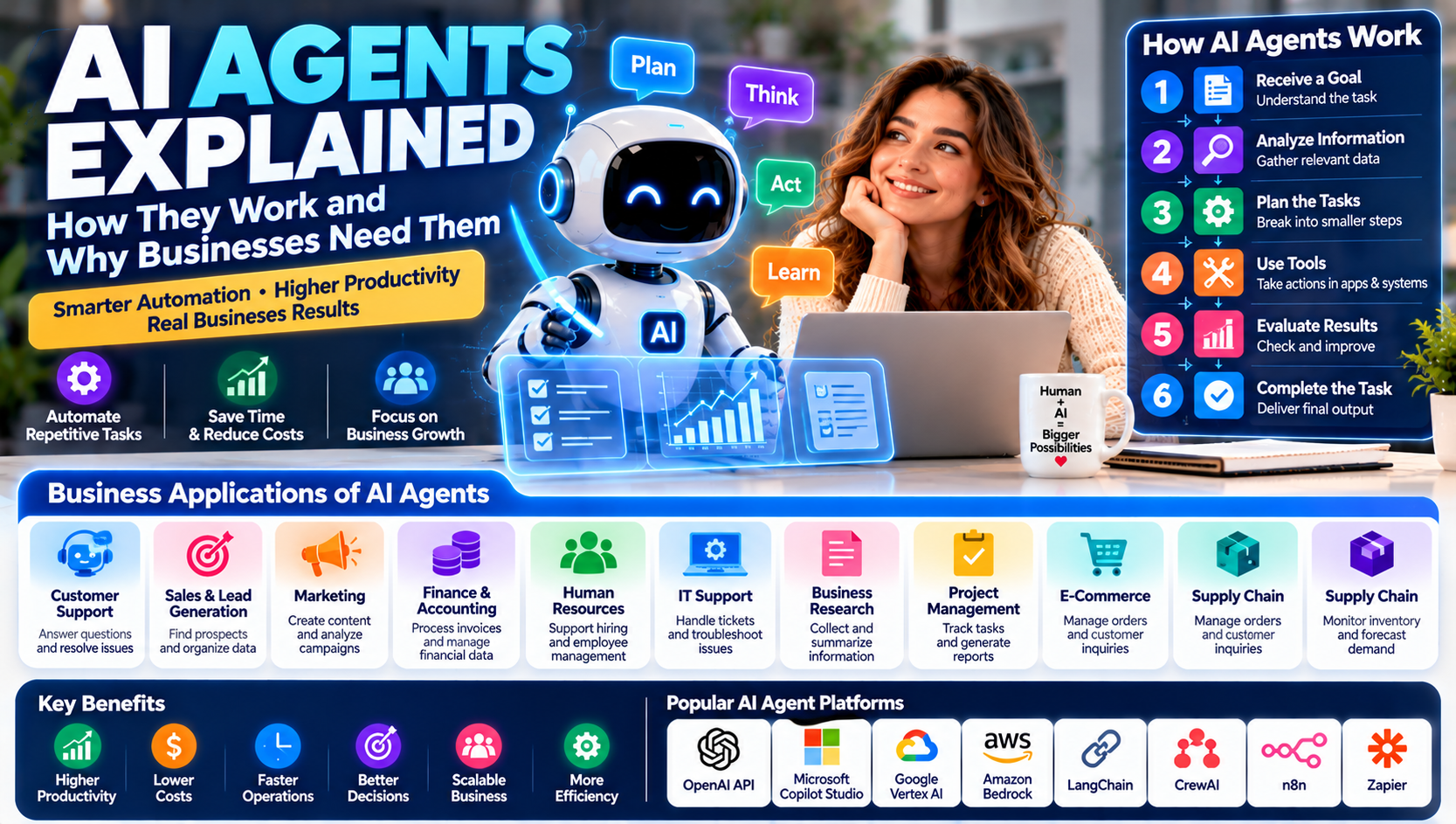
How Do AI Agents Work?
AI agents generally operate through a combination of information processing, reasoning, planning, and action.
Although implementations differ, most agent-based systems follow a similar process.
1. Receiving a Goal
The process begins when a user or another software system provides an objective.
For example:
"Prepare a weekly sales performance report using the latest approved CRM data."
The agent interprets the instruction and identifies the expected result.
2. Understanding the Context
The agent gathers relevant information from its available sources.
These sources may include:
Business databases
Customer relationship management systems
Documents and spreadsheets
Websites and approved APIs
Internal knowledge bases
Connected business applications
The quality of the result depends heavily on the accuracy and relevance of the information available.
3. Planning the Tasks
The agent breaks the main objective into smaller activities.
For a sales report, these activities might include collecting sales records, organizing customer information, calculating performance indicators, and preparing a summary.
Some systems create a plan before acting, while others determine the next step dynamically.
4. Selecting and Using Tools
AI agents can interact with external tools when they have the required integrations and permissions.
Examples include:
Searching approved websites
Reading documents
Updating CRM records
Sending notifications
Creating reports
Running calculations
Retrieving information from databases
Tool access makes agents more useful than systems that only generate text.
5. Evaluating Results
After completing an action, the agent may examine the result and determine whether another step is required.
For example, if a report is missing information, it may retrieve additional approved records or ask the user for clarification.
This process can continue until the objective is completed, a limit is reached, or human assistance is needed.
6. Completing the Task
The agent delivers the result, such as a report, organized data, completed workflow, or suggested next action.
For sensitive activities, a human approval step should be included before the system makes changes or performs external actions.
AI Agents vs. Traditional AI Tools
AI agents and traditional AI applications are related, but they do not perform exactly the same functions.
Traditional AI tools often focus on a specific task, such as answering a question, generating content, or classifying information.
AI agents can combine several capabilities to work toward a broader objective.
Feature | Traditional AI tools | AI agents |
|---|---|---|
Main function | Perform specific AI tasks | Work toward defined goals |
Interaction | Often request and response | Can involve multiple steps |
Tool usage | May be limited | Can use connected tools |
Planning | Often user-directed | May create task plans |
Workflow execution | Usually limited | Can coordinate multiple actions |
Human supervision | Depends on the task | Depends on autonomy and risk |
Example | Generate an email draft | Research a lead and prepare an email draft |
An AI agent may use a traditional AI model as its reasoning engine. The difference is in how the system coordinates actions and works toward an objective.
Types of AI Agents
AI agents can be classified in several ways depending on their architecture, behavior, and level of autonomy.
The following categories help explain common approaches in artificial intelligence.
1. Simple Reflex Agents
Simple reflex agents respond to current information using predefined rules.
They do not necessarily maintain a detailed understanding of previous events or future objectives.
For example, a basic system may detect when inventory falls below a specified threshold and send an alert to the purchasing team.
Common applications:
Basic monitoring
Rule-based alerts
Simple automated responses
Routine task triggers
2. Model-Based Agents
Model-based agents maintain an internal representation of their environment.
This allows them to consider information beyond the immediate input when selecting an action.
For example, an inventory management system may consider current stock, pending orders, and expected deliveries before recommending a purchasing decision.
3. Goal-Based Agents
Goal-based agents select actions according to a defined objective.
Rather than simply responding to a single event, they evaluate possible steps that could help achieve the requested result.
For example, a scheduling agent may examine calendar availability and propose suitable meeting times.
4. Utility-Based Agents
Utility-based agents evaluate possible actions according to a measure of usefulness or preference.
A delivery planning system, for example, may compare routes based on distance, delivery time, and operating costs.
The objective is to select an action that offers the best overall outcome according to its defined criteria.
5. Learning Agents
Learning agents improve their behavior through experience, feedback, or updated information.
They may use machine learning to recognize patterns and adapt their predictions or decisions.
For example, a recommendation system may use customer interactions to improve the relevance of future suggestions.
Learning capabilities require appropriate training data, evaluation, and monitoring.
6. Multi-Agent Systems
A multi-agent system contains multiple agents that cooperate, coordinate, or interact to complete a larger objective.
For example, a business research workflow could involve:
A research agent collecting company information.
An analysis agent organizing and evaluating the findings.
A reporting agent preparing the final document.
Multi-agent systems can divide complex tasks into specialized responsibilities, although coordination and error management become more challenging as the number of agents increases.
10 Ways Businesses Can Use AI Agents
AI agents have applications across different industries and departments.
Here are ten practical examples of how organizations can use them.
1. Customer Support
Customer service teams receive questions about products, payments, orders, subscriptions, and account access.
An AI customer support agent can classify requests, retrieve relevant information, and prepare responses based on approved company knowledge.
For example, an online store may use an agent to check an order's status, explain its return policy, and prepare a response for the customer.
Complex complaints, refunds, and sensitive account changes should be routed through appropriate human approval.
Potential benefits:
Faster handling of routine questions
Better organization of support requests
Reduced repetitive work
More consistent responses
Improved customer service availability
2. Sales and Lead Generation
Sales teams spend considerable time researching prospects, organizing customer information, and preparing follow-up messages.
An AI sales agent can help identify potential leads, summarize company information, organize CRM records, and prepare personalized outreach drafts.
For example, an agent may identify businesses that match a sales team's target market and prepare a research summary for review.
Potential applications:
Lead research
Prospect qualification support
CRM data organization
Sales conversation summaries
Follow-up reminders
Draft email preparation
Human representatives should review prospect information and outreach before important communications are sent.
3. Marketing Automation
Marketing teams manage campaigns, customer segments, content calendars, and performance reports.
AI agents can coordinate different marketing activities by gathering information, analyzing campaign data, and preparing content drafts.
For example, a marketing agent may review campaign performance and suggest improvements based on engagement data.
Common applications:
Campaign research
Content planning
Email draft preparation
Audience segmentation support
Social media content organization
Performance summaries
Marketing teams should check facts, originality, brand voice, and advertising compliance before publishing AI-generated material.
4. Finance and Accounting
Finance departments process invoices, organize financial records, prepare reports, and review transactions.
AI agents can help extract information from financial documents, classify expenses, and organize data for accounting teams.
For example, an agent may collect invoice information and prepare a payment approval request.
Financial transfers, tax filings, and accounting decisions should have appropriate controls and professional review.
5. Human Resources
HR teams handle recruitment, employee communication, onboarding, training, and administrative records.
An AI HR agent can organize job applications, prepare interview schedules, answer routine policy questions, and create onboarding checklists.
However, hiring decisions and employee evaluations require careful human oversight to reduce bias and protect employee rights.
6. IT Support
IT departments manage technical issues, software access, security alerts, and employee support requests.
An AI IT agent can classify tickets, retrieve troubleshooting instructions, summarize technical problems, and recommend next steps.
Some approved low-risk tasks may be automated, but actions involving administrator access, security settings, or critical infrastructure should require strong permissions and human authorization.
7. Business Research
Companies regularly research competitors, industries, market trends, and potential customers.
An AI research agent can collect information from approved sources, organize findings, compare information, and prepare a structured report.
For example, a business development team may use an agent to identify potential partners in a particular industry.
Research outputs should include source references and be checked for accuracy, relevance, and outdated information.
8. Project Management
Project managers coordinate tasks, deadlines, responsibilities, and progress updates.
AI agents can summarize project discussions, identify overdue tasks, organize updates, and prepare weekly reports.
For example, a project management agent may review approved task records and produce a list of delayed activities for the project manager.
9. E-Commerce Operations
Online businesses manage product information, customer inquiries, inventory, orders, and returns.
AI agents can help organize these processes by checking product details, retrieving order information, and preparing customer support responses.
More advanced workflows may coordinate information across inventory systems, payment platforms, and customer management software.
Any action involving refunds, payments, or account changes should have clear authorization rules.
10. Supply Chain Management
Supply chains involve purchasing, inventory, shipping, suppliers, and demand planning.
AI agents can analyze available operational data, summarize supplier updates, identify possible stock shortages, and prepare purchasing recommendations.
For example, an agent may identify products with declining inventory and notify the purchasing department.
These recommendations should be checked against actual stock records, supplier commitments, and business requirements.
Best AI Agent Platforms and Tools
Several platforms provide tools for building, deploying, or integrating AI agents into business workflows.
The right platform depends on technical requirements, available integrations, security needs, and the complexity of the tasks.
Platform | Main capabilities | Potential use |
|---|---|---|
OpenAI API | AI models and tools for building agent-based applications | Custom business agents |
Microsoft Copilot Studio | Building and connecting conversational agents | Microsoft business environments |
Google Vertex AI | AI development and agent-building capabilities | Enterprise AI applications |
Amazon Bedrock | Foundation models and agent development services | Cloud-based business agents |
LangChain | Frameworks for developing AI applications and agents | Custom agent workflows |
CrewAI | Framework for coordinating multiple AI agents | Multi-agent business workflows |
n8n | Workflow automation with AI integrations | Connecting agents to business applications |
Zapier | Application integrations and AI-powered automation | Small business workflows |
OpenAI API
The OpenAI API provides access to AI models and development capabilities that businesses can use to create custom applications and agent-based workflows.
Developers can connect models with approved tools and business systems to create applications that perform multiple steps toward defined objectives.
Microsoft Copilot Studio
Microsoft Copilot Studio helps organizations create and manage agents that can connect with business information and supported applications.
It may be useful for companies already working within the Microsoft ecosystem.
Google Vertex AI
Google Vertex AI provides tools for building and managing AI applications, including agent-based solutions.
Organizations can use it to develop systems that connect AI capabilities with their cloud infrastructure and business data.
Amazon Bedrock
Amazon Bedrock provides access to foundation models and tools for developing generative AI applications.
Businesses using AWS infrastructure may consider it when developing custom AI-powered workflows.
LangChain
LangChain provides development frameworks for connecting language models with tools, data sources, and application workflows.
It can help developers build applications that retrieve information and perform multiple coordinated tasks.
CrewAI
CrewAI is a framework designed to coordinate multiple AI agents with different responsibilities.
For example, one agent may conduct research while another analyzes findings and a third prepares a report.
n8n
n8n provides workflow automation capabilities and integrations that can connect AI services with business applications.
It can be useful when businesses want to combine AI agents with existing operational workflows.
Platform features, pricing, integrations, and availability change over time. Review official documentation before selecting a provider.
Benefits of AI Agents for Businesses
AI agents can support business operations in several ways when they are designed and monitored properly.
1. Improved Productivity
AI agents can handle certain repetitive activities, allowing employees to spend more time on creative, strategic, and customer-focused work.
2. Faster Task Completion
Agents can coordinate multiple steps across connected applications, reducing delays caused by manual information transfer.
3. Better Information Organization
AI systems can summarize documents, classify requests, and organize information from multiple sources.
4. Greater Operational Efficiency
Businesses may reduce repetitive administrative work and improve the consistency of routine processes.
5. Continuous Availability
Certain agents can operate outside normal working hours, depending on system availability and the organization's configuration.
6. Scalable Operations
Businesses may use agents to handle increasing volumes of routine requests without increasing every administrative workload at the same rate.
7. Support for Better Decisions
AI agents can gather relevant information and prepare summaries or recommendations that help employees make informed decisions.
They should not replace professional judgment in high-impact situations.
Challenges and Risks of AI Agents
AI agents can be powerful, but giving software access to business systems creates important risks.
1. Incorrect Information
AI agents can misunderstand instructions, retrieve outdated information, or produce inaccurate results.
Businesses should validate important outputs and use trusted data sources.
2. Data Privacy
Agents may access customer information, employee records, financial documents, and confidential business data.
Organizations need appropriate access controls, data protection practices, and vendor security reviews.
3. Unauthorized Actions
An agent with excessive permissions could make unwanted changes, send incorrect communications, or access information beyond its intended role.
Use limited permissions and approval checkpoints.
4. Integration Complexity
Connecting agents to multiple software platforms can create technical challenges, especially when systems use different data structures or access methods.
5. Implementation Costs
Costs may include model usage, software subscriptions, development, integrations, monitoring, and maintenance.
Businesses should estimate total costs before deployment.
6. Lack of Human Judgment
AI agents may struggle with unusual situations, sensitive customer interactions, and decisions requiring professional expertise.
Human supervision remains important.
7. Security Threats
AI agents may be exposed to risks such as prompt injection, malicious input, compromised integrations, or unauthorized tool usage.
Businesses should test systems, isolate sensitive operations, monitor activity, and apply security controls.
AI Agents vs. AI Chatbots
AI agents and AI chatbots are often discussed together, but they have different roles.
An AI chatbot primarily communicates with users and provides answers based on available information.
An AI agent may communicate with users as well, but it can also use connected tools to complete tasks and coordinate multiple actions.
Feature | AI chatbot | AI agent |
|---|---|---|
Primary role | Conversation and information | Goal-oriented task execution |
Communication | Main function | One possible function |
Tool access | May be limited | Can use connected tools |
Multi-step tasks | Often limited | Can coordinate multiple steps |
External actions | Usually limited | Possible with permissions |
Example | Answers product questions | Checks an order and prepares an approved update |
The distinction is not absolute. Modern chatbots can include agent-like capabilities, while some AI agents may operate without a conversational interface.
How to Implement AI Agents in Your Business
Businesses should begin with a clear problem and gradually introduce agent-based automation.
Step 1: Identify a Suitable Business Task
Look for repetitive tasks with clear objectives and predictable inputs.
Examples include:
Organizing customer support requests
Summarizing sales conversations
Preparing internal reports
Collecting business research
Creating task reminders
Classifying documents
Avoid starting with highly sensitive or complex decisions.
Step 2: Define the Agent's Responsibilities
Specify what the agent should accomplish and what it must not do.
For example, a customer support agent may answer questions using approved company information but require human approval before issuing refunds.
Step 3: Choose the Right Platform
Compare development requirements, integration options, security controls, costs, and technical support.
A no-code platform may be suitable for a simple workflow, while custom development may be necessary for more advanced applications.
Step 4: Connect Approved Data Sources
Provide access only to the information the agent needs.
Use appropriate permissions for documents, databases, customer records, and connected applications.
Step 5: Set Action Limits
Define which actions can happen automatically and which require approval.
For example:
Reading approved documents: permitted
Preparing an email draft: permitted
Sending an external email: approval required
Making a financial payment: restricted and separately authorized
Step 6: Test the Agent
Run the agent through realistic scenarios before using it in live operations.
Test incorrect inputs, missing information, unusual requests, security risks, and failed integrations.
Step 7: Monitor Performance
Track useful performance indicators, such as:
Task completion rate
Error frequency
Average completion time
Human intervention rate
Cost per completed task
User satisfaction
Step 8: Improve Gradually
Use test results and employee feedback to improve the agent's instructions, data sources, permissions, and workflow design.
Expand its responsibilities only when the system performs reliably.
AI Agents and the Future of Business
AI agents are developing from simple task assistants into more capable systems that can coordinate workflows across different applications.
Several trends are shaping their future.
More Advanced Multi-Agent Systems
Organizations may increasingly use specialized agents that work together on complex tasks.
For example, a research agent may collect information, an analysis agent may evaluate it, and a reporting agent may prepare the final document.
Integration With Business Software
AI agents are becoming more connected to CRM platforms, project management systems, office applications, and enterprise databases.
This may make it easier to introduce intelligent automation into existing business processes.
Greater Focus on Agent Security
As agents gain access to more tools and data, organizations will need stronger permission systems, audit trails, monitoring, and approval processes.
Human-Agent Collaboration
The future of business automation is likely to involve employees working alongside AI systems.
Agents can handle appropriate routine tasks, while people remain responsible for strategy, accountability, complex decisions, and relationships.
More Specialized Business Agents
Organizations may develop agents designed for specific industries or departments, such as finance, healthcare administration, logistics, marketing, and legal support.
Specialization may improve workflow relevance, but each application will still require careful testing and governance.
Frequently Asked Questions
What is an AI agent in simple terms?
An AI agent is a software system that uses artificial intelligence to work toward a specific goal. It can analyze information, plan tasks, use connected tools, and perform approved actions.
How do AI agents work?
AI agents receive an objective, collect relevant information, plan activities, use available tools, evaluate results, and complete the requested task or ask for human assistance.
What are the best AI agents for business?
The best solution depends on business requirements. Platforms such as Microsoft Copilot Studio, Google Vertex AI, Amazon Bedrock, LangChain, CrewAI, and n8n can support different types of agent-based applications.
What is the difference between AI agents and chatbots?
Chatbots primarily focus on conversation, while AI agents can use tools and coordinate multiple actions toward a goal. Some modern chatbots also include agent-like capabilities.
Can AI agents automate business processes?
Yes. Depending on their permissions and integrations, AI agents can help automate customer support, research, document processing, sales administration, reporting, and other business workflows.
Are AI agents fully autonomous?
Not necessarily. Their level of autonomy depends on their design, permissions, and operating environment. Many business agents require human approval for sensitive or high-impact actions.
Are AI agents expensive?
Costs vary according to the platform, model usage, number of tasks, integrations, development requirements, and maintenance. Simple applications may be relatively affordable, while enterprise systems can require substantial investment.
Can small businesses use AI agents?
Yes. Small businesses can use agents for tasks such as organizing customer inquiries, preparing content drafts, researching prospects, and summarizing documents.
Are AI agents safe for businesses?
They can be useful when designed with appropriate security controls. Businesses should restrict permissions, protect sensitive information, monitor actions, test for vulnerabilities, and require approval for important decisions.
Will AI agents replace human employees?
AI agents may automate certain tasks, but they do not replace all human responsibilities. Employees remain important for judgment, creativity, communication, complex problem-solving, and accountability.
Final Thoughts
AI agents represent an important development in business automation. By combining artificial intelligence with connected tools and goal-oriented workflows, they can help organizations manage repetitive activities, organize information, and coordinate operations more efficiently.
From customer support and sales to marketing, finance, HR, and research, AI agents offer opportunities across different industries.
However, successful implementation requires more than choosing an AI platform. Businesses need clearly defined objectives, reliable data, secure integrations, appropriate permissions, and human oversight.
The best approach is to begin with a simple, low-risk task, measure the results, and gradually expand as the system becomes reliable.
Organizations that combine AI capabilities with human expertise can build more efficient and adaptable business operations.
Disclaimer: This article is for educational and informational purposes only. AI technologies, platforms, pricing, and capabilities may change. Businesses should review vendor documentation, security practices, privacy requirements, and applicable regulations before implementing AI agent systems.