Cloud computing has transformed how individuals and businesses store information, run applications, manage data, and access digital services. Instead of depending entirely on physical computers and servers, organizations can use computing resources delivered through the internet.
From storing photographs online to operating complex business applications, cloud computing supports many of the digital services people use every day.
Companies can use cloud platforms to host websites, manage databases, run software, develop applications, analyze information, and support employees working from different locations.
One of the biggest advantages of cloud computing is flexibility. Businesses can access computing resources when needed without purchasing and maintaining every piece of infrastructure themselves.
However, understanding cloud computing involves more than knowing where files are stored. Different cloud models offer different levels of control, security, flexibility, and management.
In this guide, we explain what cloud computing is, how it works, its main types, service models, benefits, limitations, leading providers, and practical business applications.
What Is Cloud Computing?
Cloud computing is the delivery of computing services over the internet. These services can include servers, storage, databases, networking, software, analytics, and artificial intelligence capabilities.
Instead of purchasing and operating all computing infrastructure locally, users can access resources from cloud service providers.
For example, when someone stores a document in an online storage service, the document is saved on remote infrastructure and can be accessed through an internet-connected device.
Businesses use cloud computing for more advanced activities, such as hosting websites, operating enterprise applications, managing customer databases, and processing large amounts of information.
Common cloud computing services include:
Cloud storage.
Virtual servers.
Database hosting.
Website hosting.
Application development platforms.
Online business software.
Data analytics.
Backup and disaster recovery.
AI and machine learning services.
Cloud computing allows organizations to access technology resources without necessarily owning the physical infrastructure behind them.
How Does Cloud Computing Work?
Cloud computing relies on data centers containing physical servers, storage devices, networking equipment, and other computing infrastructure.
Cloud providers manage this infrastructure and make computing resources available to customers through internet-based services.
Here is how the process generally works.
1. Cloud Infrastructure
Cloud providers operate data centers equipped with servers, storage systems, networking hardware, and security infrastructure.
These facilities provide the computing resources required to operate cloud services.
2. Virtualization
Virtualization technology allows physical computing resources to be divided into multiple virtual environments.
For example, one physical server can support several virtual machines, each running its own operating system and applications.
This helps providers allocate infrastructure efficiently.
3. Internet Connectivity
Users connect to cloud services through websites, applications, APIs, or other network interfaces.
Businesses can access their systems from offices, homes, or other locations, depending on their configurations and access permissions.
4. Resource Allocation
Cloud platforms allow organizations to request computing resources according to their requirements.
A business may increase server capacity during periods of high website traffic and reduce it when demand decreases.
5. Management and Security
Cloud providers manage the underlying infrastructure, while customers remain responsible for securing and configuring many aspects of their cloud environments.
The exact responsibilities depend on the service model.
For example, a cloud software provider may manage the application and infrastructure, while a company using a virtual server may need to manage its operating system and installed software.
Main Types of Cloud Computing
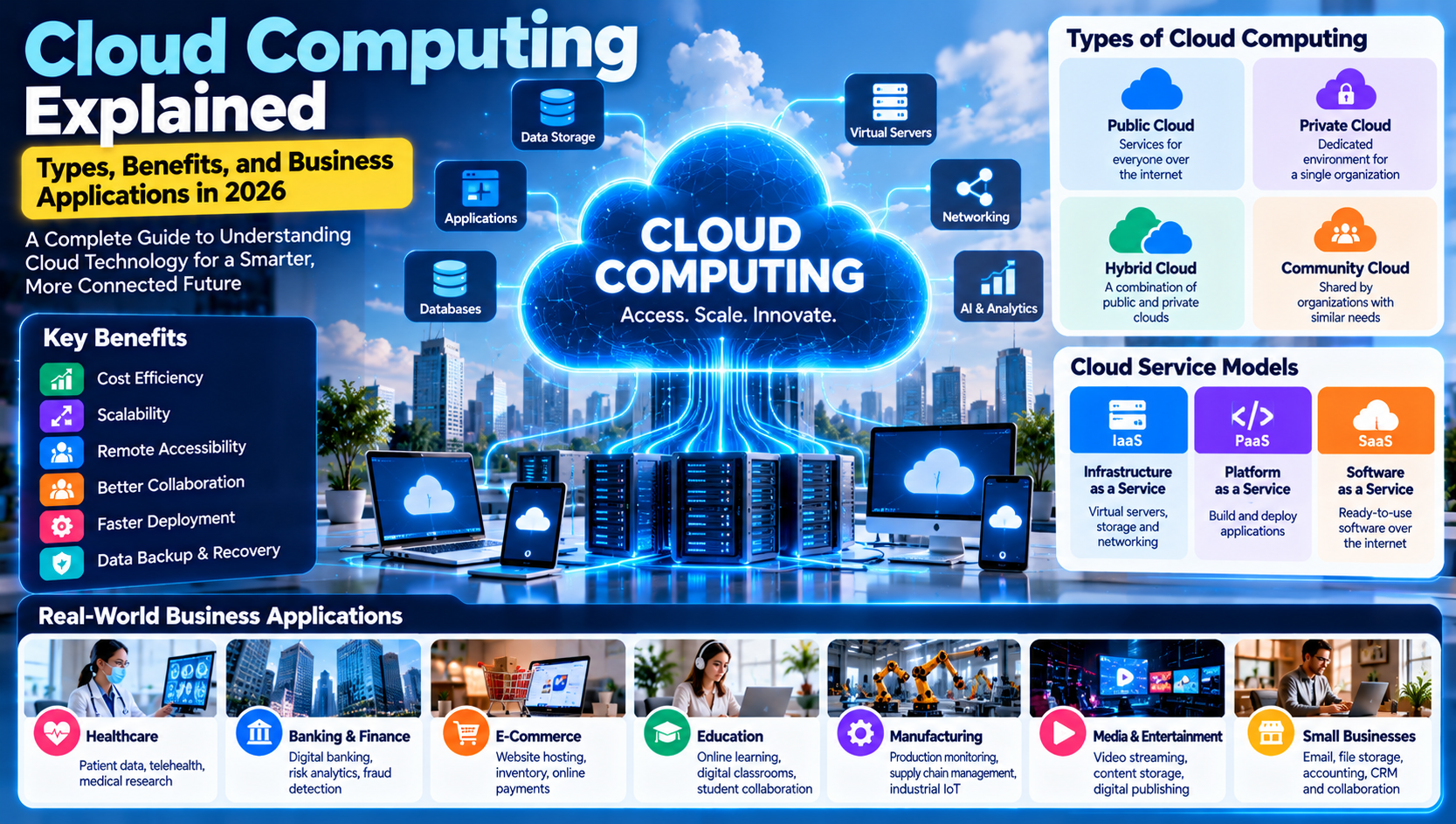
Cloud computing is commonly divided into four deployment models: public cloud, private cloud, hybrid cloud, and community cloud.
Each model offers different levels of control, flexibility, and resource sharing.
1. Public Cloud
A public cloud is a computing environment operated by a third-party provider that makes services available to multiple customers over the internet.
Customers share the provider's underlying infrastructure, but their data and environments are logically separated through security and access controls.
Examples include:
Amazon Web Services (AWS).
Microsoft Azure.
Google Cloud.
Benefits:
Easy access to computing resources.
Flexible capacity.
No need to operate physical data centers.
Multiple service options.
Suitable for businesses of different sizes.
Limitations:
Less direct control over physical infrastructure.
Costs can increase with usage.
Security configuration remains important.
Dependence on provider availability.
Best For: Startups, small businesses, online services, and organizations that need flexible computing resources.
2. Private Cloud
A private cloud is an environment dedicated to a single organization.
It can be hosted within the organization's own data center or managed by an external provider.
Private cloud environments can offer greater control over infrastructure, configurations, and data management.
Benefits:
Dedicated cloud environment.
Greater configuration control.
Custom security policies.
Support for specialized requirements.
Limitations:
Potentially higher infrastructure costs.
More management responsibilities.
Requires technical expertise.
Capacity planning can be more complex.
Best For: Organizations with specific regulatory, operational, or infrastructure requirements.
3. Hybrid Cloud
A hybrid cloud combines private infrastructure with public cloud services.
Organizations can use different environments for different workloads and connect them through suitable networking and management systems.
For example, a company may keep certain sensitive applications in a private environment while using public cloud resources for website hosting and data analysis.
Benefits:
Greater deployment flexibility.
Options for managing sensitive workloads.
Access to public cloud scalability.
Support for existing infrastructure.
Limitations:
More complicated management.
Integration requirements.
Potentially complex security policies.
Requires careful workload planning.
Best For: Businesses that need a combination of private infrastructure and public cloud services.
4. Community Cloud
A community cloud is designed for use by multiple organizations that share specific requirements, such as security standards, operational needs, or regulatory responsibilities.
The environment may be managed by one or more participating organizations or a third-party provider.
Benefits:
Shared infrastructure costs.
Common security requirements.
Collaboration between participating organizations.
Support for specialized industries.
Limitations:
Shared governance responsibilities.
More complex coordination.
Limited flexibility compared with some public cloud services.
Best For: Groups of organizations with similar operational or compliance requirements.
Cloud Computing Service Models
Cloud computing also includes different service models. The three most widely recognized are Infrastructure as a Service, Platform as a Service, and Software as a Service.
1. Infrastructure as a Service (IaaS)
IaaS provides virtualized computing resources through the internet.
Customers can rent virtual machines, storage, networking, and other infrastructure components instead of purchasing physical hardware.
Examples:
Amazon EC2.
Azure Virtual Machines.
Google Compute Engine.
Common Uses:
Hosting websites.
Running business applications.
Managing databases.
Testing software.
Supporting development environments.
Advantages:
Flexible infrastructure.
Greater control over operating systems and applications.
Scalable computing resources.
Reduced need to purchase physical servers.
2. Platform as a Service (PaaS)
PaaS provides a platform that developers can use to build, test, deploy, and manage applications.
The cloud provider manages much of the underlying infrastructure, allowing developers to focus more on application development.
Examples:
Google App Engine.
Azure App Service.
Heroku.
Common Uses:
Web application development.
API development.
Application testing.
Database-backed applications.
Software deployment.
Advantages:
Simplifies development.
Reduces infrastructure management.
Supports development teams.
Helps accelerate application deployment.
3. Software as a Service (SaaS)
SaaS delivers software applications through the internet.
Users can access these applications through a web browser or supported application without managing the underlying infrastructure.
Examples:
Google Workspace.
Microsoft 365.
Salesforce.
Dropbox.
Common Uses:
Business communication.
Customer relationship management.
File storage.
Project management.
Accounting and administration.
Advantages:
Accessible through supported devices.
No need to maintain application servers.
Centralized software updates.
Subscription-based access options.
IaaS vs PaaS vs SaaS: Key Differences
Feature | IaaS | PaaS | SaaS |
|---|---|---|---|
Main purpose | Cloud infrastructure | Application development | Ready-to-use software |
Customer control | Higher | Moderate | Lower |
Infrastructure management | Provider manages physical infrastructure | Provider manages platform infrastructure | Provider manages application infrastructure |
Main users | IT teams and system administrators | Developers | Businesses and end users |
Example | Amazon EC2 | Google App Engine | Microsoft 365 |
Simple explanation:
IaaS gives you computing infrastructure.
PaaS gives you a platform to develop applications.
SaaS gives you software that is ready to use.
Major Benefits of Cloud Computing
Cloud computing offers several advantages that make it valuable for modern businesses.
1. Cost Efficiency
Businesses can access computing resources without purchasing every physical server, storage device, and networking component.
Many providers offer usage-based or subscription-based pricing.
However, organizations should monitor usage because unnecessary resources, data transfers, and additional services can increase expenses.
2. Scalability
Cloud platforms allow organizations to increase or decrease resources according to demand.
For example, an e-commerce website may require additional computing capacity during a major sales event.
3. Remote Accessibility
Employees can access approved cloud applications and information from different locations through supported devices and internet connections.
This supports remote and hybrid working arrangements.
4. Data Backup and Recovery
Cloud services can support data backup, replication, and recovery.
Organizations can use these capabilities to reduce the risk of losing important information due to hardware failures or other incidents.
Cloud backup is not automatically a complete disaster recovery strategy. Businesses should regularly test their recovery procedures.
5. Faster Deployment
Cloud platforms provide ready-made infrastructure and services that can help businesses launch applications and digital projects more quickly.
6. Collaboration
Cloud-based applications allow employees to work with shared documents, projects, and business information.
Teams can collaborate without always needing to exchange files manually.
7. Access to Advanced Technologies
Cloud providers offer services such as artificial intelligence, machine learning, analytics, and data processing.
Businesses can explore these technologies without necessarily building all the underlying infrastructure themselves.
8. Global Infrastructure
Major cloud providers operate infrastructure across multiple geographic regions.
This can help organizations deploy applications closer to their customers and design systems with geographic resilience.
Real-World Applications of Cloud Computing
Cloud computing is used across industries to support digital services and business operations.
1. Healthcare
Healthcare organizations can use cloud platforms to support data storage, approved clinical applications, research, and collaboration.
Potential applications include:
Medical information management.
Healthcare research.
Medical image storage.
Appointment systems.
Telehealth applications.
Administrative software.
Healthcare organizations must carefully consider patient privacy, data protection, and applicable regulations when selecting cloud services.
2. Banking and Finance
Financial institutions use cloud technologies for many business and technical operations.
Applications include:
Financial data processing.
Digital banking services.
Customer relationship management.
Risk analytics.
Fraud monitoring.
Application development.
Financial organizations must evaluate security, regulatory requirements, and operational resilience before moving sensitive workloads.
3. E-Commerce
Online retailers depend on cloud infrastructure to support websites, product catalogs, payments, customer accounts, and inventory systems.
Cloud computing can help e-commerce businesses handle changing traffic levels and maintain digital operations.
4. Education
Educational institutions use cloud services for:
Online learning platforms.
Digital classrooms.
Student collaboration.
Educational content storage.
Learning management systems.
Research projects.
Students and teachers can access approved educational resources from different locations.
5. Manufacturing
Manufacturers use cloud computing to support production management, supply chain systems, equipment monitoring, and business analytics.
Cloud platforms can also help process information collected from connected industrial devices.
6. Media and Entertainment
Streaming services and digital media platforms use cloud infrastructure to store, process, and deliver content to audiences.
Cloud technologies can support video streaming, digital publishing, media processing, and content distribution.
7. Small Businesses and Startups
Smaller organizations can use cloud services for website hosting, email, file storage, accounting, customer management, and collaboration.
This allows businesses to access professional software and infrastructure without building large internal IT departments.
Popular Cloud Computing Providers
Several technology companies offer cloud infrastructure, development platforms, and software services.
1. Amazon Web Services (AWS)
Amazon Web Services is a major cloud computing platform offering infrastructure, storage, databases, networking, analytics, and AI services.
Popular Services:
Amazon EC2.
Amazon S3.
Amazon RDS.
AWS Lambda.
Amazon CloudFront.
Best For: Businesses that need a broad selection of cloud infrastructure and application services.
Official Website: https://aws.amazon.com/
2. Microsoft Azure
Microsoft Azure provides cloud services for computing, application development, data management, networking, and AI.
Popular Services:
Azure Virtual Machines.
Azure Blob Storage.
Azure SQL Database.
Azure App Service.
Azure AI services.
Best For: Organizations using Microsoft technologies and businesses that need cloud infrastructure integrated with enterprise systems.
Official Website: https://azure.microsoft.com/
3. Google Cloud
Google Cloud offers infrastructure, analytics, databases, application development, and AI services.
Popular Services:
Compute Engine.
Cloud Storage.
BigQuery.
Google Kubernetes Engine.
Vertex AI.
Best For: Organizations working with data analytics, cloud-native applications, and AI workloads.
Official Website: https://cloud.google.com/
4. IBM Cloud
IBM Cloud provides cloud infrastructure, enterprise technology services, data solutions, and AI capabilities.
Popular Services:
Virtual servers.
Cloud storage.
Kubernetes services.
Database solutions.
AI and enterprise services.
Best For: Organizations exploring enterprise cloud environments and specialized business technology solutions.
Official Website: https://www.ibm.com/cloud
5. Oracle Cloud Infrastructure (OCI)
Oracle Cloud Infrastructure provides computing, storage, networking, database, and enterprise application services.
Popular Services:
Compute.
Object Storage.
Autonomous Database.
Networking.
Cloud security services.
Best For: Businesses running Oracle databases and enterprise workloads.
Official Website: https://www.oracle.com/cloud/
Cloud Computing Security: Risks and Challenges
Cloud computing offers many advantages, but organizations must understand the risks associated with moving information and applications to cloud environments.
1. Data Breaches
Poor security configurations, compromised accounts, or software vulnerabilities can expose sensitive information.
Businesses should use access controls, encryption, monitoring, and appropriate security policies.
2. Misconfigured Cloud Services
Incorrectly configured storage, databases, or network permissions can create security weaknesses.
Regular configuration reviews and automated security checks can help reduce these risks.
3. Account Compromise
Attackers may use stolen passwords or compromised credentials to access cloud applications.
Organizations should use multi-factor authentication, strong access policies, and suspicious-login monitoring.
4. Service Outages
Cloud providers can experience service disruptions due to technical problems, network failures, or other incidents.
Businesses should plan for outages and understand the availability commitments of their providers.
5. Vendor Lock-In
Moving applications and data between cloud providers can be difficult when systems depend on provider-specific technologies.
Organizations should evaluate portability and migration requirements before committing to a platform.
6. Unexpected Costs
Cloud billing can become complicated when businesses use multiple services or fail to monitor resource consumption.
Cost alerts, budgets, and regular usage reviews can help control spending.
7. Compliance and Data Location
Organizations operating in regulated industries may have requirements concerning data storage, processing, access, and geographic location.
They should review relevant legal obligations and provider documentation before migrating sensitive workloads.
Cloud Computing vs Traditional On-Premises Infrastructure
Traditional on-premises infrastructure involves operating servers, storage, networking equipment, and related systems within an organization's own facilities or data center.
Cloud computing provides access to similar resources through services operated by a cloud provider.
Comparison | Cloud Computing | On-Premises Infrastructure |
|---|---|---|
Infrastructure ownership | Usually provider-owned | Organization-owned or directly managed |
Initial investment | Often lower | Can be higher |
Resource expansion | Often flexible | May require additional hardware |
Maintenance | Shared with provider according to service model | Primarily organization-managed |
Access | Through configured network connections | Depends on internal and remote access setup |
Cost model | Often subscription or usage-based | Hardware, licensing, and operational costs |
Control | Varies by cloud service | Greater direct infrastructure control |
Neither model is automatically better for every organization.
The right choice depends on security requirements, workload characteristics, budget, technical expertise, and regulatory responsibilities.
How Businesses Can Move to Cloud Computing
Moving business systems to the cloud requires planning.
A poorly managed migration can create downtime, unexpected expenses, or security problems.
The following steps can help organizations plan a cloud migration.
Step 1: Evaluate Existing Infrastructure
Identify current servers, databases, applications, storage systems, and networking requirements.
Understand which systems are essential to business operations.
Step 2: Define Business Objectives
Determine why the organization wants to move to the cloud.
Possible objectives include:
Reducing infrastructure maintenance.
Improving application availability.
Supporting remote teams.
Increasing storage capacity.
Improving scalability.
Accessing advanced technology services.
Step 3: Choose a Cloud Provider
Compare providers according to:
Pricing.
Available services.
Security capabilities.
Geographic regions.
Compliance support.
Technical documentation.
Customer support.
Integration requirements.
Step 4: Select the Right Cloud Model
Decide whether a public, private, hybrid, or community cloud is appropriate.
The decision should reflect the organization's operational and security requirements.
Step 5: Prepare Data and Applications
Review application compatibility, data quality, storage needs, and access permissions.
Identify systems that may require modification before migration.
Step 6: Start With a Pilot Project
Move a small, low-risk workload first.
Test its performance, security, accessibility, and cost before migrating more important systems.
Step 7: Migrate Gradually
Create a migration schedule that minimizes disruption.
Verify that applications and data work correctly after each stage.
Step 8: Monitor and Optimize
Track cloud performance, usage, security, and costs.
Review the environment regularly to identify unnecessary resources and opportunities for improvement.
How Much Does Cloud Computing Cost?
Cloud computing costs depend on the services used, resource requirements, provider, geographic region, and billing model.
There is no single price for cloud computing.
Common cost categories include:
1. Compute Costs: Charges for virtual machines, processors, memory, and serverless computing resources.
2. Storage Costs: Charges for storing files, databases, backups, and other information.
3. Data Transfer Costs: Some providers charge for transferring information between services or out of their cloud environments.
4. Database Costs: Expenses for managed database services and storage capacity.
5. Software Licensing: Certain cloud applications require additional subscriptions or licenses.
6. Support and Management: Businesses may pay for technical support, managed services, or specialized administration.
How to Control Cloud Computing Costs
Businesses can reduce unnecessary expenses by:
Monitoring resource usage.
Setting billing alerts.
Removing unused resources.
Choosing appropriate storage options.
Optimizing database performance.
Reviewing data transfer requirements.
Selecting suitable pricing plans.
Using provider cost management tools.
The goal is to pay for resources that support actual business requirements.
The Future of Cloud Computing in 2026 and Beyond
Cloud computing continues to evolve as businesses adopt artificial intelligence, connected devices, advanced analytics, and digital applications.
Several developments are likely to shape its future.
1. Cloud and AI Integration: Cloud platforms will continue supporting AI model development, deployment, data processing, and business applications.
2. Serverless Computing: More developers will use services that allow them to run code without directly managing server infrastructure.
3. Edge Computing: Organizations will increasingly process some information closer to the devices and systems generating it.
4. Hybrid and Multi-Cloud Strategies: Businesses may combine services from multiple providers or use both private and public environments.
5. Cloud Security Automation: Organizations will continue exploring automated monitoring, identity protection, and security management.
6. Sustainable Cloud Infrastructure: Energy efficiency and responsible data center operations will remain important considerations.
7. Cloud-Native Applications: Containers, microservices, and orchestration platforms will continue supporting flexible software development.
Cloud computing will remain an important foundation for modern digital services, business applications, and emerging technologies.
Frequently Asked Questions (FAQs)
1. What is cloud computing in simple words?
Cloud computing means using computing services such as storage, servers, databases, and software through the internet instead of managing all the infrastructure locally.
2. What are the four main types of cloud computing?
The four commonly recognized deployment models are public cloud, private cloud, hybrid cloud, and community cloud.
3. What are the three main cloud computing service models?
The three main service models are Infrastructure as a Service (IaaS), Platform as a Service (PaaS), and Software as a Service (SaaS).
4. What are examples of cloud computing?
Examples include online storage, web hosting, cloud databases, online office applications, streaming platforms, and cloud-based business software.
5. Which cloud provider is best for businesses?
AWS, Microsoft Azure, and Google Cloud are major options. The best provider depends on an organization's budget, technical requirements, existing applications, and security needs.
6. Is cloud computing secure?
Cloud computing can provide strong security capabilities, but protection depends on provider controls, customer configurations, access permissions, and operational practices.
7. What is the difference between cloud computing and traditional computing?
Traditional computing often relies on locally managed hardware and infrastructure, while cloud computing provides access to computing resources through services operated by cloud providers.
8. Can small businesses use cloud computing?
Yes. Small businesses can use cloud storage, email, website hosting, accounting applications, customer management software, and other cloud services without operating their own data centers.
9. What are the disadvantages of cloud computing?
Potential disadvantages include service outages, unexpected costs, vendor lock-in, security misconfigurations, compliance challenges, and dependence on internet connectivity.
10. What is the future of cloud computing?
Cloud computing is expected to become increasingly connected with AI, edge computing, serverless services, hybrid infrastructure, and cloud-native application development.
Conclusion
Cloud computing has become a fundamental part of modern technology. It allows individuals and businesses to access computing resources, store information, run applications, and support digital operations through internet-based services.
From public and private cloud environments to IaaS, PaaS, and SaaS, different cloud models offer solutions for different technical and business requirements.
Its advantages include flexibility, scalability, remote accessibility, faster deployment, and access to advanced technologies. However, organizations must also consider security, compliance, cost management, and provider dependence.
Businesses planning to adopt cloud computing should begin with clear objectives, evaluate their infrastructure, select suitable services, and migrate gradually.
Cloud computing is not simply about moving data online. It is about building a more flexible, scalable, and connected digital infrastructure for the future.