
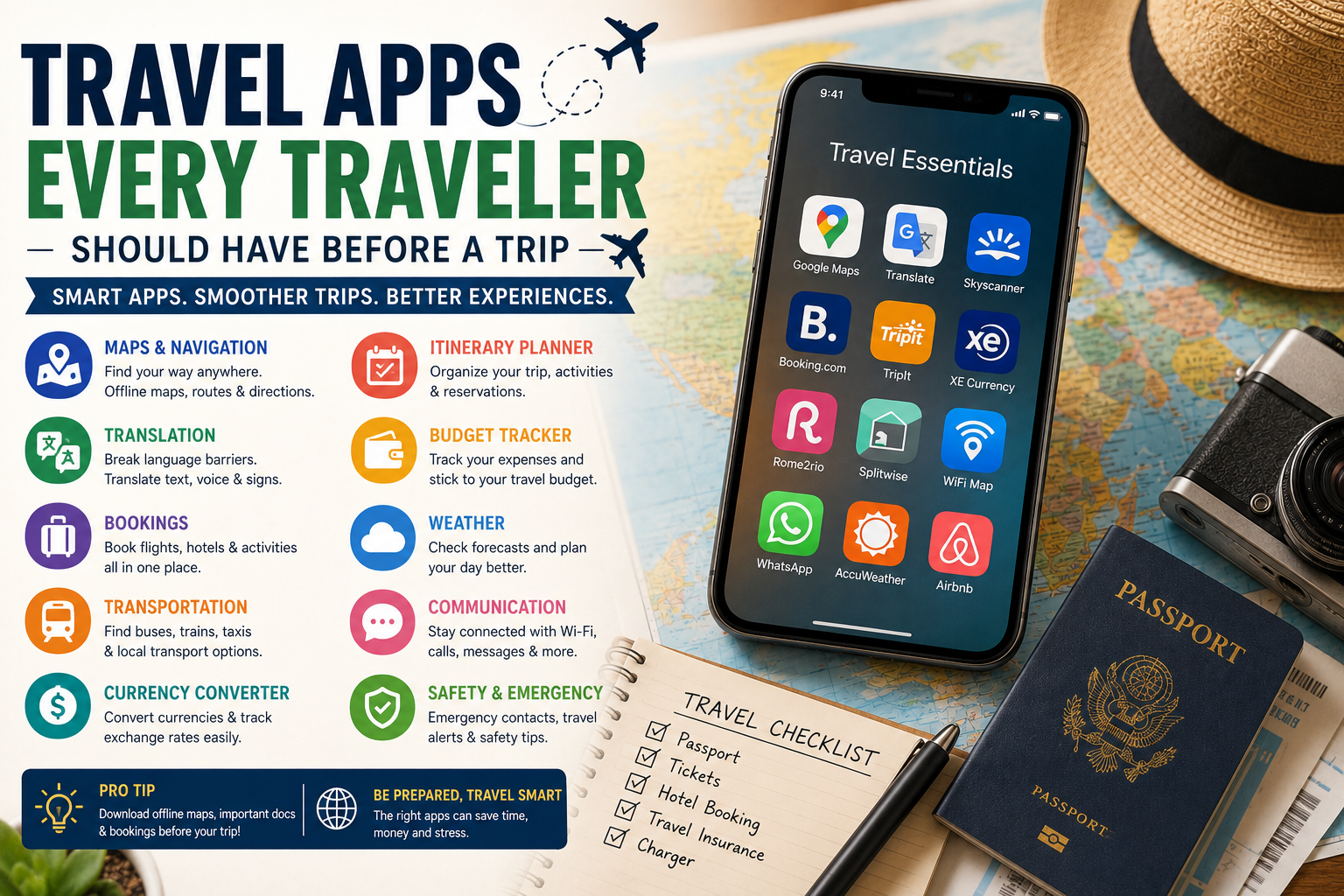
A smartphone can be one of the most useful tools you take on a trip. The right travel apps can help you find your way around unfamiliar places, organize reservations, translate languages, track expenses, find transportation, and stay connected.
However, downloading dozens of apps is not necessary. A few reliable tools can cover most common travel needs.
The best approach is to choose apps based on the type of trip you are taking and prepare them before leaving home. This is especially important for offline maps, translation tools, tickets, reservations, and other information you may need when you do not have a reliable internet connection.
Whether you are traveling internationally, taking a family vacation, planning a road trip, or exploring a city for a weekend, this guide explains the most useful types of travel apps to consider.
Why Travel Apps Are Useful
Travel apps can reduce the amount of information you need to carry and make everyday travel tasks easier.
Instead of carrying separate maps, guidebooks, calculators, translation books, printed reservations, and transportation schedules, you can organize much of your travel information on your phone.
Useful travel apps can help you:
Plan your itinerary
Navigate unfamiliar destinations
Find hotels and flights
Translate languages
Convert currencies
Track expenses
Find public transportation
Store reservations
Check weather
Stay connected
Find local attractions
Access important information offline
The key is choosing apps that solve real problems rather than filling your phone with unnecessary tools.
1. Trip Planning and Itinerary Apps
A trip-planning app can help organize your entire journey in one place.
You can use these apps to save attractions, organize activities, manage reservations, and create day-by-day plans.
Some itinerary tools can also display saved places on a map, making it easier to see whether your planned activities are close together.
Popular itinerary services include apps such as TripIt and Wanderlog, although features and pricing can change over time.
Look for features such as:
Day-by-day itinerary planning
Reservation organization
Map integration
Trip sharing
Notes
Offline access
Booking imports
You do not need a complicated itinerary app for a short weekend trip. A simple notes app may be enough for basic travel plans.
2. Navigation and Map Apps
A reliable map app is one of the most useful tools for travelers.
Navigation apps can help you find hotels, restaurants, attractions, transportation stops, and walking routes.
Google Maps is widely used for everyday navigation, while other map applications may be useful for specific regions or outdoor activities.
One of the most important features to look for is offline map access.
Download the map for your destination before leaving a reliable internet connection. Offline maps can be especially useful when mobile data is unavailable or expensive.
Before traveling:
Open your map app.
Find your destination.
Download the relevant offline map if supported.
Make sure the download is complete.
Test the map before leaving home.
Do not wait until you arrive at your destination to discover that you need an internet connection to download everything.
3. Translation Apps
Language differences can sometimes make travel challenging.
A translation app can help you understand signs, menus, instructions, messages, and everyday conversations.
Google Translate and other translation services offer features such as text translation, camera-based translation, voice translation, and offline language support, depending on the language and device.
Translation apps are particularly useful for:
Restaurant menus
Street signs
Transportation information
Basic conversations
Hotel communication
Shopping
Reading instructions
Download the language you need before traveling if offline translation is supported.
4. Flight Search and Booking Apps
Flight-search tools can help you compare routes, dates, airlines, and prices.
Instead of checking individual airline websites one at a time, flight comparison services can provide a broader overview of available options.
Google Flights and Skyscanner are examples of commonly used flight-search tools.
When comparing flights, look beyond the headline price.
Consider:
Baggage fees
Layovers
Airport changes
Departure times
Cancellation rules
Seat fees
Total travel time
The cheapest ticket is not always the best value.
5. Hotel and Accommodation Apps
Accommodation apps make it easier to compare hotels, apartments, hostels, and other properties.
Booking platforms can help you compare:
Prices
Locations
Guest reviews
Facilities
Room types
Cancellation policies
Availability
Before booking, check the final price and read the cancellation conditions carefully.
A hotel that appears inexpensive at first may have additional fees or transportation costs that change the overall value.
6. Transportation Apps
Transportation apps can make it much easier to move around unfamiliar destinations.
Depending on the location, you may find apps for:
Metro systems
Buses
Trains
Taxis
Rideshare services
Ferries
Bike rentals
Some route-planning apps can compare multiple transportation methods and show approximate travel times.
For cities with extensive public transportation, checking the official local transit app can also be useful.
Before traveling, find out which transportation services are actually available in your destination.
7. Currency Converter Apps
Currency conversion can help international travelers understand prices.
A currency app can be useful when shopping, comparing accommodation, checking restaurant prices, or managing your daily budget.
Popular currency tools include services such as XE and other currency-conversion apps.
However, remember that the rate displayed in an app may not be the exact rate your bank or card provider uses.
Also consider:
Foreign transaction fees
ATM fees
Currency conversion fees
Dynamic currency conversion
Understanding these costs can help prevent surprises.
8. Travel Budget Apps
A budget-tracking app can help you understand where your money is going.
You can record expenses such as:
Hotels
Flights
Food
Transportation
Attractions
Shopping
Tours
Emergency expenses
Some travelers prefer dedicated budgeting apps, while others simply use a spreadsheet or notes app.
The important thing is consistency.
Tracking your spending every day can help you notice when you are spending more than planned.
9. Weather Apps
Weather can affect your entire itinerary.
A weather app can help you decide what to pack and whether outdoor activities should remain on your schedule.
Check the forecast before leaving your accommodation, particularly when planning:
Hiking
Beach activities
Boat trips
Outdoor sightseeing
Road trips
Photography
Mountain activities
Weather forecasts are not perfect, so use them as planning information rather than a guarantee.
10. Communication Apps
Communication apps can be especially useful when traveling internationally.
Depending on your destination and contacts, messaging services can help you communicate with:
Family
Friends
Hotel staff
Tour operators
Transportation providers
Travel companions
Before traveling, make sure you know which communication services are commonly used at your destination.
It can also be helpful to save important phone numbers separately in case you lose access to an app.
11. Airline and Hotel Apps
If you have booked directly with an airline or hotel, consider installing its official app when useful.
These apps may provide access to:
Booking information
Digital boarding passes
Check-in
Flight updates
Hotel messaging
Reservation changes
Loyalty information
However, do not rely entirely on an app.
Keep important confirmation details available through email or another backup method.
12. Travel Document Storage
A secure digital copy of important documents can be extremely useful.
You may want to keep copies of:
Passport identification page
Visa or entry documents
Hotel reservations
Travel insurance information
Flight confirmations
Important contact details
Store copies securely and protect sensitive information appropriately.
Digital copies should supplement—not replace—your original documents.
13. Safety and Emergency Apps
Travelers should also consider tools that provide emergency or safety information.
Depending on the destination, useful resources may include:
Local emergency contacts
Embassy or consular information
Healthcare information
Emergency location sharing
Weather alerts
Travel advisories
Before traveling internationally, research the official emergency and consular resources relevant to your destination.
14. Food and Restaurant Apps
Food is an important part of many travel experiences.
Restaurant and map apps can help you discover:
Local restaurants
Cafés
Food markets
Nearby dining options
Customer reviews
Opening hours
Do not rely exclusively on ratings.
Look at recent reviews, location, menu options, and opening information before deciding where to eat.
15. Packing and Checklist Apps
A packing app can help you remember essentials before leaving home.
Some packing tools can create lists based on trip length, destination, weather, and activities.
You can also create a simple checklist yourself.
Common categories include:
Documents: Passport, identification, reservations
Clothing: Tops, pants, underwear, shoes
Technology: Phone, chargers, power bank
Health: Medication and basic health supplies
Toiletries: Toothbrush, skincare, hygiene products
A simple checklist can be just as useful as a dedicated app.
16. Road Trip and Outdoor Apps
If you are planning a road trip, hiking adventure, or outdoor vacation, specialized apps may be more useful than general travel tools.
Depending on the activity, you may need:
Road navigation
Hiking maps
Trail information
Weather
Parking information
Fuel stations
Campsite information
For outdoor trips, offline access becomes particularly important because mobile coverage may be limited.
17. Connectivity and eSIM Apps
International travelers may need mobile data when using maps, messaging, transportation, and other services.
Depending on your phone and destination, options may include:
Local SIM cards
eSIM services
International roaming
Public Wi-Fi
If you choose an eSIM, check that your phone supports the required technology and that the service provides coverage in your destination.
Set up connectivity before you need it rather than waiting until you arrive.
18. How Many Travel Apps Do You Actually Need?
More apps do not necessarily mean a better travel experience.
For many travelers, a basic setup could include:
Maps — for navigation
Translation — for language assistance
Booking — for accommodation and transportation
Itinerary — for organizing plans
Currency — for understanding prices
Weather — for daily planning
Communication — for staying in touch
You can add specialized apps depending on your destination and activities.
The goal is to build a useful travel toolkit, not a crowded phone screen.
19. Set Up Your Apps Before Leaving Home
One of the biggest travel-app mistakes is waiting until arrival.
Before leaving:
Install important apps
Create necessary accounts
Log in
Download offline maps
Download language packs
Save reservations
Add important addresses
Test navigation
Charge your phone
Carry a power bank
This preparation can save you considerable stress at the airport or after arriving at your destination.
20. Always Have a Backup
Your phone can be extremely useful, but it should not be your only source of important information.
Keep backup copies of critical documents and reservation details.
Know your accommodation address.
Keep emergency contact information available.
If practical, carry a small amount of essential information offline or on paper.
A phone battery can die, a network can fail, or an app can stop working.
Having a backup plan makes travel more resilient.
The Essential Travel App Checklist
Before your trip, consider whether you have:
Map/navigation app
Offline maps
Translation app
Flight information
Hotel/accommodation app
Itinerary organizer
Currency converter
Budget tracker
Weather app
Communication app
Local transportation app
Airline app if needed
Important documents
Emergency contacts
Offline information
You do not necessarily need every item. Choose according to your destination and travel style.
Common Travel App Mistakes to Avoid
Downloading Too Many Apps
Too many apps can make it harder to find the information you actually need.
Not Downloading Offline Content
An app is much less useful if you cannot access its essential information without internet connectivity.
Forgetting Passwords
Set up accounts before traveling and make sure you can access them securely.
Relying Only on Your Phone
Keep backups of critical information.
Ignoring App Updates
Update important apps before departure so you are less likely to encounter problems during the trip.
Not Checking Destination Coverage
Some transportation, rideshare, eSIM, and travel services may not operate everywhere.
Frequently Asked Questions
What are the most useful travel apps?
The most useful categories include navigation, offline maps, translation, flight and hotel booking, itinerary planning, currency conversion, budgeting, weather, communication, and local transportation.
Do I really need travel apps?
You can travel without them, but the right apps can make navigation, booking, communication, and organization much easier.
Which travel app should I download first?
Start with a reliable map or navigation app, especially one that supports offline maps. Then add apps for translation, bookings, itinerary management, and other needs specific to your trip.
Are travel apps free?
Many travel apps offer free versions, while some have paid features or subscriptions. Always check current pricing and available features before relying on a premium function.
Can travel apps work without internet?
Some can. Offline maps and downloaded translation packs are particularly useful when internet access is unavailable. Download and test offline features before departure.
What apps should I use for international travel?
Consider a map app, translation tool, currency converter, communication app, accommodation or booking service, and a way to access important travel documents. Add local transportation and connectivity tools when necessary.
Should I download apps before traveling?
Yes. Install important apps, log in, download offline content, and save your reservations before leaving home.
How can I save travel information offline?
Use apps that support offline access, download maps and language packs where available, and save important reservation details or documents securely on your device.
Are travel apps safe to use?
Use reputable apps, download them from official app stores, keep your phone updated, and be careful when entering sensitive information. Review permissions and privacy settings when appropriate.
How many apps should I have for a trip?
There is no perfect number. A small set covering navigation, communication, bookings, translation, money, and itinerary planning is usually more useful than dozens of specialized apps.
Conclusion
The right travel apps can make a trip easier from the moment you begin planning until you return home.
You do not need dozens of applications. Start with the essentials: navigation, offline maps, translation, bookings, itinerary organization, currency conversion, communication, and weather.
Most importantly, prepare before you leave. Download offline information, save important reservations, test your apps, and keep backups of critical documents.
Technology should make travel simpler—not more complicated. By choosing a small collection of reliable tools that match your destination and travel style, you can spend less time solving logistical problems and more time enjoying your journey.