Cloud computing has transformed the way businesses store information, run applications, manage infrastructure, and deliver digital services. Instead of purchasing and maintaining expensive physical servers, organizations can access computing resources over the internet and scale them according to their needs.
From small businesses and startups to global enterprises, cloud computing supports modern digital operations by providing flexible storage, computing power, databases, networking, analytics, and software applications. It also plays an important role in artificial intelligence, remote work, cybersecurity, and digital transformation.
In 2026, cloud computing continues to be a core technology for organizations seeking greater flexibility, faster deployment, and efficient IT management. When implemented strategically, cloud services can help businesses improve productivity, support innovation, and respond to changing customer demands.
This guide explains what cloud computing is, how it works, its main types, key benefits, popular providers, business applications, and future trends.
What Is Cloud Computing?
Cloud computing is the delivery of computing services over the internet. These services can include servers, storage, databases, networking, software, analytics, and artificial intelligence tools.
Instead of owning all the hardware and infrastructure required to run digital systems, businesses can rent resources from cloud service providers. Depending on the service, customers may pay for usage, subscriptions, reserved capacity, or a combination of pricing models.
For example, a company can host its website on a cloud server, store business documents in online storage, and use cloud-based software to manage customer relationships.
Cloud computing allows organizations to access resources without maintaining every underlying physical component themselves. However, customers still need to manage their applications, data, configurations, and security responsibilities according to the service model they choose.
How Does Cloud Computing Work?
Cloud computing relies on data centers containing servers, storage systems, networking equipment, and virtualization or resource-management technologies.
Cloud providers operate this infrastructure and make computing resources available through online platforms, application programming interfaces (APIs), and management dashboards.
The process generally works as follows:
1. Resource Provisioning
Users select the resources they need, such as computing power, storage capacity, databases, or application services.
2. Internet-Based Access
Applications and services are accessed through a web browser, mobile application, API, or remote connection.
3. Resource Management
Cloud platforms allocate and manage infrastructure based on demand, configuration, and service requirements.
4. Scaling
Businesses can increase or decrease resources according to changing workloads. Some services can scale automatically when demand increases.
5. Monitoring and Billing
Cloud platforms provide tools for monitoring performance, availability, usage, and costs. Charges depend on the provider, selected services, and pricing agreement.
This model enables organizations to deploy digital services without purchasing and operating every component of the underlying infrastructure.
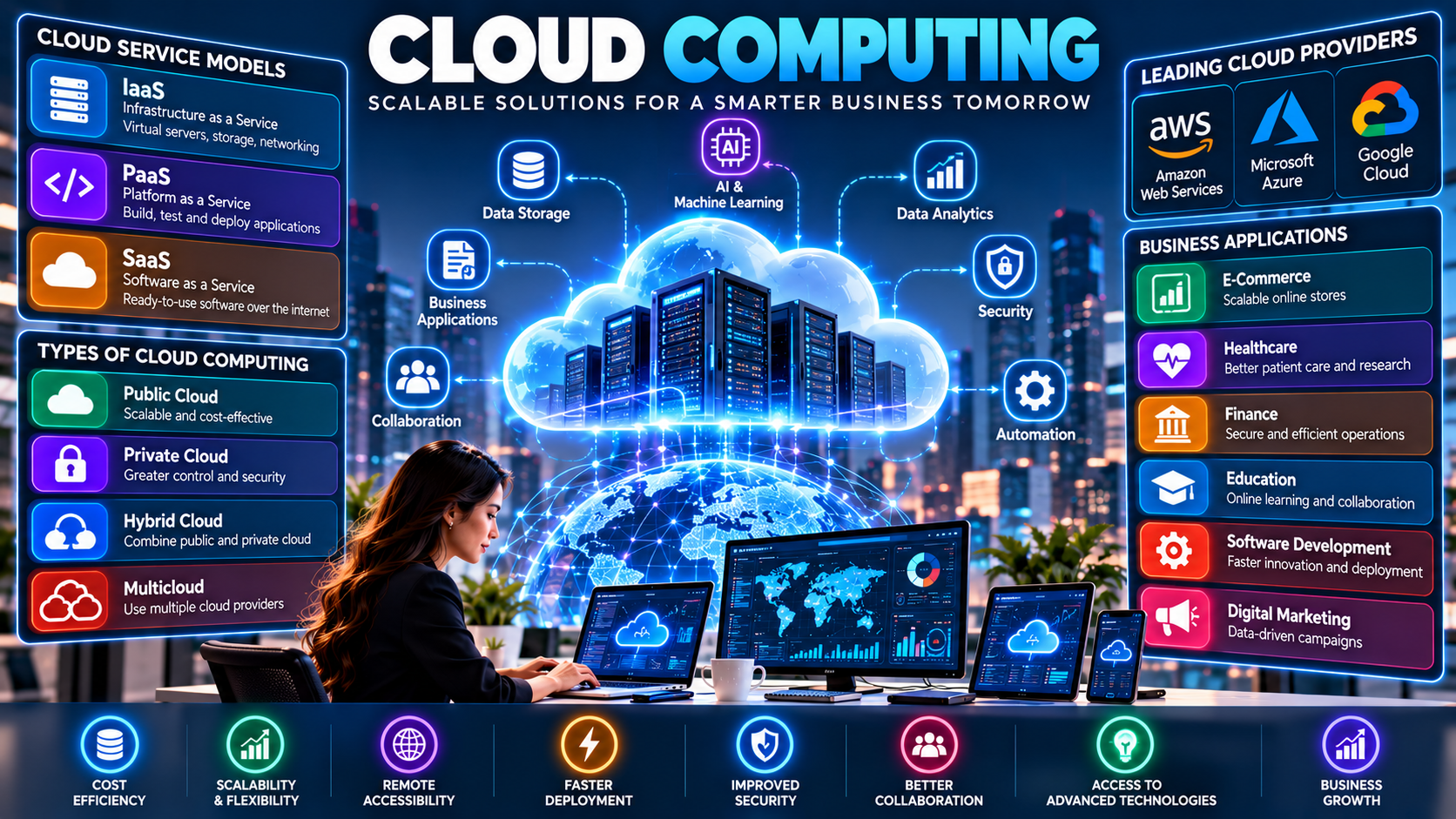
Types of Cloud Computing
Cloud computing is commonly divided into different deployment models. Each model offers a different balance of control, flexibility, security, and cost.
1. Public Cloud
A public cloud provides computing services through infrastructure operated by a third-party provider. Multiple customers use the provider's infrastructure while their resources and data are logically separated through appropriate controls.
Public cloud services are popular because businesses can access scalable infrastructure without building their own data centers.
Common applications include website hosting, application development, online storage, data analytics, and AI workloads.
Examples include Amazon Web Services, Microsoft Azure, and Google Cloud.
2. Private Cloud
A private cloud is designed for the exclusive use of one organization. It may be operated internally or hosted by a third-party provider.
Private cloud environments can offer greater control over infrastructure configuration and resource management. They may be suitable for organizations with specific regulatory, operational, or security requirements.
However, private cloud solutions can require additional investment in infrastructure, maintenance, technical expertise, and ongoing management.
3. Hybrid Cloud
A hybrid cloud combines private infrastructure with public cloud services, allowing organizations to operate workloads across both environments.
For example, a company may retain certain sensitive systems in a private environment while using public cloud services for website hosting, analytics, or additional computing capacity.
Hybrid cloud strategies can provide flexibility, but integrating systems, managing identities, maintaining consistent security, and transferring data between environments require careful planning.
4. Multicloud
Multicloud refers to the use of services from two or more cloud providers.
An organization might use one provider for application hosting, another for data analytics, and a third for specialized AI services.
A multicloud strategy can support specific technical requirements and reduce dependence on a single provider. However, it can also increase complexity, training requirements, and management costs.
The Three Main Cloud Service Models
Cloud computing services are also categorized according to how much of the technology stack the provider manages.
Infrastructure as a Service (IaaS)
Infrastructure as a Service provides fundamental computing resources, including virtual machines, storage, and networking.
Customers can install operating systems, configure applications, and manage many aspects of their software environment while the provider manages the underlying physical infrastructure.
Example: A business rents cloud servers to host its website and database.
Platform as a Service (PaaS)
Platform as a Service provides an environment for building, testing, deploying, and managing applications without requiring developers to manage all the underlying infrastructure.
Depending on the platform, the provider may manage operating systems, runtime environments, application hosting, and other components.
Example: A development team deploys a web application using a managed application platform.
Software as a Service (SaaS)
Software as a Service delivers ready-to-use applications over the internet. The provider manages most of the underlying infrastructure and application maintenance.
Users typically access the software through a browser or dedicated application.
Examples: Online email, cloud-based office software, customer relationship management platforms, and project management applications.
IaaS vs. PaaS vs. SaaS
Feature | IaaS | PaaS | SaaS |
|---|---|---|---|
Main purpose | Virtual infrastructure | Application development and deployment | Ready-to-use software |
Infrastructure management | Provider manages physical infrastructure | Provider manages infrastructure and platform components | Provider manages most of the technology stack |
Customer control | Higher | Moderate | Lower |
Technical expertise | Often more infrastructure expertise required | Development expertise required | Primarily application and user-management expertise |
Typical users | IT teams and system administrators | Developers and engineering teams | Individuals and business teams |
The right model depends on the organization's technical skills, control requirements, application needs, and budget.
Major Benefits of Cloud Computing
Cloud computing can provide important business advantages when services are selected and managed effectively.
1. Cost Efficiency
Cloud services can reduce the need for large upfront investments in servers, networking equipment, and data center facilities.
Businesses can pay for selected services according to their pricing agreements. However, cloud computing does not automatically reduce costs; unused resources, data transfer fees, and inefficient configurations can increase expenses.
2. Scalability and Flexibility
Cloud resources can often be increased or decreased as business requirements change.
An e-commerce website, for example, may need more computing capacity during a major sale and less during quieter periods.
3. Remote Accessibility
Cloud applications allow authorized users to access business tools and information from different locations, subject to connectivity and access controls.
This supports remote work, distributed teams, and collaboration across offices.
4. Faster Deployment
Organizations can provision many cloud services within minutes rather than waiting to purchase, install, and configure physical hardware.
Faster deployment can help development teams test ideas, launch applications, and respond to business needs more efficiently.
5. Backup and Disaster Recovery
Cloud storage and recovery services can help businesses maintain copies of important information and restore systems following certain failures.
Effective recovery requires suitable backup policies, tested restoration procedures, and protection against accidental deletion, ransomware, and compromised accounts.
6. Access to Advanced Technologies
Cloud platforms provide access to managed databases, machine learning, artificial intelligence, data analytics, automation, and developer tools.
This can make advanced capabilities accessible to organizations that lack the resources to build every system themselves.
7. Collaboration and Productivity
Cloud-based documents, communication platforms, and project management applications allow teams to work on shared information and coordinate tasks across locations.
8. Global Reach
Cloud providers operate infrastructure in multiple geographic regions. Businesses can deploy applications closer to their customers, subject to regional availability, data residency requirements, and architecture choices.
Business Applications of Cloud Computing
Cloud technology supports a wide range of industries and business operations.
1. Cloud Computing in Artificial Intelligence
AI applications often require substantial computing resources for training, inference, and data processing. Cloud platforms provide access to suitable infrastructure and managed AI services.
Businesses can use cloud-based AI for customer service automation, document analysis, predictive forecasting, content classification, and workflow optimization.
Organizations should evaluate the cost, privacy, security, and performance requirements of each AI workload before selecting a service.
2. Cloud Computing in Big Data Analytics
Businesses collect information from websites, customer interactions, financial systems, connected devices, and other sources.
Cloud data platforms can store and process these datasets, allowing analysts to identify trends, create dashboards, and support data-driven decisions.
Cloud-based analytics can also help organizations handle changing data volumes without maintaining all the underlying infrastructure themselves.
3. Cloud Computing in E-Commerce
Online stores need reliable hosting, secure transactions, product databases, inventory management, and systems capable of handling changing traffic levels.
Cloud infrastructure can help e-commerce businesses scale their websites, manage product information, analyze customer behavior, and maintain service availability.
4. Cloud Computing in Healthcare
Healthcare organizations may use cloud services for approved medical applications, research, administrative systems, data analysis, and collaboration.
Because healthcare information can be highly sensitive, implementations require appropriate privacy protections, access controls, regulatory compliance, and agreements with service providers.
5. Cloud Computing in Education
Educational institutions use cloud platforms for online learning, virtual classrooms, digital assignments, collaboration, and learning management systems.
These tools can help teachers and students access learning resources from different locations and devices.
6. Cloud Computing in Finance
Banks and financial companies use cloud technologies for selected applications, reporting, data analytics, customer service, and software development.
Financial organizations must carefully assess operational resilience, data security, regulatory obligations, and third-party risk before moving sensitive workloads to the cloud.
7. Cloud Computing in Software Development
Development teams use cloud infrastructure to build, test, deploy, and monitor applications.
Cloud-based development environments, automated testing, and continuous integration and deployment pipelines can help teams release updates more efficiently.
8. Cloud Computing in Digital Marketing
Marketing teams use cloud-based tools for email campaigns, customer relationship management, website analytics, advertising performance, and campaign reporting.
By connecting relevant data sources, organizations can better understand campaign results and identify opportunities to improve customer engagement.
Popular Cloud Computing Providers
Several major providers offer infrastructure, platforms, storage, analytics, and application services.
Amazon Web Services (AWS)
AWS provides cloud infrastructure and services for computing, storage, databases, networking, analytics, security, and AI.
It is used by businesses ranging from startups to large enterprises.
Microsoft Azure
Microsoft Azure offers cloud infrastructure, application development services, databases, analytics, AI tools, and integration with many Microsoft business products.
It can be particularly relevant to organizations already using Microsoft technologies.
Google Cloud
Google Cloud provides computing, storage, data analytics, machine learning, application hosting, and other cloud services.
It offers tools for organizations working with large datasets, cloud-native applications, and AI workloads.
Other Cloud Platforms
Depending on their needs, organizations may also consider Oracle Cloud Infrastructure, IBM Cloud, and regional cloud providers.
The best provider depends on technical requirements, geographic availability, service reliability, pricing, compliance, existing systems, and support needs.
Cloud Computing Security: Risks and Best Practices
Cloud computing can offer advanced security features, but moving data to the cloud does not automatically make it secure.
Security responsibilities are shared between the cloud provider and the customer. The division of responsibilities depends on the service model and the specific service being used.
Common Cloud Security Risks
Unauthorized access to accounts and business information.
Misconfigured storage, networks, or permissions.
Data breaches and accidental information exposure.
Phishing attacks and stolen credentials.
Inadequate backup and recovery procedures.
Vulnerable applications and outdated software.
Excessive permissions granted to users or services.
Compliance and data residency problems.
Best Practices for Cloud Security
Use multifactor authentication: Require additional verification for accounts, especially those with administrative privileges.
Apply least-privilege access: Give users and applications only the permissions necessary for their responsibilities.
Encrypt sensitive information: Protect data in transit and at rest using appropriate encryption and key-management practices.
Monitor activity: Review security logs, access events, configuration changes, and unusual behavior.
Maintain secure backups: Keep appropriate backups and regularly test restoration procedures.
Update systems: Apply security patches and maintain supported software versions.
Review configurations: Check storage permissions, network settings, identity policies, and public access regularly.
Understand compliance requirements: Evaluate applicable privacy, industry, and data residency obligations before choosing a cloud service.
Prepare an incident response plan: Define how the organization will identify, contain, investigate, and recover from security incidents.
A well-designed cloud security strategy combines technical controls, clear policies, trained personnel, and continuous monitoring.
Cloud Computing Challenges
Despite its advantages, cloud computing can introduce operational and financial challenges.
Unexpected Costs
Resource usage, data transfer, premium support, and storage growth can increase cloud bills. Businesses should use budgets, alerts, tagging, and cost monitoring to track spending.
Internet Dependency
Many cloud services require reliable network connectivity. Organizations should assess connectivity requirements and develop contingency plans for important systems.
Vendor Lock-In
Applications that depend heavily on provider-specific services may be difficult or expensive to migrate elsewhere.
Portable architectures, documented dependencies, and exit planning can help manage this risk.
Migration Complexity
Moving applications and data from existing systems can involve compatibility issues, downtime, and unexpected costs.
A phased migration, testing, and clear rollback plans can reduce disruption.
Data Privacy and Compliance
Some industries have specific rules governing how data is stored, processed, transferred, or accessed. Businesses must verify that their chosen cloud architecture meets applicable requirements.
Skills and Training
Cloud platforms evolve rapidly. Teams may need training in architecture, security, automation, monitoring, and cost management.
Service Availability
Cloud providers can experience outages or regional disruptions. Critical systems may require redundancy, tested recovery plans, and carefully designed high-availability architectures.
Cloud Computing vs. Traditional Computing
Traditional computing often relies on hardware owned and managed by an organization, while cloud computing provides access to resources operated or delivered through cloud service providers.
Feature | Cloud Computing | Traditional On-Premises Computing |
|---|---|---|
Infrastructure | Provider-operated or cloud-managed resources | Hardware managed by the organization |
Initial investment | Often lower upfront infrastructure costs | May require substantial hardware investment |
Scaling | Resources can often be provisioned quickly | May require purchasing and installing equipment |
Maintenance | Shared according to the service model | Organization manages more of the infrastructure |
Control | Varies by service model | Often greater direct hardware control |
Internet access | Frequently required for remote cloud services | Depends on the system and deployment |
Cost structure | Usage-based, subscription, or reserved pricing | Hardware, facilities, staffing, and maintenance costs |
Neither approach is automatically superior. Some businesses benefit from cloud-first strategies, while others retain on-premises systems or use hybrid environments to meet specific technical and regulatory needs.
How to Choose the Right Cloud Computing Solution
Selecting a cloud platform requires more than comparing prices. Businesses should evaluate the complete requirements of their applications and operations.
1. Identify Business Requirements
Determine whether the primary need is website hosting, file storage, application development, analytics, backup, or enterprise software.
2. Estimate Resource Needs
Assess computing capacity, storage, network traffic, expected growth, and performance requirements.
3. Compare Total Costs
Include usage charges, licensing, data transfers, support, security tools, migration, and staff training.
4. Evaluate Security and Compliance
Review identity controls, encryption, logging, backup options, data location, and relevant regulatory obligations.
5. Check Reliability and Support
Evaluate service availability commitments, support options, recovery capabilities, and regional infrastructure.
6. Test Before Migrating
Start with a pilot project or non-critical workload. Measure performance, costs, usability, and security before expanding.
7. Create a Migration and Recovery Plan
Document responsibilities, testing requirements, data transfer steps, downtime expectations, and rollback procedures.
A structured evaluation helps organizations select services that support both current operations and future growth.
The Future of Cloud Computing in 2026 and Beyond
Cloud computing continues to evolve alongside AI, automation, connected devices, and modern software development.
AI-Optimized Cloud Infrastructure
Cloud providers are expanding services designed to support AI model training, inference, data processing, and intelligent applications. Businesses must balance performance requirements with energy consumption and operating costs.
Serverless Computing
Serverless platforms allow developers to run code or application functions without directly managing the underlying servers. Billing and scaling models vary by service.
Edge Computing
Edge computing processes some information closer to where it is generated, such as on devices, in factories, or near connected infrastructure. This can reduce delays and unnecessary data transfers.
Cloud-Native Applications
Containers, microservices, managed platforms, and automated deployment tools help teams develop and operate applications in flexible environments.
Stronger Cloud Governance
Organizations are placing more emphasis on cost control, security policies, resource ownership, and compliance across complex cloud environments.
Sustainable Cloud Operations
Businesses are increasingly considering energy efficiency, hardware utilization, and environmental impact when planning digital infrastructure.
Hybrid and Multicloud Architectures
Some organizations will continue combining multiple environments to meet availability, data residency, performance, and operational requirements.
The future of cloud computing will be shaped by how effectively organizations combine flexible infrastructure with responsible data management, security, and measurable business value.
Conclusion
Cloud computing has become a foundation of modern digital business. It allows organizations to access computing resources, store information, deploy applications, and use advanced technologies without managing every component of the underlying infrastructure.
Its benefits include scalability, faster deployment, remote accessibility, collaboration, and access to AI and analytics services. However, successful cloud adoption also requires careful planning for security, cost management, compliance, migration, and service availability.
For businesses considering the cloud, the best approach is to identify clear objectives, compare suitable providers, test important workloads, and establish strong security and governance practices.
When implemented effectively, cloud computing can help organizations operate more efficiently, support innovation, and build flexible digital systems for long-term growth.
Frequently Asked Questions About Cloud Computing
1. What is cloud computing in simple words?
Cloud computing means using computing services, such as storage, servers, databases, and software, over the internet instead of managing all the necessary hardware yourself.
2. What are the four main types of cloud computing?
The commonly discussed deployment models are public cloud, private cloud, hybrid cloud, and multicloud. Multicloud involves using services from multiple cloud providers.
3. What are the three main cloud service models?
The three main service models are Infrastructure as a Service (IaaS), Platform as a Service (PaaS), and Software as a Service (SaaS).
4. What are examples of cloud computing?
Examples include online email, cloud file storage, website hosting, virtual servers, cloud databases, video conferencing, and cloud-based business applications.
5. What are the main benefits of cloud computing?
Key benefits include flexible scaling, reduced upfront infrastructure investment, faster deployment, remote accessibility, collaboration, and access to advanced technologies.
6. Is cloud computing secure?
Cloud computing can be secure when properly configured and managed. Security depends on access controls, encryption, monitoring, backup procedures, application security, and the responsibilities shared between the provider and customer.
7. Which companies provide cloud computing services?
Major providers include Amazon Web Services (AWS), Microsoft Azure, and Google Cloud. Other providers serve particular industries, regions, and technical requirements.
8. Is cloud computing suitable for small businesses?
Yes. Small businesses can use cloud services for websites, email, file storage, accounting, customer management, and collaboration without building their own data centers.
9. What is the difference between cloud computing and cloud storage?
Cloud storage is a service for storing and accessing digital information. Cloud computing is a broader category that includes storage, processing, databases, networking, application hosting, and other computing services.
10. What is the future of cloud computing?
Important trends include AI infrastructure, serverless computing, edge computing, cloud-native development, hybrid environments, cost optimization, and stronger security and governance.