Artificial intelligence is changing the way businesses operate. From automating repetitive tasks and improving customer service to analyzing business data and creating marketing content, AI technologies are helping organizations work more efficiently.
Businesses of all sizes can now explore AI-powered solutions without necessarily developing their own artificial intelligence systems. Ready-made platforms, automation software, and intelligent assistants make it easier to introduce AI into everyday operations.
However, successful AI adoption requires more than purchasing software or experimenting with chatbots. Businesses need a clear strategy, suitable tools, reliable data, employee training, and measurable objectives.
Implementing AI without understanding business requirements can lead to unnecessary expenses, poor results, and security concerns.
This guide explains how to implement AI in your business step by step, how to choose suitable tools, which departments can benefit, what challenges to expect, and how to measure the results.
What Does Implementing AI in a Business Mean?
Implementing artificial intelligence means introducing AI-powered technologies into business processes to improve how tasks are performed, information is analyzed, and decisions are supported.
Depending on the organization's needs, AI implementation may involve:
Automating repetitive administrative tasks.
Using AI assistants for business communication.
Improving customer support with intelligent chatbots.
Analyzing sales and customer data.
Generating marketing content.
Forecasting inventory and demand.
Supporting recruitment and employee training.
Connecting different business applications through automated workflows.
For example, an online store can implement AI to answer common customer questions, recommend relevant products, organize customer inquiries, and summarize sales performance.
The goal is not to introduce AI everywhere. It is to identify where the technology can deliver practical business value.
Why Should Businesses Implement Artificial Intelligence?
AI adoption can help organizations improve productivity, reduce manual work, and manage growing operational requirements.
Here are some important reasons businesses are exploring AI.
1. Improve Operational Efficiency
AI-powered systems can automate repetitive activities that require significant employee time.
Examples include:
Organizing business documents.
Preparing routine reports.
Scheduling appointments.
Processing customer inquiries.
Updating information across connected applications.
This allows employees to focus on more valuable responsibilities.
2. Reduce Repetitive Work
Employees often spend hours performing tasks that follow predictable patterns.
AI and workflow automation can reduce manual involvement in activities such as data entry, document classification, and routine communication.
3. Improve Customer Experiences
AI-powered customer support tools can answer frequently asked questions, provide basic product information, and direct customers to appropriate services.
Businesses can also use AI to summarize customer feedback and identify common concerns.
4. Support Better Decision-Making
Machine learning and predictive analytics can help businesses identify patterns in sales, customer behavior, inventory, and financial information.
These insights can support management decisions when combined with reliable data and human expertise.
5. Support Business Growth
AI can help organizations manage increasing workloads without requiring every process to be handled manually.
Small businesses can use automation to improve efficiency while focusing resources on customer relationships, product development, and expansion.
10 Business Areas Where You Can Implement AI
Before choosing AI software, understand which departments can benefit from it.
1. Marketing and Content Creation
Marketing is one of the most accessible areas for AI adoption.
Businesses can use generative AI to:
Generate blog ideas and content outlines.
Draft social media posts.
Prepare email campaigns.
Create advertising concepts.
Summarize marketing research.
Analyze campaign performance.
Example: A digital marketing agency can use AI to prepare article outlines, generate campaign ideas, organize client research, and draft promotional content.
Human editors should review content for accuracy, originality, brand consistency, and search quality.
2. Sales and Lead Generation
AI can help sales teams organize prospects and manage follow-up activities.
Possible applications include:
Categorizing incoming leads.
Summarizing customer conversations.
Drafting follow-up emails.
Updating CRM records.
Identifying sales trends.
Prioritizing opportunities using defined criteria.
Example: When a potential customer submits a website inquiry, an automated workflow can add the contact to a CRM, categorize the inquiry, and notify the relevant sales representative.
3. Customer Support
Businesses can use AI-powered chatbots and assistants to manage routine customer questions.
Common applications include:
Answering frequently asked questions.
Providing product information.
Explaining delivery procedures.
Directing inquiries to the right department.
Summarizing customer conversations.
Example: An e-commerce business can introduce a chatbot that answers common questions about shipping, returns, and product availability.
Complex complaints and sensitive issues should remain accessible to human representatives.
4. Finance and Accounting
AI can support financial administration by helping businesses process and organize information.
Potential applications include:
Extracting information from invoices.
Categorizing expenses.
Preparing financial summaries.
Sending payment reminders.
Organizing financial documents.
Identifying unusual transaction patterns.
Financial records and important accounting decisions should always receive appropriate human review.
5. Human Resources
HR departments can use AI to support routine administrative processes.
Examples include:
Preparing job descriptions.
Organizing onboarding documents.
Scheduling interviews.
Summarizing training materials.
Answering routine employee questions.
Managing internal communication.
Hiring and employee evaluation decisions require careful human oversight to prevent unfair or discriminatory outcomes.
6. Project Management
AI-powered project management tools can help teams organize responsibilities and track progress.
Businesses can use them to:
Summarize project updates.
Create task descriptions.
Organize deadlines.
Identify potential workflow delays.
Prepare progress reports.
Support team collaboration.
7. Inventory and Supply Chain Management
Retailers and manufacturers can use machine learning and analytics to support inventory planning.
Applications include:
Demand forecasting.
Inventory monitoring.
Identifying unusual stock movements.
Predicting maintenance requirements.
Analyzing supplier performance.
These systems can help businesses make more informed operational decisions.
8. IT and Software Development
Technology teams can use AI to support software development and IT operations.
Applications include:
Code suggestions.
Technical documentation.
Software testing assistance.
Log analysis.
Troubleshooting support.
Cybersecurity monitoring.
AI-generated code and technical recommendations should be tested and reviewed before implementation.
9. Business Research and Analysis
AI can help organizations collect, organize, and summarize information.
Businesses can use it to:
Summarize market research.
Analyze customer feedback.
Compare business strategies.
Organize competitor information.
Prepare management reports.
AI-generated research should be verified using reliable sources, particularly when it influences financial or strategic decisions.
10. Internal Communication
AI tools can simplify communication across departments.
They can assist with:
Drafting professional emails.
Summarizing meetings.
Preparing internal announcements.
Translating business communication.
Organizing action items.
Creating training documentation.
This can reduce administrative effort and improve information sharing.
How to Implement AI in Your Business: 10 Practical Steps
Successful AI implementation starts with business requirements, not software selection.
Follow these steps to introduce AI systematically.
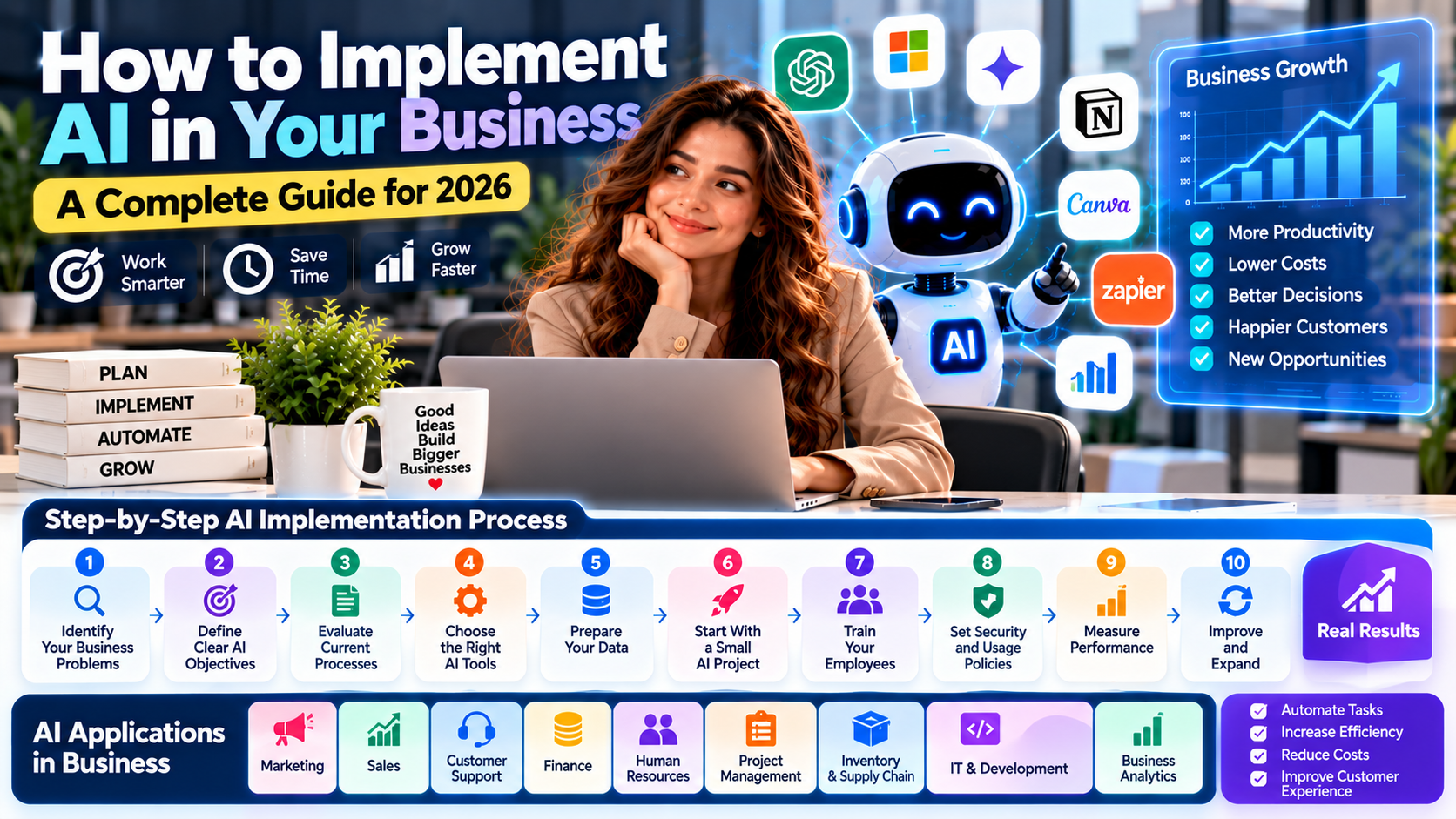
Step 1: Identify Your Business Problems
Start by understanding which processes need improvement.
Ask questions such as:
Which activities consume the most employee time?
Where do repetitive manual tasks occur?
Which processes experience frequent errors?
What causes delays in customer service?
Which business decisions require better data?
Where could automation improve productivity?
Create a list of problems before selecting any AI tools.
For example, if employees spend several hours every week organizing customer inquiries, that process may be a suitable starting point.
Step 2: Define Clear AI Objectives
Every AI project should have a specific business objective.
Examples include:
Business Objective | Possible AI Application |
|---|---|
Reduce manual work | Workflow automation |
Improve customer support | AI chatbot |
Increase content productivity | Generative AI assistant |
Improve sales organization | AI-supported CRM |
Improve reporting | Data analysis tools |
Reduce scheduling effort | AI-assisted scheduling |
Avoid vague goals such as implementing AI to become more advanced.
Instead, define measurable outcomes that demonstrate business value.
Step 3: Evaluate Your Existing Business Processes
Review how your current systems work.
Identify:
Existing software applications.
Manual data transfers.
Repetitive administrative activities.
Communication gaps.
Data quality problems.
Existing security procedures.
Understanding current processes helps determine whether AI is necessary and where it can make a meaningful difference.
Step 4: Choose the Right AI Tools
Select platforms according to your business requirements, budget, and technical capabilities.
Here are some useful options.
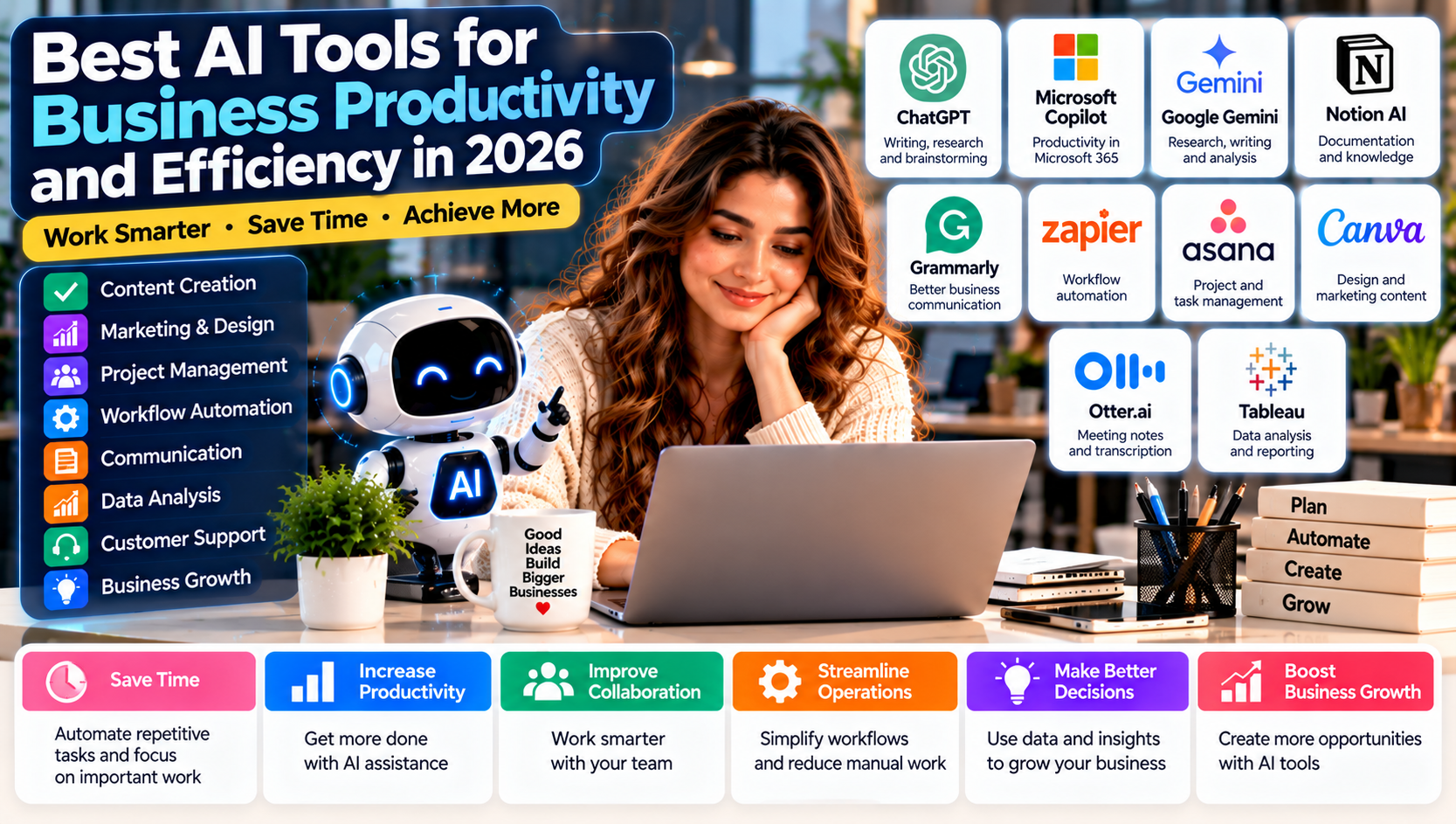
ChatGPT: Suitable for writing, research, brainstorming, document analysis, and business assistance.
Microsoft Copilot: Useful for organizations working with Microsoft 365 applications.
Google Gemini: Supports writing, research, and productivity workflows within Google's ecosystem.
Zapier: Connects business applications and automates repetitive workflows.
Make: Provides visual workflow automation for more complex processes.
n8n: Offers customizable automation and AI workflow capabilities for businesses with technical resources.
HubSpot: Supports customer relationship management, marketing, and sales automation.
Canva: Helps businesses create marketing graphics, presentations, and visual content.
The best platform is the one that solves your specific problem effectively.
Step 5: Prepare Your Business Data
AI systems depend on relevant information to produce useful results.
Before implementation:
Organize important business documents.
Remove unnecessary duplicate records.
Review data accuracy.
Establish consistent naming conventions.
Identify sensitive information.
Define who can access business data.
Poor-quality information can lead to inaccurate results, so data preparation is an important part of AI implementation.
Step 6: Start With a Small AI Project
Do not attempt to automate your entire organization immediately.
Choose one manageable process and test it.
For example, a small agency could begin by automating website lead notifications.
The workflow might operate as follows:
A potential client submits an inquiry.
The information is added to the CRM.
AI categorizes the inquiry.
The sales team receives a notification.
The customer receives an acknowledgment email.
A follow-up task is created.
This limited project allows the business to evaluate performance before expanding automation.
Step 7: Train Your Employees
AI implementation is not only a technology project. Employees need to understand how to use the systems effectively.
Training should cover:
Basic AI concepts.
Writing effective prompts.
Reviewing AI-generated information.
Using approved business applications.
Protecting confidential information.
Identifying inaccurate outputs.
Reporting workflow problems.
Employees should understand that AI is a support tool, not an automatic replacement for professional judgment.
Step 8: Establish AI Security and Usage Policies
AI systems may process customer records, financial information, business documents, and employee data.
Organizations should establish clear rules covering:
Approved AI applications.
Confidential information.
User access permissions.
Data retention.
Account security.
Human approval requirements.
Third-party integrations.
Use multi-factor authentication where available, protect API credentials, and avoid sharing sensitive information with unapproved systems.
Step 9: Measure Performance
After implementation, evaluate whether the AI system is delivering measurable improvements.
Useful performance indicators include:
Time saved per task.
Reduction in manual workload.
Workflow completion rate.
Customer response time.
Error frequency.
Employee productivity.
Operating costs.
Customer satisfaction.
Compare performance before and after implementation.
Step 10: Improve and Expand
Once the initial project performs reliably, identify other suitable processes.
For example, a company that successfully automates customer inquiries might later introduce AI-assisted reporting or marketing workflows.
Expand gradually, monitor results, and update processes as business needs change.
Best AI Tools for Different Business Sizes
Not every business requires the same technology.
The right solution depends on the number of employees, existing software, available budget, and operational complexity.
Business Type | Suggested AI Tools | Main Purpose |
|---|---|---|
Freelancers | ChatGPT, Grammarly, Canva | Writing and productivity |
Small businesses | ChatGPT, Zapier, Notion | Daily operations and automation |
Digital agencies | ChatGPT, Canva, HubSpot | Marketing and client management |
E-commerce businesses | ChatGPT, Zapier, customer support AI | Customer and order workflows |
Medium-sized companies | Copilot, Asana, Make | Collaboration and process automation |
Larger organizations | Enterprise AI platforms, custom integrations | Scalable business operations |
These are examples rather than fixed packages. Always evaluate security, integrations, and pricing before adopting a platform.
How Much Does AI Implementation Cost?
AI implementation costs vary considerably.
A business using an existing AI assistant may need only a subscription, while a company developing custom AI systems may require developers, infrastructure, data preparation, and ongoing maintenance.
Common cost categories include:
1. Software Subscriptions
Businesses may pay monthly or annual fees for AI assistants, automation platforms, CRM software, and productivity applications.
2. API and Usage Costs
Some platforms charge according to the number of requests, automated operations, or AI model usage.
3. Implementation Costs
Custom integrations, workflow development, and technical configuration can require additional investment.
4. Employee Training
Staff may need training sessions and time to become comfortable with new systems.
5. Maintenance and Monitoring
AI systems require ongoing monitoring, security reviews, troubleshooting, and occasional improvements.
How to Control AI Implementation Costs
Businesses can manage expenses by:
Starting with free or entry-level plans where appropriate.
Automating one process at a time.
Avoiding unnecessary subscriptions.
Comparing total usage costs.
Reusing existing software integrations.
Monitoring automation activity.
The objective should be measurable business value rather than purchasing the largest number of AI tools.
Common Mistakes to Avoid During AI Implementation
AI projects can fail when organizations focus on technology instead of business requirements.
Avoid these mistakes.
1. Implementing AI Without a Clear Objective
Using AI simply because competitors are adopting it can lead to unnecessary expenses.
2. Automating Inefficient Processes
Automating a poorly designed workflow may make existing problems happen faster. Improve the process before automating it.
3. Ignoring Data Quality
Incorrect or incomplete data can reduce the reliability of AI-generated outputs.
4. Choosing Too Many Tools
Purchasing multiple overlapping platforms can increase costs and create unnecessary complexity.
5. Ignoring Employee Training
Employees need guidance to use AI responsibly and effectively.
6. Removing Human Oversight
AI-generated information may contain errors. Important business decisions should have appropriate human review.
7. Overlooking Data Security
Businesses must understand how their chosen providers process and protect information.
8. Failing to Measure Results
Without measurable performance indicators, it becomes difficult to determine whether AI implementation is delivering value.
Real-World Example: Implementing AI in a Digital Marketing Agency
Consider a digital marketing agency that manages multiple clients and receives frequent project inquiries.
The agency faces several operational challenges:
Manual lead organization.
Repetitive client communication.
Time-consuming content planning.
Delayed project updates.
Manual performance reporting.
It decides to introduce AI gradually.
Phase 1: Marketing Productivity
The agency uses ChatGPT to brainstorm content ideas, prepare outlines, and draft marketing materials.
Phase 2: Lead Management
It connects website inquiry forms with a CRM through Zapier or Make.
Phase 3: Client Communication
Employees use AI assistants to draft routine emails and summarize client meetings.
Phase 4: Project Management
The agency uses a project management platform to organize tasks, deadlines, and responsibilities.
Phase 5: Reporting
The team uses analytics tools and AI-assisted summaries to prepare client performance reports.
Expected Business Improvements
The agency can aim to:
Reduce repetitive administrative work.
Improve lead organization.
Speed up content preparation.
Improve project visibility.
Make reporting more consistent.
Actual results should be measured against the agency's previous workflow rather than assumed in advance.
How to Measure the Success of AI Implementation
AI implementation should be evaluated using business performance indicators.
A practical measurement framework includes:
KPI | What It Measures |
|---|---|
Time saved | Reduction in task completion time |
Automation rate | Share of eligible tasks automated |
Error rate | Frequency of incorrect outputs or process failures |
Customer response time | Speed of customer communication |
Cost per task | Operating cost associated with completing a task |
Employee productivity | Work completed within a defined period |
Customer satisfaction | Quality of the customer experience |
Businesses should establish a baseline before introducing AI and review the results regularly.
Future of AI Implementation in Business
Artificial intelligence is evolving beyond basic content generation and simple automation.
Several developments are likely to influence how organizations implement AI.
1. AI Agents: Businesses will increasingly explore AI agents that can use connected tools and perform multi-step tasks with appropriate supervision.
2. Intelligent Automation: AI will work alongside traditional automation platforms to process information, interpret requests, and manage more complex workflows.
3. Multimodal AI: Systems will increasingly work with text, images, audio, video, and other types of information.
4. Personalized Business Assistants: Organizations may adopt assistants designed around specific departments, responsibilities, and internal knowledge.
5. Stronger AI Governance: Security, transparency, privacy, accountability, and human oversight will become increasingly important.
6. Wider AI Adoption by Small Businesses: More accessible software and cloud-based services will make it easier for smaller organizations to experiment with AI.
The most successful businesses will be those that adopt AI strategically and connect it to genuine operational needs.
Frequently Asked Questions (FAQs)
1. How do I implement AI in my business?
Start by identifying repetitive tasks or operational problems, defining measurable objectives, choosing suitable AI tools, preparing your data, training employees, and testing a small project before expanding.
2. What is the best AI tool for business implementation?
There is no single best tool for every business. ChatGPT is useful for general assistance, Zapier and Make support workflow automation, Microsoft Copilot helps Microsoft 365 users, and HubSpot supports sales and customer management.
3. Can small businesses implement AI?
Yes. Small businesses can use ready-made AI assistants, automation platforms, customer support tools, and marketing applications without necessarily developing their own AI systems.
4. How much does it cost to implement AI in a business?
Costs depend on software subscriptions, usage, integrations, training, and maintenance. Businesses should begin with a limited project and calculate its total cost before expanding.
5. Which business departments can benefit from AI?
Marketing, sales, customer support, finance, human resources, project management, IT, research, and inventory management can all benefit from appropriate AI applications.
6. Do employees need technical skills to use AI?
Not always. Many AI tools are designed for non-technical users. However, employees need basic AI literacy, digital skills, and the ability to review generated outputs.
7. What are the biggest challenges of AI implementation?
Common challenges include data privacy, security, poor data quality, employee resistance, integration difficulties, inaccurate outputs, and unclear business objectives.
8. How long does it take to implement AI in a business?
The timeline depends on the project's complexity. A simple AI assistant or workflow may be introduced relatively quickly, while custom enterprise systems can require extensive planning, development, testing, and ongoing maintenance.
Conclusion
Implementing artificial intelligence in a business is a strategic process that requires clear objectives, suitable technology, reliable information, and employee involvement.
From marketing and customer support to finance, sales, and project management, AI can help organizations reduce repetitive work and improve operational efficiency.
However, successful implementation does not depend on adopting every available AI platform. It depends on choosing the right technology for the right business problem.
Start with one process, test the results, train employees, establish security policies, and expand gradually.
Businesses that combine artificial intelligence with human expertise and responsible management can build more efficient, adaptable, and competitive operations.
The smartest way to implement AI is to start with a real business problem and use technology to solve it.