Modern businesses rely on multiple digital tools to manage their daily operations. A company might use one platform for customer relationships, another for accounting, a separate application for online payments, and cloud software for communication and project management.
But how do these different systems exchange information without requiring employees to transfer data manually?
The answer is API integration.
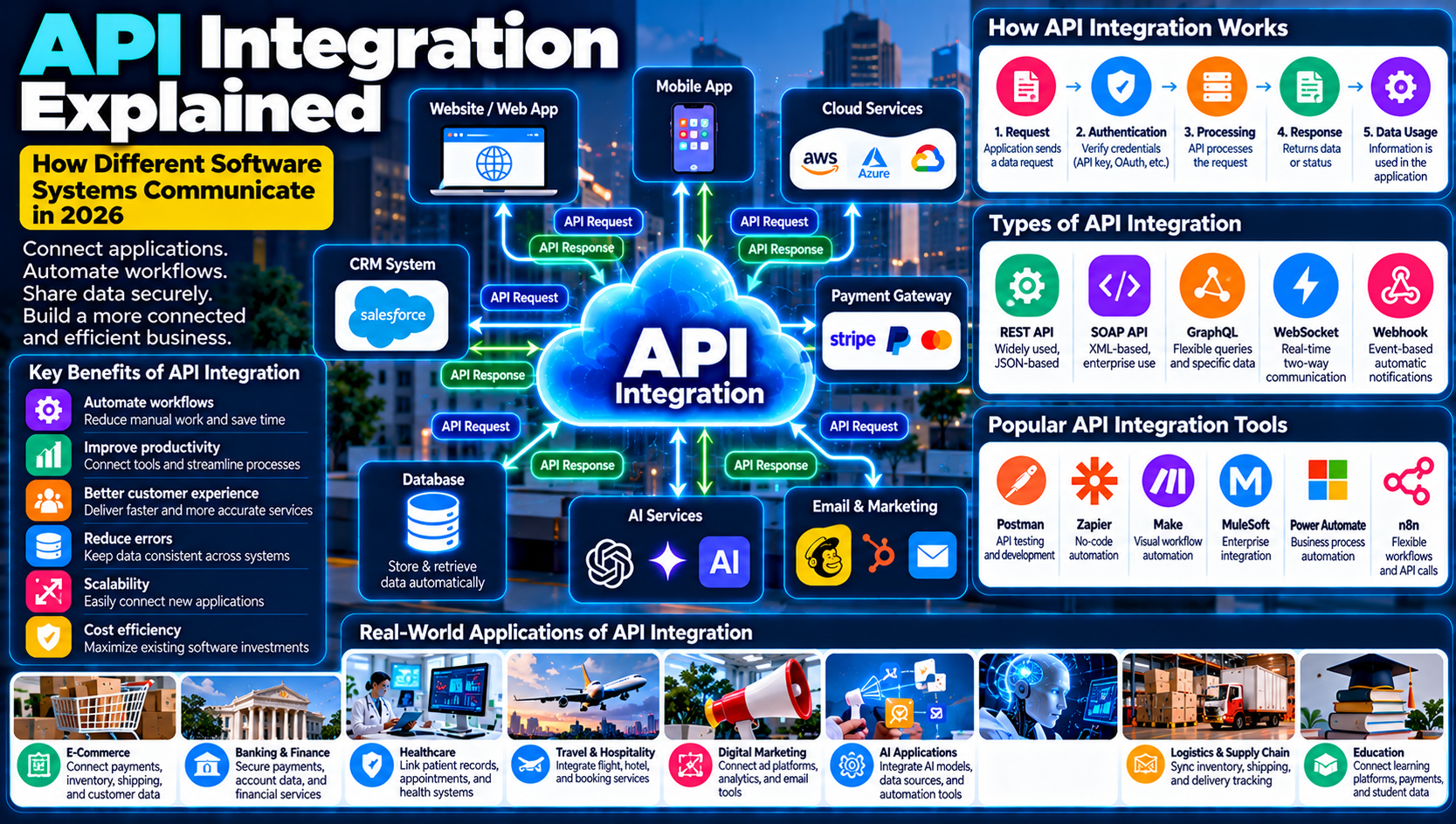
API integration allows different software applications, platforms, and services to communicate and exchange information. It helps businesses automate workflows, connect digital tools, improve customer experiences, and reduce repetitive tasks.
From online payment processing and e-commerce websites to mobile applications and artificial intelligence platforms, APIs play an essential role in today's connected digital environment.
In this guide, we explain what API integration is, how it works, its major types, benefits, challenges, and practical applications for businesses in 2026.
What Is API Integration?
API integration is the process of connecting two or more software applications through Application Programming Interfaces (APIs) so they can exchange information and perform actions.
An API acts as a communication interface between software systems. It defines how one application can request information or functionality from another application.
For example, when a customer purchases a product from an online store, several systems may work together:
The online store receives the order.
A payment API connects to a payment provider.
The payment provider processes the transaction.
An inventory system updates product availability.
A shipping service receives delivery information.
The customer receives an order confirmation.
These activities can happen automatically through API connections.
Without API integration, businesses may need to transfer information manually between different platforms, increasing operational effort and the possibility of mistakes.
What Is an API and How Does It Work?
An API, or Application Programming Interface, is a set of rules that allows software applications to communicate with each other.
Think of an API as a waiter in a restaurant.
A customer places an order, the waiter takes the request to the kitchen, and the kitchen prepares the food. The waiter then delivers the result to the customer.
An API performs a similar communication role between software applications.
How an API Works Step by Step
1. Request
One application sends a request to another application through an API.
2. Authentication
The receiving system checks whether the request is authorized. Depending on the API, this may involve API keys, access tokens, or other authentication methods.
3. Processing
The receiving application processes the request and performs the required operation.
4. Response
The system sends information or a status response back to the requesting application.
5. Data Usage
The requesting application uses the returned information to update its interface, database, or workflow.
Simple API Integration Example
Imagine an online shopping website that wants to display live shipping information.
The website sends an API request to a delivery company's system. The delivery platform returns the shipment status, and the website displays the latest available tracking information to the customer.
This connection eliminates the need for customers to visit multiple websites to check their orders.
Main Components of API Integration
Understanding the basic components of an API connection helps explain how software systems communicate.
1. API Endpoint
An endpoint is a specific address where an application can send an API request.
For example, an e-commerce system might use different endpoints for customer information, product details, and orders.
2. API Request
A request is a message sent from one application to another.
It may contain information such as customer details, payment instructions, search terms, or product identifiers.
3. API Response
A response is the information returned by the receiving application.
It may contain requested data, a confirmation message, or an error indicating that something went wrong.
4. Authentication
Authentication verifies the identity of the application or user making an API request.
Common methods include:
API keys
OAuth 2.0
Bearer tokens
JSON Web Tokens (JWT)
Mutual TLS
The appropriate method depends on the sensitivity of the data and the requirements of the API.
5. Data Format
Applications need a shared format to exchange information.
Common API data formats include:
JSON
XML
Form data
Plain text
JSON is particularly common in modern web APIs because it is relatively lightweight and easy for many programming languages to process.
6. API Documentation
API documentation explains how developers can use an API.
It commonly includes endpoints, request methods, authentication requirements, data structures, response examples, and error codes.
Good documentation makes integration easier to develop, test, and maintain.
Types of API Integration
Different API technologies and integration approaches support different business requirements.
1. REST API Integration
REST, or Representational State Transfer, is an architectural style commonly used to build web APIs.
REST APIs frequently use HTTP methods such as:
GET: Retrieve information.
POST: Create or submit information.
PUT: Replace or update a resource.
PATCH: Partially update a resource.
DELETE: Remove a resource.
REST APIs commonly exchange data using JSON.
They are widely used in websites, mobile applications, cloud platforms, and business software.
2. SOAP API Integration
SOAP stands for Simple Object Access Protocol.
It is a messaging protocol that commonly uses XML to exchange structured information.
SOAP APIs are often found in enterprise environments where established messaging standards, formal contracts, and specific security requirements are important.
3. GraphQL API Integration
GraphQL is a query language and runtime for APIs.
It allows clients to request specific information rather than receiving a fixed response containing every available field.
For example, a mobile application may request only a customer's name and recent orders instead of retrieving an entire customer record.
This flexibility can be useful when building applications that need different data for different screens.
4. WebSocket APIs
WebSocket APIs support two-way communication between connected systems over a persistent connection.
They are useful when applications need frequent updates without repeatedly opening new connections.
Common examples include:
Live chat applications
Real-time notifications
Collaborative applications
Live dashboards
Online gaming
5. Webhook-Based Integrations
Webhooks allow one system to send an automatic notification to another system when a particular event occurs.
For example, when an online payment is completed, a payment provider can send a webhook notification to the store.
The store can then update the order status and trigger a confirmation email.
Unlike a typical repeated polling approach, webhooks can notify applications when relevant events occur.
API Integration Types Compared
API Type | Main Purpose | Common Use Cases |
|---|---|---|
REST | Web-based communication | Websites and mobile applications |
SOAP | Structured messaging | Enterprise and legacy systems |
GraphQL | Flexible data queries | Complex applications |
WebSocket | Two-way real-time communication | Chat and live dashboards |
Webhooks | Event-based notifications | Payments and order updates |
The best approach depends on the application, performance requirements, security needs, and available services.
Real-World Applications of API Integration
API integration is used across almost every major digital industry.
1. E-Commerce and Online Shopping
Online stores connect multiple services to create a smooth shopping experience.
Common integrations include:
Payment gateways
Inventory management
Shipping providers
Customer relationship management
Product information systems
Marketing automation
For example, an online store can automatically update stock levels after a successful purchase.
2. Banking and Financial Services
Banks and financial technology companies use APIs to connect financial applications and services.
Potential applications include:
Account information access
Payment processing
Transaction notifications
Financial reporting
Customer verification
Open banking services
API-based financial connections must follow applicable security, consent, and regulatory requirements.
3. Healthcare
Healthcare organizations use APIs to connect different digital systems and support information exchange.
Examples include:
Electronic health records
Appointment scheduling
Laboratory systems
Patient portals
Pharmacy applications
Healthcare analytics
Standards such as HL7 FHIR help healthcare systems exchange structured health information.
4. Travel and Hospitality
Travel platforms use APIs to connect services such as flight searches, hotel bookings, payment processing, and customer notifications.
A booking website may retrieve hotel availability from a provider and display the results directly to customers.
5. Digital Marketing
Marketing teams use API integrations to connect advertising platforms, analytics tools, customer databases, and email marketing software.
Examples include:
Social media publishing
Advertising performance reporting
Lead collection
Email campaign automation
Website analytics
Customer segmentation
These connections help marketing teams manage campaigns and understand performance across multiple platforms.
6. Artificial Intelligence Applications
AI applications frequently use APIs to connect language models, image generation tools, databases, business software, and external services.
For example, a customer support application might connect to an AI service through an API to generate suggested responses.
An AI workflow could also retrieve customer information from a CRM, analyze a support request, and create a ticket in a separate system.
These integrations make it possible to build connected AI-powered business workflows.
7. Education and E-Learning
Educational platforms use APIs to connect learning management systems, video conferencing tools, payment services, and student information systems.
Examples include:
Online course enrollment
Student progress tracking
Digital certificates
Learning analytics
Video lesson integration
8. Logistics and Supply Chain
Logistics businesses connect warehouse systems, shipping services, inventory platforms, and delivery tracking applications.
API integration can help automate order updates and improve visibility across supply chains.
Benefits of API Integration for Businesses
API integration provides several practical advantages.
1. Business Process Automation
APIs allow applications to exchange information automatically.
Businesses can reduce repetitive manual work and create connected workflows.
2. Improved Productivity
Employees spend less time moving information between platforms.
This allows teams to focus on customer service, planning, and other important responsibilities.
3. Better Customer Experience
Connected systems can provide faster updates, smoother transactions, and more consistent information.
For example, customers can receive automatic order confirmations and delivery notifications.
4. Reduced Operational Errors
Manual data entry can introduce mistakes, such as incorrect customer details or duplicate records.
Automated data exchange can reduce these errors when integrations are properly designed and validated.
5. Scalability
Businesses can connect additional applications and services as their requirements grow.
A well-designed integration architecture can support new workflows without requiring every system to be rebuilt.
6. Real-Time Data Exchange
Some API technologies allow systems to exchange information quickly or respond automatically to events.
This can improve operational visibility and support faster decision-making.
7. Cost Efficiency
Automation can reduce repetitive administrative work and improve the use of existing software investments.
However, API development, maintenance, hosting, and third-party usage fees should also be considered.
Challenges and Risks of API Integration
Although API integration provides important benefits, it also introduces technical and operational challenges.
1. Security Vulnerabilities
Poorly secured APIs can expose sensitive business or customer information.
Common risks include:
Weak authentication
Excessive permissions
Exposed API keys
Insecure data transmission
Broken access controls
Insufficient monitoring
Businesses should apply strong authentication, authorization, encryption, and security testing.
2. Compatibility Issues
Different applications may use different data formats, structures, and business rules.
Developers may need to transform information before systems can exchange it correctly.
3. API Downtime
If an external service becomes unavailable, connected applications may stop working as expected.
Businesses should design integrations with appropriate error handling and recovery mechanisms.
4. Rate Limits
API providers often limit how many requests an application can make within a specific period.
Exceeding these limits may result in temporary errors or rejected requests.
Developers can manage this through caching, request batching, and retry strategies.
5. Maintenance Requirements
APIs can change over time.
A provider may introduce a new version, discontinue an endpoint, or modify its authentication requirements.
Businesses need to monitor API updates and maintain their integrations.
6. Data Quality Problems
Incorrect, outdated, or incomplete information can move between connected systems.
Validation, data cleaning, and monitoring help maintain information quality.
API Integration vs. Traditional Software Integration
Traditional software integration can involve custom connections, manual data transfers, or tightly coupled systems.
API integration offers a standardized interface for applications to communicate.
Feature | Traditional Integration | API Integration |
|---|---|---|
Communication | May rely on custom connections | Uses defined API interfaces |
Automation | Often requires additional development | Supports automated workflows |
Flexibility | Can be tightly coupled | Often more modular |
Data exchange | May involve manual transfers | Can be automated |
Maintenance | Depends on implementation | Requires API and version management |
Scalability | May become complex as systems grow | Can support modular expansion |
API integration is not automatically better in every situation. Some organizations still need file-based integration, database connections, or specialized enterprise messaging systems.
The right architecture depends on the systems involved.
Popular API Integration Tools and Platforms
Businesses can use different tools to build, manage, and monitor API integrations.
1. Postman
Postman is widely used by developers to create, test, document, and manage APIs.
It helps teams send API requests, inspect responses, and collaborate on API development.
2. Zapier
Zapier is a no-code automation platform that connects supported applications through automated workflows.
It is useful for businesses that want to automate common tasks without building every integration from scratch.
3. Make
Make provides a visual automation environment for connecting applications and building multi-step workflows.
It can help businesses automate processes involving data transfer, notifications, and application updates.
4. MuleSoft
MuleSoft provides an integration platform for connecting applications, data, and systems.
It is commonly used in enterprise integration environments.
5. Microsoft Power Automate
Power Automate helps organizations automate workflows across supported Microsoft services and other connected applications.
It provides connectors and automation capabilities for business processes.
6. Workato
Workato offers enterprise automation and integration capabilities that connect business applications and support complex workflows.
7. n8n
n8n is a workflow automation platform that supports application connections, API requests, and customizable automation workflows.
It is useful for technical teams that need greater control over their integrations.
API Integration Tools Compared
Tool | Main Strength | Suitable For |
|---|---|---|
Postman | API testing and development | Developers |
Zapier | No-code automation | Small businesses and teams |
Make | Visual workflow automation | Growing businesses |
MuleSoft | Enterprise integration | Large organizations |
Power Automate | Business process automation | Microsoft-based environments |
Workato | Enterprise workflow integration | Large teams |
n8n | Flexible workflow automation | Technical teams |
Before choosing a tool, businesses should compare pricing, supported integrations, security features, scalability, and technical requirements.
How to Implement API Integration in a Business
A successful API integration project starts with a clear understanding of business requirements.
Step 1: Identify the Business Problem
Determine which applications need to communicate and why.
For example, an online store may want to connect its website with a payment gateway and inventory system.
Step 2: Choose the Right API
Review the available APIs and select services that meet your requirements.
Check documentation, supported features, authentication, pricing, and usage limits.
Step 3: Plan the Data Flow
Determine which system sends information, which system receives it, and how the information should be processed.
Define the required fields and data formats.
Step 4: Configure Authentication
Implement appropriate security measures.
Use secure credential storage, restrict permissions, and avoid exposing API keys in public code or client-side applications.
Step 5: Develop the Integration
Build the connection using a suitable programming language, integration platform, or automation tool.
Implement request handling, data transformation, validation, and error management.
Step 6: Test the Integration
Test normal operations and unexpected situations.
Check for:
Incorrect data
Authentication failures
Duplicate requests
Network interruptions
Rate-limit errors
Unexpected API responses
Step 7: Monitor Performance
Track API availability, response times, error rates, and usage.
Monitoring helps teams identify problems before they significantly affect business operations.
Step 8: Maintain and Update
Review API versions, security requirements, and provider documentation regularly.
Keep integrations updated as business needs change.
API Security Best Practices
API security should be a central part of every integration project.
Businesses should follow these practices:
Use secure authentication and authorization.
Apply HTTPS to protect information in transit.
Store API keys and secrets securely.
Give applications only the permissions they require.
Validate incoming data and API responses.
Apply rate limits to control excessive requests.
Monitor suspicious activity and unusual traffic.
Keep API software and dependencies updated.
Use versioning to manage changes safely.
Perform regular security assessments.
Organizations should also follow relevant data protection laws and industry requirements when handling personal or financial information.
The Future of API Integration in 2026 and Beyond
API integration continues to evolve as businesses adopt cloud platforms, artificial intelligence, automation, and connected digital services.
Several developments are shaping the future of API technology.
1. AI-Powered API Integration
AI systems are increasingly being connected to external applications through APIs.
This enables AI-powered tools to retrieve information, interact with business software, and support automated workflows.
2. API-Driven Automation
Businesses are using APIs to connect more processes across departments.
Examples include automated customer onboarding, invoice processing, order management, and reporting.
3. Greater API Security
As businesses depend more heavily on connected services, API security is becoming a critical part of cybersecurity planning.
Organizations are investing in access controls, monitoring, API gateways, and automated security testing.
4. Growth of Cloud-Based Integration
Cloud integration platforms allow businesses to connect applications without maintaining every component of the integration infrastructure themselves.
This can simplify deployment and help organizations scale their operations.
5. Real-Time Data Connectivity
Applications increasingly require timely information.
Event-driven APIs, webhooks, and streaming technologies can support more responsive digital services.
6. API Management and Governance
Larger organizations need to manage many APIs across multiple teams.
API management platforms help with documentation, access control, monitoring, versioning, and governance.
Frequently Asked Questions (FAQs)
1. What is API integration in simple words?
API integration connects different software applications so they can automatically share information and perform tasks together.
2. What does API stand for?
API stands for Application Programming Interface. It defines how software applications can communicate and exchange information.
3. How does API integration work?
One application sends a request through an API. The receiving system processes the request and returns information or a response to the requesting application.
4. What are common examples of API integration?
Examples include payment gateways, Google Maps integration, social media connections, shipping tracking, CRM systems, and AI-powered applications.
5. What are the most common types of APIs?
Common API approaches and technologies include REST, SOAP, GraphQL, WebSocket APIs, and webhook-based integrations.
6. Is API integration important for small businesses?
Yes. Small businesses can connect websites, payment systems, accounting software, marketing platforms, and customer management tools to reduce manual work.
7. Do you need coding skills for API integration?
Not always. No-code platforms such as Zapier and Make support many integrations. However, complex or customized integrations often require programming knowledge.
8. Is API integration secure?
API integration can be secure when implemented properly. Strong authentication, authorization, encryption, input validation, and monitoring are essential.
9. What is the difference between an API and API integration?
An API is the interface that allows software systems to communicate. API integration is the process of using APIs to connect applications and exchange information.
10. What is the future of API integration?
API integration is expected to become increasingly important as businesses adopt AI, cloud computing, automation, and real-time digital services.
Conclusion
API integration is an essential part of modern digital infrastructure. It allows different software applications to communicate, exchange information, and work together through standardized interfaces.
From e-commerce and banking to healthcare, marketing, logistics, and artificial intelligence, APIs help businesses automate operations and create more connected digital experiences.
As organizations continue adopting cloud software and AI-powered solutions, the importance of reliable API integration will continue to grow.
For businesses in 2026, investing in well-designed API connections can improve productivity, reduce manual processes, support scalability, and create a stronger foundation for digital transformation.