Businesses today rely on software for almost everything, from communication and accounting to customer management, marketing, project planning, and data storage. However, purchasing, installing, maintaining, and updating traditional software can require significant time, money, and technical resources.
This is where Software as a Service (SaaS) becomes valuable.
SaaS is a software delivery model in which applications are hosted by a service provider and made available to customers over the internet. Instead of installing and maintaining software on individual computers or company servers, users can typically access applications through a web browser or dedicated application.
Many businesses already use SaaS products without realizing how important this technology has become.
Email platforms, online office applications, customer relationship management systems, accounting tools, and project management software are common examples.
In 2026, SaaS continues to play a major role in digital transformation as organizations adopt cloud computing, artificial intelligence, remote collaboration, and subscription-based technology services.
This comprehensive guide explains what SaaS is, how it works, its main characteristics, benefits, challenges, pricing models, popular platforms, and real-world business applications.
What Is Software as a Service (SaaS)?
Software as a Service (SaaS) is a cloud-based software delivery model that allows users to access applications over the internet without managing the underlying infrastructure themselves.
The software provider hosts and maintains the application, manages updates, and typically handles infrastructure operations. Customers access the service through supported devices and pay according to the provider's pricing model.
Traditional software may require users to purchase a license, install the application, and manage updates locally.
With SaaS, much of this responsibility is handled by the service provider.
Simple Example of SaaS
Imagine a small business that needs software to manage customer information.
With traditional software, the company might need to purchase licenses, install the application on computers, maintain servers, and arrange updates.
With a SaaS customer relationship management platform, employees can log in through a browser and manage customer records online.
The provider maintains the underlying application and infrastructure.
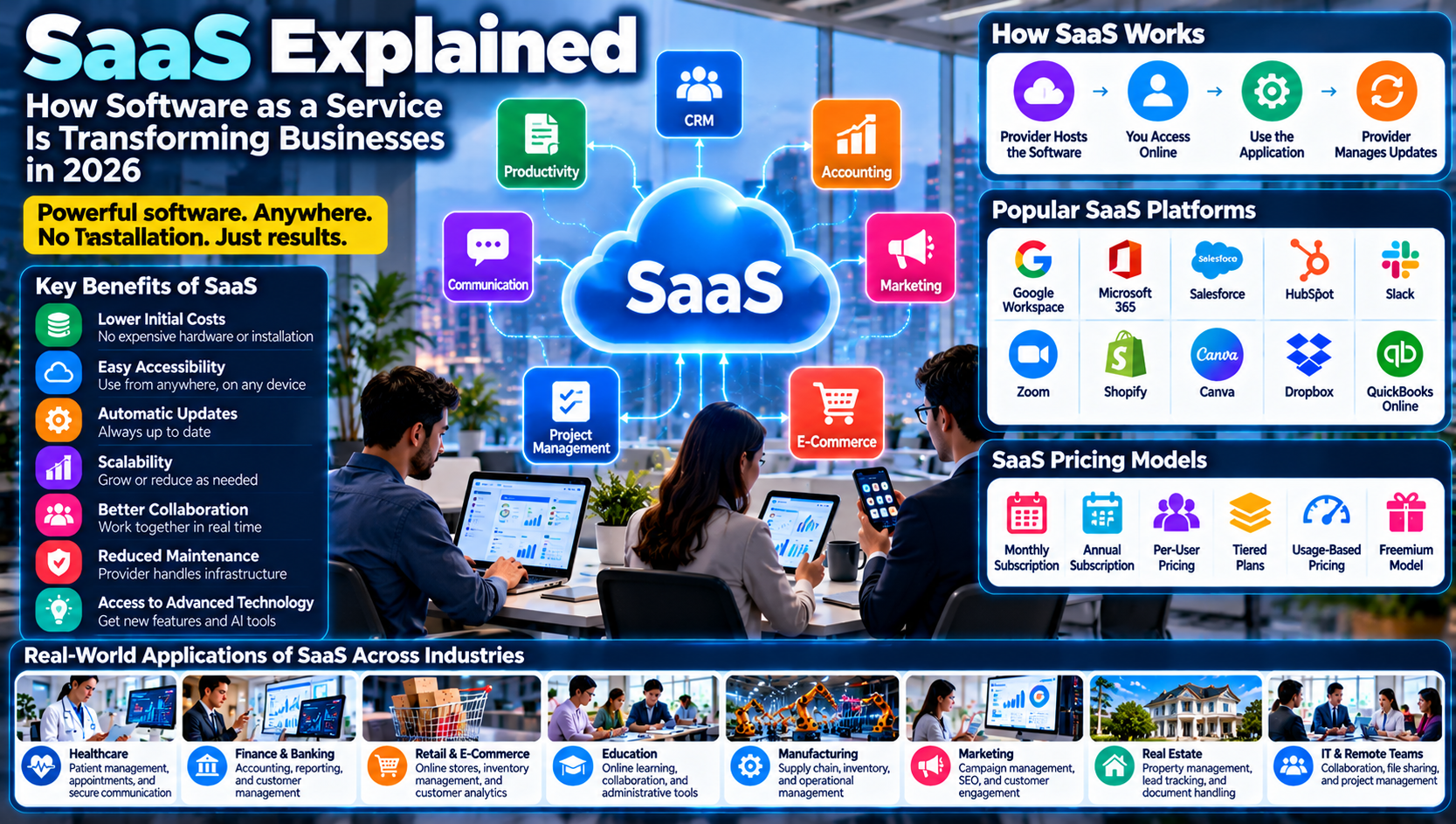
Common examples of SaaS applications include:
Google Workspace
Microsoft 365
Salesforce
Slack
Zoom
Dropbox
Canva
Shopify
HubSpot
QuickBooks Online
In simple terms, SaaS allows businesses and individuals to use software through an online service instead of managing the entire software infrastructure themselves.
How Does SaaS Work?
SaaS operates through cloud infrastructure, hosted applications, internet connectivity, and user authentication.
Although different providers use different architectures, the general process is straightforward.
1. Software Is Hosted by a Provider
The SaaS provider develops or maintains an application and deploys it on its own infrastructure or through a cloud hosting provider.
The infrastructure may include servers, databases, storage systems, and networking services.
2. Users Access the Application Online
Customers access the application through a web browser, desktop application, or mobile application.
They usually need an internet connection and valid account credentials.
3. User Information Is Processed
When a user performs an action, such as creating a document or updating a customer record, the application processes the request.
Depending on the product architecture, information may be stored in cloud databases or other managed storage systems.
4. The Provider Maintains the Software
The provider generally manages software updates, infrastructure maintenance, and application improvements.
Customers do not normally need to install every update manually.
5. Users Collaborate and Access Services
Many SaaS applications support multiple users, shared workspaces, collaboration, and access from different devices.
For example, employees can work on the same online document from different locations.
6. Customers Pay According to the Subscription or Pricing Model
Many SaaS companies charge monthly or annual subscription fees.
Other pricing approaches include usage-based billing, per-user pricing, and tiered plans.
The basic SaaS process:
Software Hosted by Provider → User Account Creation → Online Access → Application Usage → Cloud Data Processing → Provider Maintenance and Updates
Main Characteristics of SaaS
SaaS applications share several characteristics that distinguish them from traditional software delivery models.
1. Internet-Based Access
Users can access SaaS applications through supported browsers or applications without maintaining the underlying infrastructure.
2. Subscription-Based Pricing
Many SaaS providers charge recurring fees instead of requiring a large upfront software purchase.
However, some services also offer free plans, one-time charges, or usage-based pricing.
3. Automatic Updates
The provider generally manages application updates and infrastructure maintenance.
This reduces the need for customers to install updates manually.
4. Centralized Infrastructure
The provider operates the application using its own infrastructure or cloud services.
Customers access the software without managing the complete backend environment.
5. Scalability
Businesses can often increase or decrease the number of users, storage capacity, or service level according to their requirements.
6. Multi-Device Accessibility
Many SaaS platforms support access through computers, tablets, and smartphones.
7. Shared or Multi-Tenant Architecture
Many SaaS products use multi-tenant architecture, in which a shared application environment serves multiple customers while maintaining logical separation of customer data.
Not every SaaS product uses the same architecture.
Types of SaaS Applications
SaaS covers many software categories. Businesses can select applications according to their operational requirements.
1. Customer Relationship Management (CRM) SaaS
CRM platforms help organizations manage customer relationships, sales activities, leads, and communication.
Examples include:
Salesforce
HubSpot
Zoho CRM
These platforms can help sales teams track opportunities, manage customer information, and organize follow-ups.
2. Enterprise Resource Planning (ERP) SaaS
ERP applications help businesses manage different operational functions through integrated software.
Common functions include:
Finance
Accounting
Procurement
Inventory
Human resources
Supply chain management
Examples include SAP Cloud ERP and Oracle Fusion Cloud ERP.
3. Communication and Collaboration SaaS
These applications support messaging, meetings, document sharing, and remote teamwork.
Examples include:
Slack
Zoom
Microsoft Teams
Google Workspace
4. Accounting and Financial SaaS
Accounting platforms help businesses manage financial records, invoices, expenses, and reports.
Examples include:
QuickBooks Online
Xero
FreshBooks
5. Marketing SaaS
Marketing platforms help organizations manage advertising, email campaigns, customer engagement, and marketing analytics.
Examples include:
Mailchimp
HubSpot
Semrush
Canva
6. Project Management SaaS
Project management platforms help teams plan tasks, assign responsibilities, track deadlines, and monitor project progress.
Examples include:
Asana
Trello
ClickUp
7. E-Commerce SaaS
E-commerce platforms provide software for building online stores, managing products, processing orders, and supporting customer transactions.
Examples include:
Shopify
BigCommerce
Wix
8. Storage and File Management SaaS
These platforms allow users to store, synchronize, share, and manage digital files online.
Examples include:
Dropbox
Google Drive
Microsoft OneDrive
SaaS vs. Traditional Software
SaaS and traditional software both provide applications for business and personal use, but they differ in how the software is delivered, maintained, and accessed.
Feature | SaaS | Traditional Software |
|---|---|---|
Installation | Usually accessed online | Often installed locally |
Infrastructure | Managed largely by provider | May be managed by customer |
Pricing | Often subscription-based | Often license or purchase-based |
Updates | Usually provider-managed | May require manual updates |
Accessibility | Multiple supported devices | Often tied to installed systems |
Maintenance | Provider manages much of the platform | Customer may manage more maintenance |
Scalability | Often flexible | May require additional installations or infrastructure |
Internet Requirement | Usually needed for full service | Some applications work offline |
SaaS is not automatically better than traditional software. The right option depends on performance requirements, security, customization, connectivity, cost, and business operations.
SaaS vs. PaaS vs. IaaS
SaaS is one of the three commonly discussed cloud service models.
The other two are Platform as a Service (PaaS) and Infrastructure as a Service (IaaS).
1. Software as a Service (SaaS)
SaaS provides ready-to-use software applications over the internet.
Customers primarily use the application rather than managing its underlying infrastructure.
Examples include Google Workspace, Salesforce, and Microsoft 365.
2. Platform as a Service (PaaS)
PaaS provides a platform and development environment that allows developers to build, test, and deploy applications without managing all the underlying infrastructure.
Examples include Google App Engine and Azure App Service.
3. Infrastructure as a Service (IaaS)
IaaS provides computing infrastructure such as virtual machines, networking, and storage.
Customers have greater responsibility for configuring operating systems, applications, and other software components.
Examples include Amazon EC2 and Azure Virtual Machines.
Comparison of SaaS, PaaS, and IaaS
Feature | SaaS | PaaS | IaaS |
|---|---|---|---|
Main Purpose | Ready-to-use software | Application development platform | Computing infrastructure |
Primary Users | Businesses and end users | Developers | IT teams and system administrators |
Infrastructure Management | Provider | Provider manages underlying platform | Provider manages physical infrastructure |
Customer Responsibility | Application usage and configuration | Application development and deployment | Operating systems and deployed software |
Example | Salesforce | Azure App Service | Amazon EC2 |
The main difference is the level of control and responsibility given to the customer.
Benefits of Software as a Service
SaaS provides several advantages that make it attractive to businesses of different sizes.
1. Lower Initial Investment
Businesses can often begin using SaaS without purchasing expensive servers or building their own software infrastructure.
Subscription pricing can make advanced applications more accessible.
However, long-term subscription costs should still be evaluated.
2. Easy Accessibility
Employees can access supported applications from different locations and devices.
This is especially useful for remote and hybrid teams.
3. Automatic Software Updates
SaaS providers generally manage application updates and improvements.
Businesses can use supported features without managing every software release themselves.
4. Scalability and Flexibility
Organizations can often adjust subscription plans, user numbers, or service capacity as their needs change.
5. Faster Deployment
Businesses can often start using SaaS applications more quickly than deploying complex software infrastructure internally.
6. Reduced Maintenance Responsibilities
The provider manages much of the underlying infrastructure, hosting, and application maintenance.
This can reduce the burden on internal IT teams.
7. Improved Collaboration
Many SaaS platforms support shared documents, communication, task management, and collaboration across different locations.
8. Integration With Other Applications
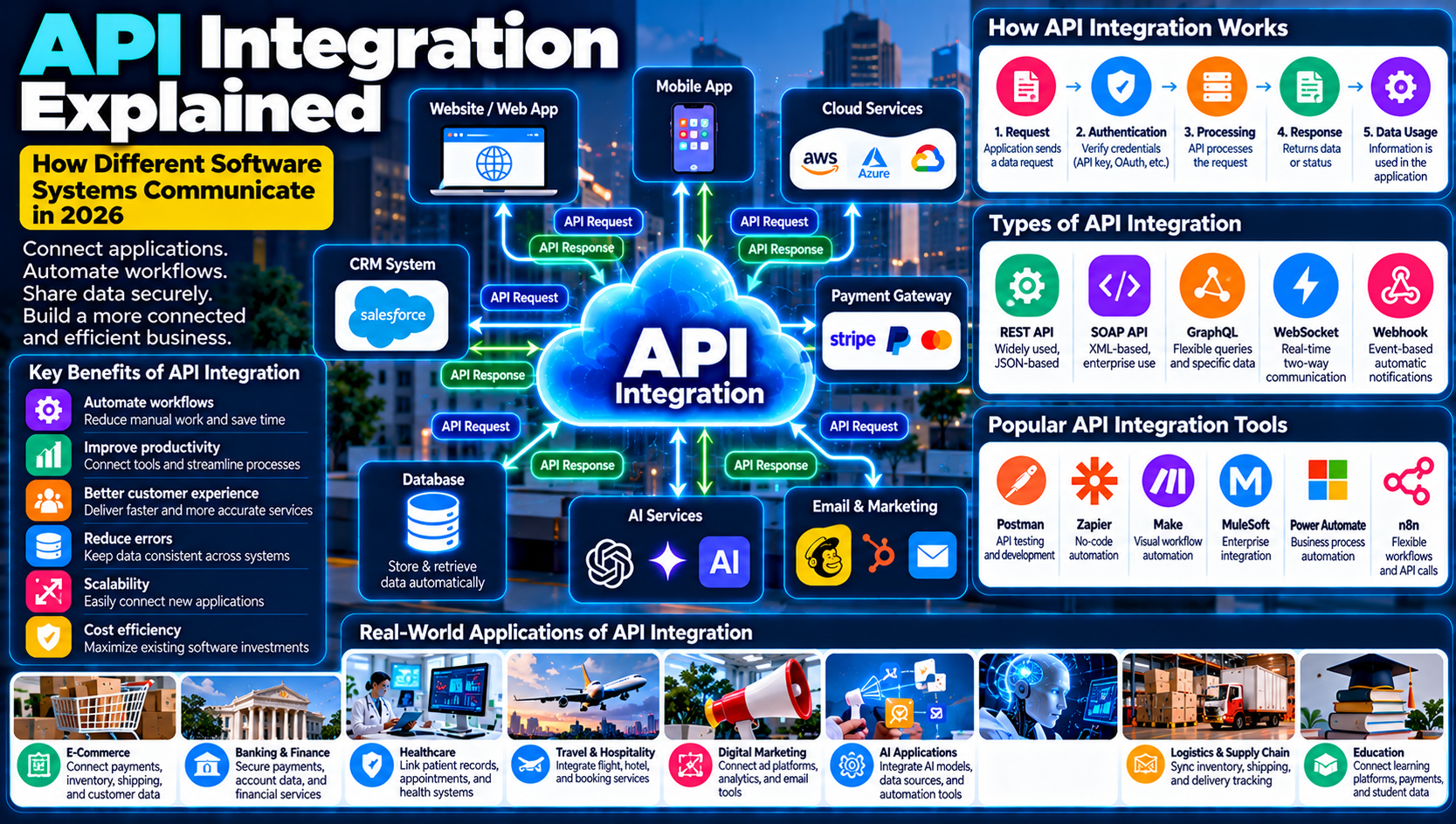
Many SaaS platforms offer APIs, connectors, and integrations that allow businesses to connect different tools.
For example, a CRM platform may integrate with email marketing software and accounting applications.
9. Business Continuity Support
Some providers offer backup, redundancy, and disaster recovery capabilities.
However, customers should understand the provider's actual service commitments and maintain their own recovery plans where necessary.
10. Access to Advanced Technology
SaaS can give businesses access to advanced features such as AI-powered analytics, automation, and collaboration tools without developing everything internally.
Challenges and Disadvantages of SaaS
Despite its advantages, SaaS also introduces risks and limitations that businesses should understand.
1. Internet Dependency
Many SaaS applications require an internet connection.
Poor connectivity can affect access and productivity.
Some platforms provide offline features, but these are not always available or complete.
2. Data Security and Privacy Concerns
SaaS applications may process and store sensitive business and customer information.
Organizations need to understand how providers secure, access, store, and process this information.
Strong authentication, access controls, encryption, and vendor assessments are important.
3. Limited Customization
Some SaaS products provide fewer customization options than software built specifically for an organization.
This can create limitations for businesses with complex requirements.
4. Subscription Costs
Monthly or annual subscriptions can become expensive as organizations add users, storage, integrations, and premium features.
Businesses should calculate total ownership costs over time.
5. Vendor Lock-In
Moving from one SaaS provider to another can be difficult if data formats, integrations, or workflows are not easily transferable.
Organizations should review data export options and migration requirements before committing to a platform.
6. Service Outages
If a provider experiences a service disruption, customers may temporarily lose access to important applications.
Businesses should review service availability commitments and prepare alternative operating procedures for critical activities.
7. Compliance Challenges
Organizations must ensure that SaaS services support their applicable legal, privacy, and industry requirements.
Using a recognized cloud provider does not automatically make a business compliant.
8. Less Control Over Infrastructure
Customers generally have limited control over the provider's underlying infrastructure and software release schedule.
This may be a concern for organizations with specialized operational requirements.
Popular SaaS Platforms and Examples in 2026
The SaaS market includes platforms for communication, accounting, marketing, project management, design, sales, and many other business functions.
SaaS Platform | Main Category | Primary Use |
|---|---|---|
Google Workspace | Productivity | Email, documents, and collaboration |
Microsoft 365 | Productivity | Office applications and cloud collaboration |
Salesforce | CRM | Customer and sales management |
HubSpot | CRM and Marketing | Marketing, sales, and customer service |
Slack | Communication | Team messaging and collaboration |
Zoom | Communication | Online meetings and video conferencing |
Shopify | E-Commerce | Online store management |
Canva | Design | Graphic design and visual content |
Dropbox | File Management | Online file storage and sharing |
QuickBooks Online | Accounting | Financial management |
Asana | Project Management | Task and project organization |
Semrush | Marketing | SEO and digital marketing analysis |
1. Google Workspace
<Entity value="Google Workspace" category="software" disambig="Cloud-based productivity and collaboration software"/> provides business email, document editing, cloud storage, calendars, and collaboration tools.
It allows teams to work together through online applications.
2. Microsoft 365
<Entity value="Microsoft 365" category="software" disambig="Subscription-based productivity and collaboration software"/> offers productivity applications, cloud services, email, file management, and collaboration features.
3. Salesforce
<Entity value="Salesforce" category="software" disambig="Customer relationship management and enterprise cloud software"/> provides CRM and business applications that help organizations manage customer relationships, sales, and service operations.
4. HubSpot
<Entity value="HubSpot" category="software" disambig="CRM, marketing, sales, and customer service software"/> offers tools for marketing automation, customer management, sales operations, and customer support.
5. Shopify
<Entity value="Shopify" category="software" disambig="E-commerce platform for online stores"/> helps businesses build online stores, manage products, process orders, and operate e-commerce businesses.
6. Canva
<Entity value="Canva" category="software" disambig="Online graphic design and visual content platform"/> provides browser-based design tools for presentations, social media graphics, marketing materials, and other visual content.
The best SaaS platform depends on the organization's budget, size, workflow requirements, integrations, security needs, and expected growth.
How Businesses Use SaaS Across Different Industries
SaaS applications are used in almost every industry because organizations need flexible software for managing information and daily operations.
1. Healthcare
Healthcare organizations use SaaS platforms for administrative operations, scheduling, communication, billing, and selected healthcare information systems.
Applications may include:
Appointment management
Patient administration
Billing systems
Secure communication
Document management
Healthcare analytics
Healthcare providers must evaluate privacy, data protection, security, and regulatory requirements before selecting a platform.
2. Banking and Financial Services
Financial institutions use cloud-based software for customer relationship management, accounting, workflow management, communication, and analytics.
Potential applications include:
Customer service management
Financial reporting
Risk management support
Internal collaboration
Business intelligence
Sensitive financial information requires appropriate security and compliance controls.
3. Retail and E-Commerce
Retailers use SaaS platforms to manage online stores, customer relationships, marketing campaigns, and inventory-related workflows.
Examples include:
Online store management
Payment integration
Customer analytics
Email marketing
Order management
Customer support
4. Education
Educational institutions use SaaS applications to support online learning, communication, administration, and collaboration.
Examples include learning management systems, virtual classrooms, online assessments, and student information platforms.
5. Manufacturing
Manufacturers use SaaS platforms for enterprise resource planning, inventory management, procurement, reporting, and supply chain coordination.
These systems can improve visibility across business operations.
6. Marketing and Advertising
Marketing agencies use SaaS tools for SEO research, social media management, email campaigns, customer analytics, and project coordination.
For example, an agency can use marketing software to manage campaigns and measure performance across multiple channels.
7. Human Resources
HR teams use SaaS platforms for recruitment, payroll administration, employee records, leave management, and performance tracking.
8. Real Estate
Real estate businesses use SaaS platforms for property management, customer communication, document handling, lead management, and transaction administration.
SaaS Pricing Models Explained
SaaS companies use different pricing models depending on their products and customer requirements.
Understanding these models helps businesses select appropriate software without unnecessary expenses.
1. Monthly Subscription
Customers pay a recurring fee every month to access the service.
This approach offers flexibility but may cost more over longer periods compared with discounted annual plans.
2. Annual Subscription
Customers pay for a full year of service, often at a lower effective monthly price.
This can be suitable for businesses with stable software requirements.
3. Per-User Pricing
The subscription cost depends on the number of users.
For example, a company may pay a fixed amount for each employee who needs access.
4. Tiered Pricing
Providers offer different subscription levels with different features, limits, and support options.
Common tiers include:
Free
Starter
Professional
Business
Enterprise
5. Usage-Based Pricing
Customers pay according to the amount of service they consume.
Pricing may depend on storage, API requests, transactions, computing time, or other usage measurements.
6. Freemium Model
A provider offers basic features for free while charging for advanced functionality, additional capacity, or premium support.
SaaS Pricing Comparison
Pricing Model | How It Works | Suitable For |
|---|---|---|
Monthly | Recurring monthly payment | Small teams and flexible use |
Annual | Payment for a full year | Long-term customers |
Per User | Charged for each account | Team-based applications |
Tiered | Different feature packages | Businesses of different sizes |
Usage-Based | Based on consumption | Variable workloads |
Freemium | Basic free access with paid upgrades | Individuals and startups |
Businesses should compare the full cost, including implementation, integrations, training, additional users, storage, and support.
SaaS and Artificial Intelligence: How They Work Together
Artificial intelligence is becoming an important part of many SaaS products.
Instead of building AI infrastructure internally, businesses can access AI-powered features through cloud software applications.
This combination is sometimes described as AI-powered SaaS.
Common AI-Powered SaaS Applications
Customer Support: AI assistants can help classify customer requests and suggest responses.
Marketing Automation: AI can assist with campaign analysis, audience segmentation, and content workflows.
Business Analytics: AI-powered tools can identify patterns and help users understand business performance.
Document Processing: AI can extract information from documents and assist with data entry.
Sales Forecasting: Machine learning tools can analyze historical information and support sales predictions.
Productivity: AI features can help users summarize information, organize tasks, and draft documents.
Benefits of AI-Powered SaaS
Improved productivity
Faster information analysis
Automated routine tasks
Better customer support
More personalized experiences
Easier access to advanced AI features
However, businesses should evaluate AI accuracy, privacy, security, data retention, and human oversight before relying on AI-generated results.
How to Choose the Right SaaS Platform for Your Business
Selecting the right SaaS platform requires more than comparing subscription prices.
Businesses should evaluate whether a product fits their operational requirements and long-term objectives.
Step 1: Identify Your Business Needs
Determine what problem the software should solve.
For example, a company may need customer management software, accounting tools, or project management applications.
Step 2: Set a Realistic Budget
Consider subscription fees, additional users, implementation costs, training, integrations, and future upgrades.
Step 3: Evaluate Essential Features
Compare the functionality offered by different providers.
Avoid paying for advanced features your business does not need.
Step 4: Check Security and Privacy
Review authentication options, encryption, data handling policies, backup arrangements, and security documentation.
Step 5: Review Integrations
Check whether the platform connects with your existing business systems.
Step 6: Test the Platform
Use a free trial or demonstration where available.
Test common workflows before committing to a long-term subscription.
Step 7: Understand Customer Support
Evaluate support availability, documentation, service commitments, and escalation procedures.
Step 8: Review Data Portability
Understand how you can export your information and migrate it if you decide to change providers.
Step 9: Start With a Pilot
Test the application with a small team before introducing it across the entire organization.
Step 10: Monitor Performance
Review user adoption, productivity improvements, costs, reliability, and customer feedback.
How to Implement SaaS in a Business
Successful SaaS adoption requires planning, employee training, security controls, and proper integration.
Businesses can follow these steps.
1. Assess Existing Software
Review the applications currently used by the organization and identify unnecessary duplication or outdated systems.
2. Define Implementation Goals
Set clear objectives, such as improving collaboration, reducing administrative work, or managing customer relationships more effectively.
3. Select a Suitable Provider
Choose a provider that meets the company's functional, security, compliance, and budget requirements.
4. Plan Data Migration
Determine what information needs to be transferred from existing systems.
Check data formats, compatibility, backup requirements, and migration risks.
5. Configure User Access
Create accounts, assign roles, and establish permissions based on employee responsibilities.
6. Integrate Business Applications
Connect the new platform with relevant systems using supported integrations or APIs.
7. Train Employees
Provide instructions and practical training so employees understand how to use the application effectively.
8. Test the System
Verify that important workflows, data access, notifications, and integrations operate correctly.
9. Monitor Usage and Costs
Track user adoption, service reliability, subscription expenses, and business outcomes.
10. Review and Improve
Regularly assess whether the platform continues to meet business needs.
SaaS Security and Data Privacy
SaaS applications often process important business and customer information.
Although providers generally manage much of the underlying infrastructure, customers still have responsibilities for protecting their accounts, data, and configurations.
Common SaaS Security Risks
Weak passwords
Compromised employee accounts
Unauthorized application access
Misconfigured sharing permissions
Insecure integrations
Third-party vendor exposure
Data leakage
Phishing attacks
Unprotected API connections
SaaS Security Best Practices
1. Enable Multi-Factor Authentication: Require additional verification for important accounts.
2. Use Role-Based Access Controls: Give employees only the permissions needed for their responsibilities.
3. Review Sharing Settings: Prevent unnecessary public access to documents and sensitive records.
4. Encrypt Sensitive Information: Understand the provider's encryption capabilities and key management options.
5. Monitor Account Activity: Review suspicious logins, unusual access patterns, and unexpected data transfers.
6. Secure Integrations: Review connected applications and restrict unnecessary permissions.
7. Train Employees: Teach employees to recognize phishing attempts and follow secure account practices.
8. Review Vendor Policies: Understand how the provider handles customer information, backups, data retention, and security incidents.
9. Maintain Recovery Plans: Prepare for service disruptions, accidental deletion, and other incidents.
10. Review Compliance Requirements: Confirm that the service supports the organization's applicable privacy and industry obligations.
Remember that using a reputable SaaS provider does not automatically make a business secure or legally compliant.
What Is the Future of SaaS in 2026 and Beyond?
SaaS continues to evolve as businesses adopt artificial intelligence, automation, cloud computing, and digital collaboration.
Several developments are shaping the future of this software model.
1. AI-Powered SaaS
More applications are incorporating AI features to support analytics, content generation, automation, and customer service.
2. Automation and Workflow Integration
SaaS platforms are increasingly connecting different business applications to automate workflows.
For example, a customer purchase may trigger updates across inventory, accounting, and customer management systems.
3. Vertical SaaS
Vertical SaaS refers to software designed for a particular industry.
Examples include specialized applications for healthcare, real estate, education, construction, and financial services.
These platforms often address industry-specific workflows.
4. Industry-Specific AI Solutions
SaaS providers are developing specialized AI features for business functions such as finance, marketing, sales, human resources, and customer support.
5. Low-Code and No-Code Development
Some SaaS platforms allow users to build workflows, forms, and applications with minimal traditional programming.
This can help businesses customize processes more quickly.
6. Stronger Security and Privacy
As SaaS applications manage increasing amounts of business information, providers and customers will need stronger identity controls, encryption, monitoring, and privacy management.
7. Usage-Based and Flexible Pricing
Providers may continue offering pricing models that better reflect actual service consumption.
8. Greater Integration Between Platforms
Businesses increasingly need different applications to communicate with each other.
APIs, connectors, and workflow automation tools will remain important for connecting SaaS ecosystems.
The future of SaaS will involve more intelligent, connected, flexible, and specialized applications.
Frequently Asked Questions About SaaS
1. What does SaaS stand for?
SaaS stands for Software as a Service. It is a software delivery model that allows users to access applications over the internet without managing the underlying infrastructure.
2. How does SaaS work?
A SaaS provider hosts and maintains software on its infrastructure. Customers access the application through a browser or supported application, usually using an account or subscription.
3. What are examples of SaaS?
Examples include Google Workspace, Microsoft 365, Salesforce, HubSpot, Slack, Zoom, Shopify, Canva, Dropbox, and QuickBooks Online.
4. What are the main benefits of SaaS?
SaaS can provide easier access, lower initial infrastructure costs, automatic updates, scalability, reduced maintenance responsibilities, and improved collaboration.
5. What are the disadvantages of SaaS?
Common disadvantages include internet dependency, subscription costs, limited customization, data security concerns, vendor lock-in, and service outages.
6. What is the difference between SaaS and cloud computing?
Cloud computing is a broader model that provides computing resources over networks. SaaS is a specific cloud service model that delivers ready-to-use software applications.
7. What is the difference between SaaS, PaaS, and IaaS?
SaaS provides ready-to-use software, PaaS provides a development platform, and IaaS provides computing infrastructure such as virtual machines and storage.
8. Is SaaS suitable for small businesses?
Yes. SaaS can help small businesses access professional software without building and maintaining extensive IT infrastructure. The platform should be selected according to actual requirements and budget.
9. Is SaaS secure?
SaaS can be secure when providers and customers apply appropriate security practices. Businesses should evaluate authentication, encryption, access controls, data handling, and vendor security arrangements.
10. What is the future of SaaS?
The future of SaaS will be influenced by artificial intelligence, workflow automation, vertical software, low-code development, improved integrations, and stronger security capabilities.
Conclusion
Software as a Service has transformed how individuals and organizations access and use software.
By delivering applications through the internet, SaaS allows businesses to use professional tools without managing all the underlying infrastructure themselves.
From customer relationship management and accounting to communication, marketing, e-commerce, and project management, SaaS platforms support important business operations across industries.
However, successful adoption requires careful evaluation of subscription costs, data security, privacy, integrations, vendor reliability, and long-term requirements.
As artificial intelligence and automation become more integrated into cloud applications, SaaS will continue to play an important role in modern business technology.
For organizations planning their digital transformation, understanding SaaS is an important step toward building flexible, efficient, and scalable operations.