Modern technology generates enormous amounts of data every second. Smartphones, smart cameras, industrial machines, connected vehicles, healthcare devices, and Internet of Things (IoT) systems continuously collect and exchange information.
Traditionally, much of this information was sent to centralized cloud servers or data centers for processing. However, sending every piece of data to a distant server can introduce delays, consume network bandwidth, and create connectivity challenges.
This is where edge computing becomes important.
Edge computing is a technology approach that processes data closer to the devices and locations where it is generated rather than sending everything to a centralized cloud environment.
This can help businesses reduce processing delays, improve responsiveness, manage network traffic, and support applications that require real-time decisions.
In 2026, edge computing is becoming increasingly relevant as organizations adopt connected devices, artificial intelligence, smart infrastructure, autonomous systems, and industrial automation.
From smart factories and healthcare monitoring to connected vehicles and retail operations, edge computing is changing how digital systems process information.
This comprehensive guide explains what edge computing is, how it works, its architecture, benefits, challenges, tools, and real-world applications.
What Is Edge Computing?
Edge computing is a distributed computing approach that processes data near the location where it is created, such as on a connected device, local server, gateway, or nearby edge data center.
Instead of transferring all information to a centralized cloud platform, edge systems can analyze and process selected data locally.
For example, consider a security camera installed in a business building.
In a traditional cloud-based setup, video footage may be transmitted to a remote server for analysis. With edge computing, the camera or a nearby processing device can analyze video locally and identify movement before sending relevant alerts or selected information to another system.
This reduces the need to transfer every video frame to a distant server.
Simple Example of Edge Computing
Imagine a manufacturing company operating hundreds of machines.
Each machine contains sensors that measure temperature, vibration, pressure, and performance.
Without local processing, all sensor information might need to travel to a central cloud system before any analysis occurs.
With edge computing:
Sensors collect information from machines.
A nearby edge device processes the information.
The system identifies unusual operating conditions.
An alert is generated when a potential problem is detected.
Relevant information is sent to a central platform for further analysis.
This allows the factory to respond more quickly to certain equipment problems.
In simple terms, edge computing brings computing power closer to the source of data.
How Does Edge Computing Work?
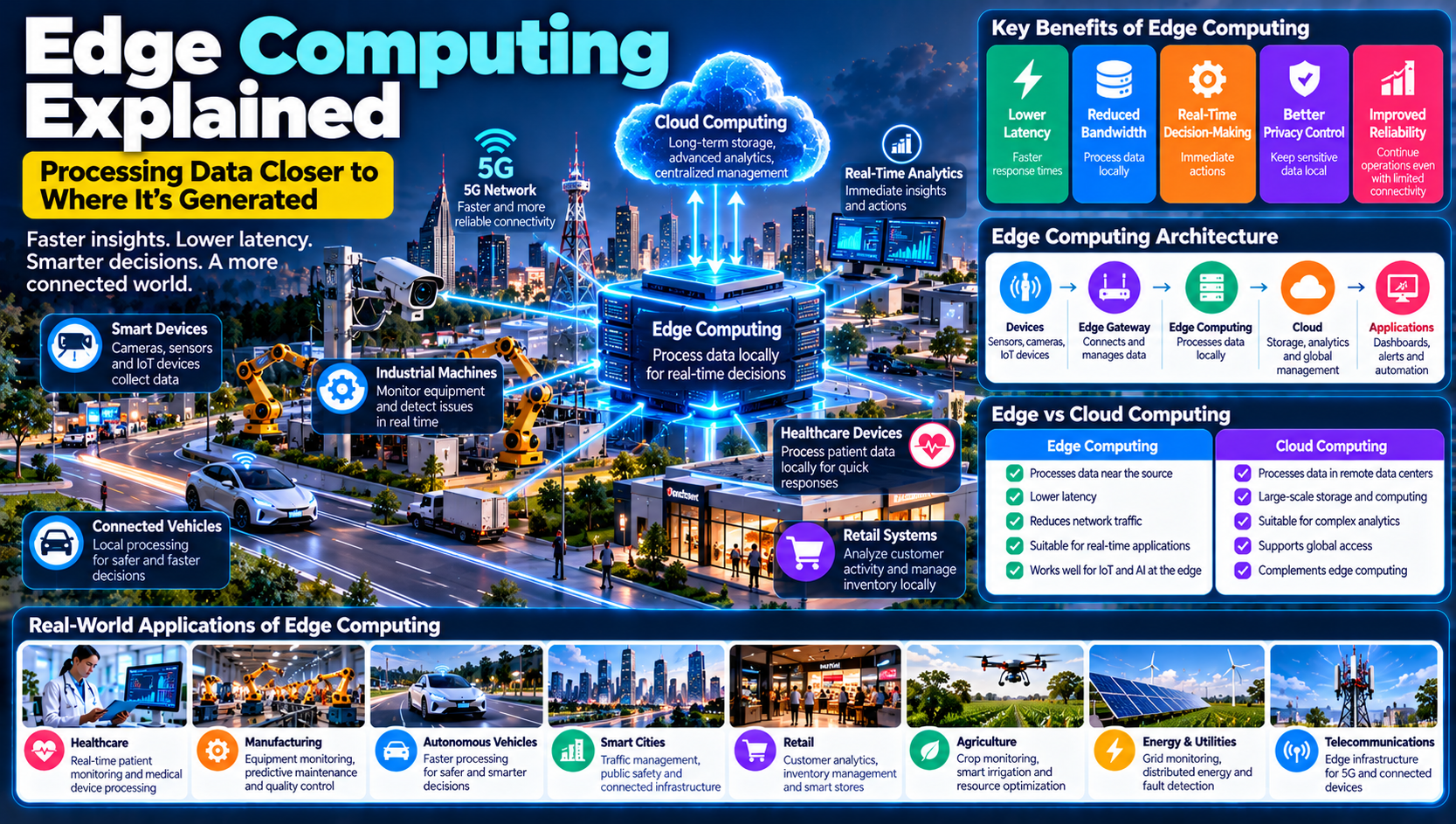
Edge computing works by distributing processing tasks across devices, local gateways, edge servers, and cloud infrastructure.
The exact architecture depends on the application, but most systems follow a similar process.
1. Data Collection
Connected devices collect information through sensors, cameras, applications, and other data sources.
Examples include:
Temperature sensors
Smart cameras
Industrial machines
Connected vehicles
Medical monitoring devices
Smartphones
Retail equipment
2. Local Data Transmission
The collected information is transmitted to a nearby processing device or edge gateway.
Connectivity may use Wi-Fi, Ethernet, Bluetooth, cellular networks, or industrial communication technologies.
3. Edge Processing
The edge device processes information locally.
It may filter unnecessary data, perform calculations, analyze sensor readings, or run an AI model.
4. Immediate Response
If the system identifies a condition requiring action, it can trigger a response.
For example, an industrial system may generate an alert when equipment temperature exceeds a configured threshold.
5. Cloud Communication
Important information can be sent to a central cloud platform for long-term storage, advanced analytics, reporting, or coordination across multiple locations.
6. Continuous Monitoring
The edge system continues collecting and processing information as conditions change.
The basic edge computing process:
Data Collection → Local Processing → Data Analysis → Immediate Response → Cloud Synchronization → Continuous Monitoring
What Is Edge Computing Architecture?
Edge computing architecture describes how devices, networks, local processing systems, and cloud platforms work together.
Unlike a traditional centralized architecture, edge computing distributes processing across multiple locations.
A typical architecture contains several layers.
1. Edge Devices Layer
This is where data is generated.
Edge devices can include cameras, sensors, smartphones, industrial machines, smart meters, and connected vehicles.
2. Edge Gateway Layer
An edge gateway connects devices to local processing infrastructure and networks.
It can collect information from multiple devices, filter data, translate communication protocols, and forward information to nearby systems.
3. Edge Computing Layer
This layer contains the computing resources that process information close to its source.
It may include:
Local servers
Industrial computers
Edge gateways with processing capabilities
Embedded systems
AI-enabled devices
4. Cloud or Central Data Center Layer
The cloud or central data center handles tasks that benefit from centralized processing.
These may include long-term data storage, large-scale analytics, model training, centralized management, and coordination across locations.
5. Application Layer
Applications use processed information to provide services, dashboards, alerts, automation, and business insights.
Edge Computing Architecture Example
Layer | Function | Example |
|---|---|---|
Device Layer | Generates data | Industrial sensor |
Gateway Layer | Connects devices | Edge gateway |
Edge Layer | Processes data locally | Local server |
Cloud Layer | Stores and analyzes information | Cloud platform |
Application Layer | Displays results or actions | Monitoring dashboard |
The main advantage of this architecture is that not every processing task needs to depend on a distant cloud server.
Edge Computing vs. Cloud Computing
Edge computing and cloud computing are closely related, but they process information in different locations.
Cloud computing provides computing resources through centralized or distributed data centers accessed over a network.
Edge computing processes selected information closer to where it is generated.
Feature | Edge Computing | Cloud Computing |
|---|---|---|
Processing Location | Near the data source | Remote data centers |
Response Time | Can be very low | Depends on network and service conditions |
Internet Dependency | Some tasks can operate locally | Usually requires network access |
Data Transfer | Can reduce unnecessary transfers | Often transfers data to cloud services |
Storage | Often limited at the edge | Can provide large-scale storage |
Best Applications | Real-time monitoring and local automation | Large-scale analytics and centralized services |
Scalability | Distributed across edge locations | Scalable centralized infrastructure |
Does Edge Computing Replace Cloud Computing?
No. Edge computing is generally designed to complement cloud computing rather than replace it.
Edge systems handle tasks that benefit from local processing, while cloud platforms provide centralized storage, management, and large-scale computing resources.
For example, a smart factory may use edge computers to detect equipment problems immediately while sending historical information to the cloud for long-term performance analysis.
Combining both approaches can provide a flexible computing environment.
Edge Computing vs. Fog Computing
Edge computing and fog computing are related concepts, but they are not identical.
Edge computing generally refers to processing information close to the device that generates it.
Fog computing extends processing across intermediate network layers between edge devices and centralized cloud infrastructure.
Feature | Edge Computing | Fog Computing |
|---|---|---|
Processing Location | At or very near the data source | Intermediate network layer |
Main Purpose | Local data processing | Distributed processing across network layers |
Infrastructure | Devices, gateways, local servers | Gateways, routers, local servers |
Example | Smart camera analyzing video locally | Multiple cameras sending data to a nearby regional processing system |
Both approaches aim to reduce unnecessary communication with distant centralized systems.
Types of Edge Computing
Edge computing can be implemented in different ways depending on the processing location, infrastructure, and application requirements.
1. Device Edge Computing
Processing takes place directly on the device that generates information.
Examples include smart cameras that recognize objects locally and smartphones that perform AI-based image processing.
2. Gateway Edge Computing
A gateway collects data from several connected devices and performs local processing.
This approach is useful in industrial facilities, smart buildings, and IoT environments.
3. On-Premises Edge Computing
Organizations deploy local servers or computing infrastructure within their own facilities.
This is common in manufacturing, healthcare, and businesses that require local control over information processing.
4. Network Edge Computing
Processing resources are placed close to network infrastructure, such as telecommunications facilities or nearby data centers.
This can support applications requiring responsive communication and distributed computing.
5. Cloud-Connected Edge Computing
Local edge infrastructure works together with cloud platforms.
Selected information is processed locally, while other information is transferred to the cloud for storage, analytics, and centralized management.
Benefits of Edge Computing
Edge computing offers several advantages for organizations that need faster processing, reliable operations, and efficient data management.
1. Lower Latency
Latency refers to the delay between sending information and receiving a response.
Processing data near its source can reduce communication delays caused by sending information to distant data centers.
This is useful for applications such as industrial control, connected vehicles, and real-time monitoring.
2. Faster Decision-Making
Edge systems can analyze information locally and respond without waiting for every processing task to complete in the cloud.
For example, a smart machine may detect an abnormal condition and trigger an immediate warning.
3. Reduced Network Bandwidth Usage
Not all collected information needs to be transferred to a central server.
Edge systems can filter, summarize, or process data locally before sending relevant results to the cloud.
This can reduce network traffic and communication costs.
4. Improved Reliability
Some edge applications can continue performing selected local functions when internet connectivity becomes unavailable.
This is particularly useful in remote facilities and industrial environments.
However, the level of independence depends on system design and whether required services are available locally.
5. Better Data Privacy Control
Processing sensitive information locally can reduce the need to transfer raw data across networks.
For example, a healthcare facility may process certain information within its own infrastructure.
However, local processing does not automatically guarantee privacy. Proper access controls, encryption, retention policies, and security management are still required.
6. Support for Artificial Intelligence
Edge computing allows AI models to run closer to the devices generating information.
This supports applications such as object recognition, predictive maintenance, and intelligent monitoring.
7. Scalability Across Locations
Businesses can deploy edge infrastructure at different facilities, branches, stores, and industrial locations.
This allows computing resources to be distributed according to operational needs.
8. Improved User Experience
Applications that require quick responses can benefit from local processing.
Examples include interactive systems, connected devices, smart cameras, and responsive digital services.
Challenges and Limitations of Edge Computing
Despite its advantages, edge computing introduces technical, operational, and security challenges.
1. Security Risks
Distributed infrastructure creates more locations that organizations must protect.
Each edge device, gateway, and local server may introduce a potential security weakness.
Businesses should use strong authentication, encryption, secure configuration, regular updates, and network monitoring.
2. Infrastructure Costs
Deploying edge infrastructure may require investment in local servers, gateways, sensors, software, connectivity, and maintenance.
Organizations should evaluate whether the benefits justify the additional infrastructure.
3. Device Management Complexity
Managing hundreds or thousands of edge devices across different locations can become difficult.
Businesses need centralized monitoring, configuration management, software updates, and device inventory systems.
4. Limited Computing Resources
Many edge devices have less processing power, storage, and memory than centralized cloud systems.
This means some advanced workloads may still need to run in the cloud or a larger local server environment.
5. Data Synchronization
When information is processed locally, systems must coordinate data with central platforms.
Poor synchronization can create outdated or inconsistent records.
6. Network Connectivity Problems
Although edge computing can reduce dependence on constant cloud communication, devices may still need networks for synchronization, management, and remote monitoring.
Unreliable connectivity can affect these operations.
7. Privacy and Compliance Requirements
Organizations must ensure that local data processing follows applicable privacy, security, and industry requirements.
Keeping information near its source does not automatically make a system legally compliant.
8. Maintenance and Technical Expertise
Edge infrastructure requires installation, monitoring, troubleshooting, and maintenance.
Businesses may need skilled professionals to manage distributed systems.
Real-World Applications of Edge Computing
Edge computing is being used across industries where fast processing, local decision-making, and efficient data communication are important.
1. Healthcare
Healthcare devices generate information that may need to be processed quickly.
Edge computing can support:
Medical device monitoring
Connected patient monitoring systems
Medical imaging workflows
Hospital equipment monitoring
Local analysis of sensor information
For example, a connected monitoring device may process selected sensor readings locally and generate an alert when a configured threshold is reached.
Healthcare applications must follow appropriate clinical, safety, privacy, and regulatory requirements.
2. Manufacturing and Industrial Automation
Factories use sensors, machines, robotics, and connected production systems that generate continuous data.
Edge computing can help manufacturers:
Monitor equipment performance
Detect abnormal operating conditions
Support predictive maintenance
Analyze production quality
Reduce processing delays
Monitor industrial environments
For example, an edge computer can analyze vibration information from a machine and alert maintenance teams when unusual patterns appear.
3. Autonomous and Connected Vehicles
Connected vehicles generate information from cameras, radar, sensors, and navigation systems.
Many driving-related functions require rapid processing close to the vehicle.
Edge computing can support:
Local sensor processing
Driver assistance systems
Vehicle monitoring
Road condition analysis
Connected transportation infrastructure
Safety-critical vehicle systems require specialized engineering and validation. Edge computing alone does not make a vehicle autonomous or safe.
4. Smart Cities
Smart cities use connected infrastructure to improve transportation, utilities, public services, and environmental monitoring.
Edge computing can support:
Traffic signal management
Smart parking
Public safety monitoring
Environmental sensors
Smart street lighting
Waste management systems
For example, traffic systems may process information from nearby sensors and adjust signal timing according to local traffic conditions.
5. Retail and E-Commerce
Retail businesses use cameras, connected devices, digital payment systems, and inventory technology.
Edge computing can help with:
Local video analytics
Inventory monitoring
Store equipment management
Customer traffic analysis
Point-of-sale processing
Smart shelf monitoring
For example, a retail store may process camera information locally to estimate customer traffic without transferring all video footage to a remote cloud service.
Privacy requirements must be considered when monitoring customers.
6. Telecommunications
Telecommunications providers use edge infrastructure to support applications that need responsive network services.
Potential applications include:
Local content delivery
Connected device services
Real-time communication
Network optimization
Distributed application hosting
Edge infrastructure can also work alongside mobile network technologies such as 5G.
7. Agriculture
Smart farming systems use connected sensors, cameras, drones, and automated equipment.
Edge computing can help farmers process information from:
Soil moisture sensors
Weather monitoring devices
Crop cameras
Irrigation systems
Agricultural machinery
A local system can analyze soil moisture information and activate irrigation according to predefined conditions.
8. Energy and Utilities
Energy providers manage complex infrastructure that includes power equipment, smart meters, and connected monitoring systems.
Edge computing can support:
Equipment monitoring
Local energy management
Smart grid applications
Fault detection
Consumption analysis
Distributed energy systems
9. Banking and Financial Services
Financial institutions may use edge infrastructure for selected local processing tasks, such as branch operations, connected equipment monitoring, and secure transaction environments.
Any financial processing application must meet appropriate security, reliability, and regulatory requirements.
Edge Computing and Artificial Intelligence
Artificial intelligence and edge computing are increasingly being combined to support intelligent applications.
AI models can analyze information, while edge computing provides the infrastructure to run selected models near the devices that generate the data.
This combination is often called Edge AI.
How Edge AI Works
A connected device collects information.
An AI model runs on the device or a nearby edge computer.
The model analyzes the information locally.
The system generates a prediction, classification, or alert.
Selected results may be transferred to a cloud platform.
Examples of Edge AI
Smart cameras identifying objects locally
Industrial equipment detecting unusual vibration
Vehicles analyzing nearby sensor information
Agricultural devices identifying crop conditions
Retail systems analyzing store activity
Benefits of Combining Edge Computing and AI
Faster Responses: AI models can process information locally without always waiting for a remote server.
Reduced Data Transfers: Only selected information may need to be transmitted.
Improved Local Operation: Some AI applications can continue operating when cloud connectivity is limited.
Privacy Opportunities: Certain data can be analyzed locally rather than transferring raw information to centralized systems.
However, Edge AI requires appropriate model design, computing resources, testing, security, and ongoing updates.
Edge Computing and 5G Technology
5G and edge computing are complementary technologies.
5G provides advanced mobile connectivity, while edge computing places processing resources closer to connected devices and users.
Together, they can support applications that require responsive communication and distributed computing.
Examples include:
Connected vehicle services
Smart manufacturing
Remote equipment monitoring
Industrial automation
Augmented and virtual reality applications
Smart city infrastructure
It is important to understand that 5G does not automatically eliminate latency. Actual performance depends on network coverage, configuration, processing location, workload, and application design.
Popular Edge Computing Platforms and Technologies
Businesses use different platforms and technologies to build, manage, and operate edge computing systems.
Platform or Technology | Main Purpose |
|---|---|
AWS IoT Greengrass | Local processing and device interaction with AWS services |
Azure IoT Operations | Edge-oriented industrial data and operations capabilities |
Google Distributed Cloud | Distributed cloud infrastructure, including edge deployments |
NVIDIA Jetson | Edge AI and embedded computing |
Intel Edge Platforms | Edge computing hardware and software technologies |
Raspberry Pi | Prototyping and lightweight edge applications |
Kubernetes | Container orchestration across supported environments |
KubeEdge | Extends Kubernetes capabilities to edge computing environments |
1. AWS IoT Greengrass
AWS IoT Greengrass supports local computing, messaging, and interaction between connected devices and AWS cloud services.
It can help organizations build applications that process information locally.
2. Azure IoT Operations
Microsoft provides edge and industrial IoT capabilities through its Azure ecosystem.
These technologies can support connected industrial environments and data management across edge and cloud systems.
3. Google Distributed Cloud
Google Distributed Cloud provides infrastructure for organizations that need cloud capabilities in distributed environments, including certain edge and local deployments.
4. NVIDIA Jetson
NVIDIA Jetson is a family of computing platforms designed for edge AI and embedded applications.
It can support computer vision, robotics, and intelligent connected devices.
5. Kubernetes and KubeEdge
Kubernetes is used to manage containerized applications.
KubeEdge extends Kubernetes capabilities to edge environments, helping organizations manage applications across cloud and edge infrastructure.
The right platform depends on computing requirements, connectivity, hardware compatibility, security, deployment complexity, and existing business systems.
How Businesses Can Implement Edge Computing
Businesses should begin with a clear operational requirement rather than deploying edge infrastructure without a defined purpose.
The following steps provide a practical implementation approach.
Step 1: Identify the Business Problem
Determine which process needs faster local processing or more reliable operation.
Examples include industrial monitoring, connected cameras, smart retail, and remote equipment management.
Step 2: Evaluate Processing Requirements
Identify which tasks need to happen locally and which can be handled by centralized cloud infrastructure.
Not every application requires edge computing.
Step 3: Select Suitable Edge Hardware
Choose devices, gateways, or local servers based on processing power, memory, storage, environmental conditions, and reliability.
Step 4: Choose Connectivity Technologies
Select appropriate network technologies such as Wi-Fi, Ethernet, cellular connectivity, or industrial networks.
Consider bandwidth, range, reliability, and operating costs.
Step 5: Select an Edge Platform
Choose software that supports application deployment, monitoring, security, device management, and cloud integration.
Step 6: Establish Security Controls
Implement secure device identities, encryption, authentication, access restrictions, software updates, and network segmentation.
Step 7: Build a Pilot Project
Start with a small deployment to test performance, reliability, processing requirements, and business value.
Step 8: Integrate With Cloud Systems
Determine which information needs to be transferred to centralized systems for storage, analytics, reporting, or coordination.
Step 9: Monitor and Maintain Infrastructure
Track device health, software versions, network performance, security events, and processing results.
Step 10: Expand Gradually
Once the pilot demonstrates value, expand the deployment to additional locations or processes.
Edge Computing vs. Fog Computing vs. Cloud Computing
These three computing approaches are related but operate at different levels of a distributed technology environment.
Feature | Edge Computing | Fog Computing | Cloud Computing |
|---|---|---|---|
Processing Location | Near data source | Intermediate network layer | Centralized or distributed data centers |
Main Focus | Local processing | Distributed network processing | Centralized computing services |
Response | Can be very fast locally | Depends on network location | Depends on cloud distance and connectivity |
Storage | Often limited | Intermediate storage | Large-scale storage |
Common Use | Smart cameras and industrial sensors | Multi-device local coordination | Enterprise applications and large-scale analytics |
Businesses may combine all three approaches when designing complex connected systems.
How to Measure the Success of Edge Computing
Organizations should evaluate edge deployments using measurable operational and technical indicators.
KPI | What It Measures |
|---|---|
Processing Latency | Time required to process information |
Network Bandwidth Usage | Amount of data transferred |
Device Availability | Whether edge devices remain operational |
Processing Accuracy | Accuracy of local analysis |
System Reliability | Consistency of system performance |
Energy Consumption | Power used by edge infrastructure |
Operational Cost | Total cost of deployment and maintenance |
Response Time | Time taken to perform a required action |
For example, a manufacturer may compare machine monitoring delays, network usage, equipment downtime, and maintenance costs before and after introducing edge computing.
The results should be measured against the organization's original business objectives.
The Future of Edge Computing in 2026 and Beyond
Edge computing is expected to remain an important part of digital infrastructure as connected devices, AI applications, and real-time systems continue to expand.
Several trends are shaping its development.
1. Growth of Edge AI
More organizations are exploring ways to run AI models directly on devices or nearby computing infrastructure.
This can support applications that need quick responses and local processing.
2. Expansion of 5G and Advanced Networks
Improved network capabilities can support more connected devices and distributed applications.
3. Industrial Automation
Factories may continue adopting edge computing to support equipment monitoring, quality analysis, and industrial automation.
4. Smart Cities and Connected Infrastructure
Edge systems can help process information from traffic sensors, smart lighting, environmental monitoring devices, and connected public infrastructure.
5. Autonomous Systems
Robotics, connected vehicles, and other autonomous systems require local processing for selected functions.
6. Privacy-Focused Data Processing
Organizations may increasingly use local processing to reduce unnecessary transfers of sensitive information.
7. Distributed Cloud Infrastructure
Cloud providers and technology companies are developing services that extend computing capabilities into distributed and local environments.
8. Stronger Edge Security
As edge deployments expand, organizations will need better device identity management, secure updates, threat detection, and centralized monitoring.
The future of edge computing will depend on how effectively businesses combine local processing, cloud infrastructure, AI, and secure network management.
Frequently Asked Questions About Edge Computing
1. What is edge computing in simple words?
Edge computing means processing information close to where it is generated instead of sending everything to a distant cloud server.
2. How does edge computing work?
Connected devices collect information and send it to nearby processing systems. These systems analyze data locally, trigger selected actions, and send relevant information to centralized platforms when needed.
3. What is an example of edge computing?
A smart security camera that analyzes video locally and sends an alert when it detects movement is an example of edge computing.
4. What are the benefits of edge computing?
Its benefits can include lower latency, faster responses, reduced network traffic, improved local reliability, and support for real-time applications.
5. What is the difference between edge computing and cloud computing?
Edge computing processes data near its source, while cloud computing uses remote data centers to provide storage and computing resources.
6. What is Edge AI?
Edge AI refers to running artificial intelligence models on devices or nearby computing infrastructure instead of relying entirely on centralized cloud processing.
7. Does edge computing require the internet?
Not every edge processing task requires continuous internet access. Some functions can operate locally, although connectivity may still be needed for synchronization, updates, and remote management.
8. What industries use edge computing?
Industries exploring edge computing include healthcare, manufacturing, telecommunications, retail, transportation, agriculture, energy, and smart city infrastructure.
9. What are the challenges of edge computing?
Common challenges include security risks, infrastructure costs, device management complexity, limited computing resources, data synchronization, and maintenance requirements.
10. What is the future of edge computing?
Its future will be influenced by Edge AI, advanced connectivity, industrial automation, smart cities, connected vehicles, distributed cloud services, and improved security technologies.
Conclusion
Edge computing is changing how organizations process and manage information by bringing computing resources closer to the devices and locations where data is generated.
It can help reduce processing delays, limit unnecessary network traffic, improve local responsiveness, and support applications that require timely decisions.
From manufacturing and healthcare to smart cities, retail, transportation, and connected devices, edge computing is becoming an important part of modern digital infrastructure.
However, successful implementation requires careful planning, appropriate hardware, reliable connectivity, strong security, and ongoing maintenance.
As artificial intelligence, IoT, and advanced networks continue to develop, edge computing will play an increasingly important role in creating responsive, distributed, and intelligent digital systems.
For businesses planning their technology strategy, understanding edge computing can help identify new opportunities to improve performance and support digital transformation.