Businesses are constantly looking for ways to improve productivity, reduce operating costs, and deliver better customer experiences. Traditional business processes often involve repetitive tasks, manual data entry, lengthy approval procedures, and disconnected software systems. These activities consume valuable time and can slow down business growth.
Artificial intelligence (AI) is changing how organizations manage these processes. Through AI workflow automation, companies can use intelligent software to analyze information, perform routine tasks, coordinate business activities, and support decision-making with less manual intervention.
Unlike traditional automation, which generally follows predefined rules, AI-powered automation can work with information such as text, documents, customer messages, and historical data. Depending on the system, it can recognize patterns, classify information, generate responses, and recommend appropriate next steps.
From customer service and marketing to finance, human resources, and supply chain management, AI workflow automation is becoming an important part of modern business operations.
This guide explains how AI workflow automation works, where businesses can use it, its major benefits and challenges, and how organizations can implement it successfully.
What Is AI Workflow Automation?
AI workflow automation is the use of artificial intelligence technologies to perform, coordinate, or improve business tasks that would otherwise require manual work.
It combines automation software with technologies such as machine learning, natural language processing, predictive analytics, and generative AI.
A workflow is a sequence of connected activities designed to complete a particular task. For example, processing a customer inquiry may involve receiving a message, identifying the customer's problem, checking relevant information, preparing a response, and assigning the request to an employee.
An AI-powered workflow can automate several of these steps while allowing employees to review decisions that require human judgment.
How AI Workflow Automation Works
Most AI workflow automation systems follow a series of connected stages:
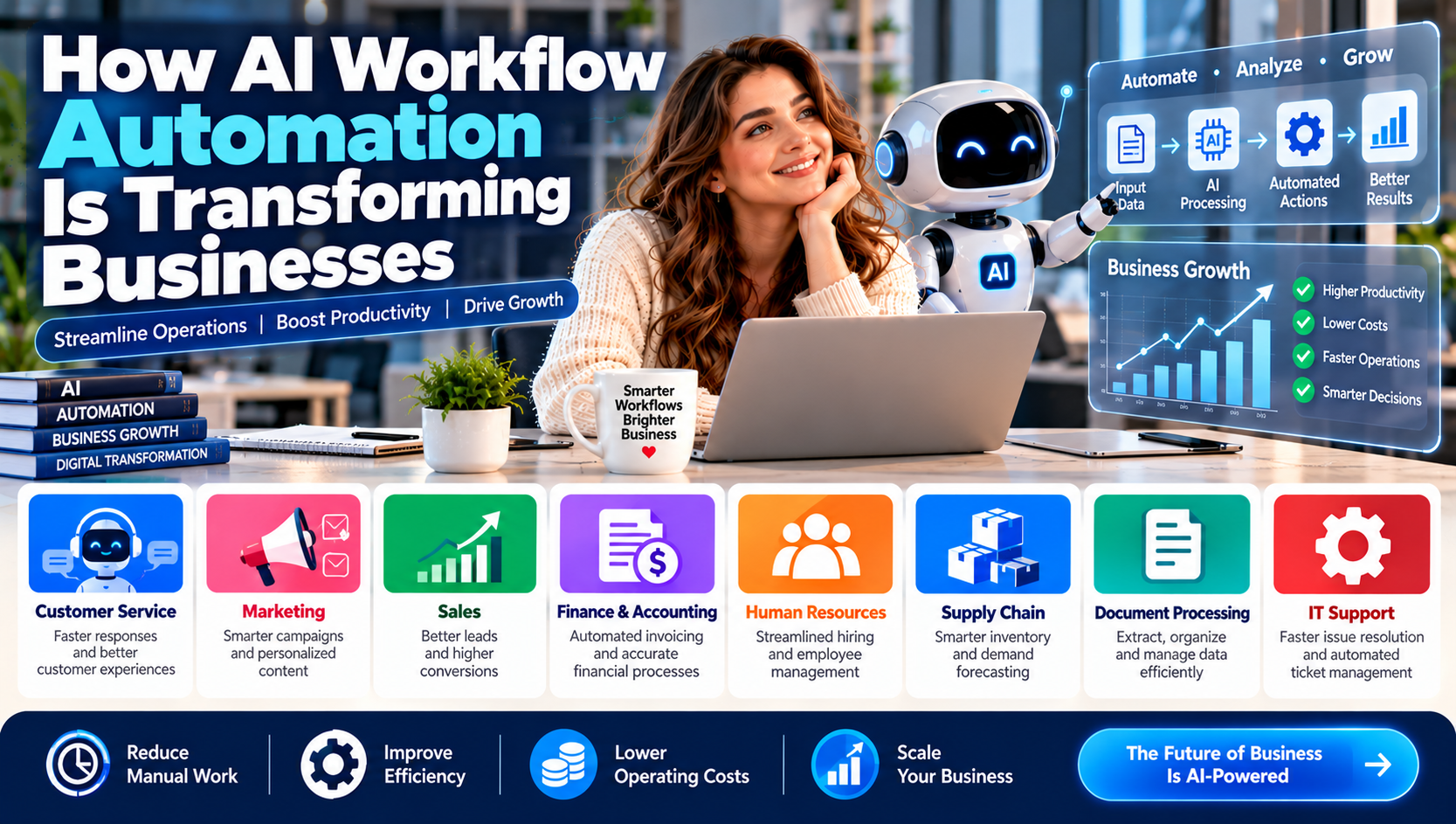
1. Input collection: The system receives information from emails, forms, documents, databases, customer platforms, or other software.
2. Information analysis: AI models interpret the incoming information, identify relevant details, classify requests, or recognize patterns.
3. Decision-making: The system applies business rules, model outputs, and predefined conditions to determine the next action.
4. Task execution: Automation software performs an action, such as updating a record, sending a notification, creating a report, or routing a request.
5. Human review: Employees review sensitive, unusual, or high-impact decisions when necessary.
6. Monitoring and improvement: Businesses evaluate performance, identify errors, and adjust workflows to improve reliability.
The exact process depends on the tools, data, and level of automation used by the organization.
AI Workflow Automation vs. Traditional Automation
Traditional automation and AI workflow automation both reduce repetitive work, but they operate differently.
Traditional automation usually follows predefined instructions. For example, a system may send an email whenever a customer submits a particular form.
AI-powered automation can go further by interpreting the information in that form, identifying the customer's intent, and recommending an appropriate response.
Feature | Traditional automation | AI workflow automation |
|---|---|---|
Operating method | Predefined rules | Rules combined with AI capabilities |
Data handling | Structured information | Structured and certain unstructured information |
Decision support | Rule-based conditions | Pattern recognition and model-based analysis |
Flexibility | Limited to configured instructions | Can handle some variations in input |
Common applications | Scheduled emails and data transfers | Document processing and intelligent support |
Human involvement | Depends on workflow design | Often needed for oversight and exceptions |
AI does not eliminate the need for traditional automation. In many business environments, combining both approaches produces more reliable results.
10 Ways AI Workflow Automation Is Transforming Businesses
AI workflow automation can support many departments and operational activities. The following applications demonstrate how businesses can use it in practical situations.
1. Customer Service Automation
Customer service teams often handle large volumes of repetitive questions about products, orders, payments, returns, and account access.
AI-powered systems can classify incoming messages, retrieve relevant information, suggest responses, and route complex requests to the appropriate employee.
For example, an online retailer can use an AI assistant to answer common questions about shipping policies while sending unusual delivery complaints to a human support representative.
Business benefits:
Faster responses to common inquiries
More organized customer requests
Reduced repetitive work
Better availability outside standard business hours
Improved support team productivity
Businesses should ensure automated responses are accurate and provide customers with a clear way to reach a human representative.
2. Marketing and Content Automation
Marketing departments manage several connected activities, including campaign planning, audience segmentation, email communication, content production, and performance reporting.
AI tools can help automate parts of these workflows.
For example, a marketing platform may analyze customer segments, suggest email subject lines, organize campaign information, and generate draft content for review.
AI can also help marketers analyze engagement patterns and identify opportunities to improve campaigns.
Potential applications include:
Email campaign preparation
Content idea generation
Customer segmentation
Social media scheduling
Campaign performance summaries
Personalized content recommendations
Human review remains important for brand consistency, factual accuracy, originality, and compliance with marketing rules.
3. Sales Process Automation
Sales teams spend significant time researching prospects, updating customer relationship management (CRM) systems, preparing follow-up messages, and organizing sales information.
AI workflow automation can help streamline these activities.
A system may summarize sales conversations, extract important customer details, update CRM records, and remind representatives about follow-up tasks.
AI-powered lead scoring may also help sales teams prioritize potential customers based on available information and defined business criteria.
Potential advantages:
More organized customer records
Faster lead qualification
Improved follow-up management
Reduced administrative work
Better visibility into sales activities
AI-generated lead scores should support, rather than replace, professional sales judgment.
4. Finance and Accounting Automation
Finance departments handle invoices, expense reports, transaction records, reconciliations, and financial reporting.
AI-enabled document processing can extract information from invoices and receipts, classify transactions, identify unusual entries, and prepare data for accounting systems.
For example, a business may receive hundreds of supplier invoices each month. An automated workflow can extract invoice numbers, dates, supplier names, and payment amounts before routing the documents for approval.
Common applications:
Invoice data extraction
Expense categorization
Document verification
Financial report preparation
Transaction monitoring
Accounts payable workflows
Financial decisions and payments should have appropriate authorization controls. Businesses should not allow an AI system to approve sensitive transactions without suitable safeguards.
5. Human Resources Automation
Human resources teams manage recruitment, onboarding, employee records, leave requests, training, and internal communication.
AI workflow automation can assist with administrative tasks throughout the employee lifecycle.
For example, an onboarding workflow can automatically send welcome messages, organize required documents, schedule training sessions, and notify relevant departments when a new employee joins.
Potential uses include:
Organizing job applications
Scheduling interviews
Preparing onboarding checklists
Answering routine employee questions
Managing training reminders
Organizing HR documentation
Recruitment and employee evaluation require particular care. Automated systems should be monitored for unfair bias, inaccurate recommendations, and inappropriate use of personal information.
6. Supply Chain and Inventory Management
Supply chain operations involve suppliers, inventory records, purchase orders, shipping schedules, and customer demand.
AI can analyze historical sales, inventory levels, and other available data to help businesses forecast demand and identify possible supply disruptions.
Automated workflows can also notify purchasing teams when stock levels reach predefined thresholds.
Business applications include:
Demand forecasting
Inventory monitoring
Purchase order preparation
Supplier communication
Delivery tracking
Supply chain reporting
Forecasts are estimates rather than guarantees. Businesses should consider data quality, unexpected market changes, and supplier reliability when making purchasing decisions.
7. Document Processing and Data Management
Many organizations manage large volumes of contracts, forms, reports, applications, and other documents.
AI-powered document processing can extract relevant information, classify files, summarize content, and route documents to appropriate departments.
For example, a legal or administrative team may use an AI system to identify important dates and clauses in a document before an employee reviews the original file.
This can reduce manual information extraction and make document management more organized.
However, sensitive documents should only be processed through systems that meet the organization's privacy, security, and regulatory requirements.
8. IT Support and Technical Operations
IT teams handle support requests, software issues, access requests, system alerts, and routine maintenance activities.
AI workflow automation can classify technical support tickets, suggest troubleshooting steps, summarize system alerts, and route incidents based on priority.
Some systems can also automate approved routine actions, such as creating support tickets or notifying responsible employees.
Potential benefits:
Faster ticket classification
Better incident organization
Reduced repetitive administrative tasks
Improved knowledge management
More consistent support procedures
Actions involving system access, security settings, or critical infrastructure should require appropriate authorization and monitoring.
9. Business Reporting and Data Analysis
Managers need accurate information to understand performance and make decisions.
AI-powered workflows can collect data from connected systems, organize information, identify trends, and prepare reports.
For example, a sales reporting workflow may combine information from a CRM platform and financial software to produce a summary of monthly revenue, sales activity, and customer trends.
AI-generated reports should be checked against original data because incorrect inputs or model interpretations can produce misleading conclusions.
10. Project and Task Management
Project teams coordinate deadlines, responsibilities, progress updates, documents, and communication across departments.
AI automation can help organize project information, summarize discussions, identify overdue tasks, and send reminders.
For example, an AI assistant connected to a project management platform may summarize weekly updates and highlight tasks that need attention.
This can make project coordination easier, although project managers should remain responsible for priorities, approvals, and important decisions.
Best AI Workflow Automation Tools for Businesses
Several platforms provide workflow automation features that businesses can use to connect applications and introduce AI into daily operations.
The best option depends on business size, technical requirements, existing software, security needs, and budget.
Platform | Main capabilities | Potential use |
|---|---|---|
Zapier | Connects applications and automates workflows | Marketing, sales, and administrative tasks |
Make | Visual workflow building and integrations | Multi-step business processes |
Microsoft Power Automate | Business process automation and Microsoft ecosystem integrations | Enterprise and office workflows |
n8n | Customizable workflow automation | Technical teams and advanced integrations |
UiPath | Robotic process automation and AI-enabled automation | Enterprise operations |
Workato | Enterprise integration and workflow automation | Cross-department processes |
Google Workspace automation | Automation and AI capabilities across supported Google services | Document and productivity workflows |
Zapier
Zapier allows users to connect different applications and create automated workflows without extensive programming.
Businesses can use it to transfer information between tools, send notifications, create records, and connect supported AI services.
It may be useful for small businesses looking to automate repetitive tasks across their existing software.
Make
Make provides a visual environment for creating workflows that connect applications and process information.
Its visual approach can help users build multi-step automations involving conditions, data transformations, and integrations.
Microsoft Power Automate
Microsoft Power Automate supports workflow automation across Microsoft products and many third-party services.
Organizations using Microsoft 365 may find it useful for automating approvals, document processes, notifications, and administrative tasks.
n8n
n8n is a workflow automation platform that provides flexibility for technical users who want to create customized integrations and AI-enabled processes.
Depending on deployment and configuration, it can support more advanced workflows and greater control over infrastructure.
UiPath
UiPath provides robotic process automation and AI-enabled automation capabilities for organizations with complex operational processes.
It may be useful for enterprises seeking to automate repetitive work across multiple systems.
Workato
Workato focuses on enterprise integration and automation, helping organizations connect applications and coordinate processes across departments.
It can support workflows involving customer data, employee processes, finance, and other business operations.
Tool features, pricing, integrations, and AI capabilities change over time. Check each provider's official documentation before selecting a platform.
Benefits of AI Workflow Automation
AI workflow automation can improve business operations when it is applied to appropriate tasks and supported by reliable data.
Increased Productivity
Automating repetitive activities allows employees to spend more time on tasks that require creativity, communication, and professional judgment.
Reduced Manual Errors
Automation can reduce mistakes caused by repeated data entry and inconsistent manual procedures. However, AI systems can also make errors, so validation remains necessary.
Faster Business Processes
Workflows can move information between departments and applications more quickly, reducing unnecessary delays.
Better Customer Experiences
Businesses can use AI to organize customer inquiries, provide faster responses, and support more consistent service.
Improved Data Insights
AI tools can analyze large amounts of information and help teams identify patterns, trends, and potential operational problems.
Easier Business Scaling
Well-designed workflows can help organizations manage increasing volumes of work without expanding every administrative process at the same rate.
More Consistent Operations
Standardized workflows can help teams follow repeatable procedures and maintain clearer records of business activities.
Challenges of Implementing AI Automation
Despite its potential advantages, AI workflow automation also introduces challenges that businesses must address.
1. Data Privacy and Security
AI workflows may process customer details, employee information, financial records, and confidential documents.
Businesses should review data access permissions, encryption, retention policies, vendor security practices, and applicable privacy requirements.
2. Integration Difficulties
Organizations may use several software platforms that do not easily communicate with one another.
Integrating older systems with new automation tools can require technical planning, custom development, or additional software.
3. Implementation Costs
AI tools may involve subscription charges, integration expenses, training, infrastructure, and ongoing maintenance.
Businesses should evaluate the full cost rather than focusing only on the advertised software price.
4. AI Accuracy and Reliability
AI models can misunderstand requests, generate incorrect information, or produce inconsistent results.
Critical workflows need testing, clear escalation procedures, and human review.
5. Employee Training
Employees need to understand how automated workflows operate, when to trust their outputs, and when to escalate problems.
Training can improve adoption and reduce mistakes.
6. Over-Automation
Not every business task should be automated.
Activities involving sensitive customer relationships, complex negotiations, legal judgments, or high-impact financial decisions may require substantial human involvement.
How to Implement AI Workflow Automation in Your Business
Successful implementation begins with a clear understanding of business problems rather than simply purchasing new technology.
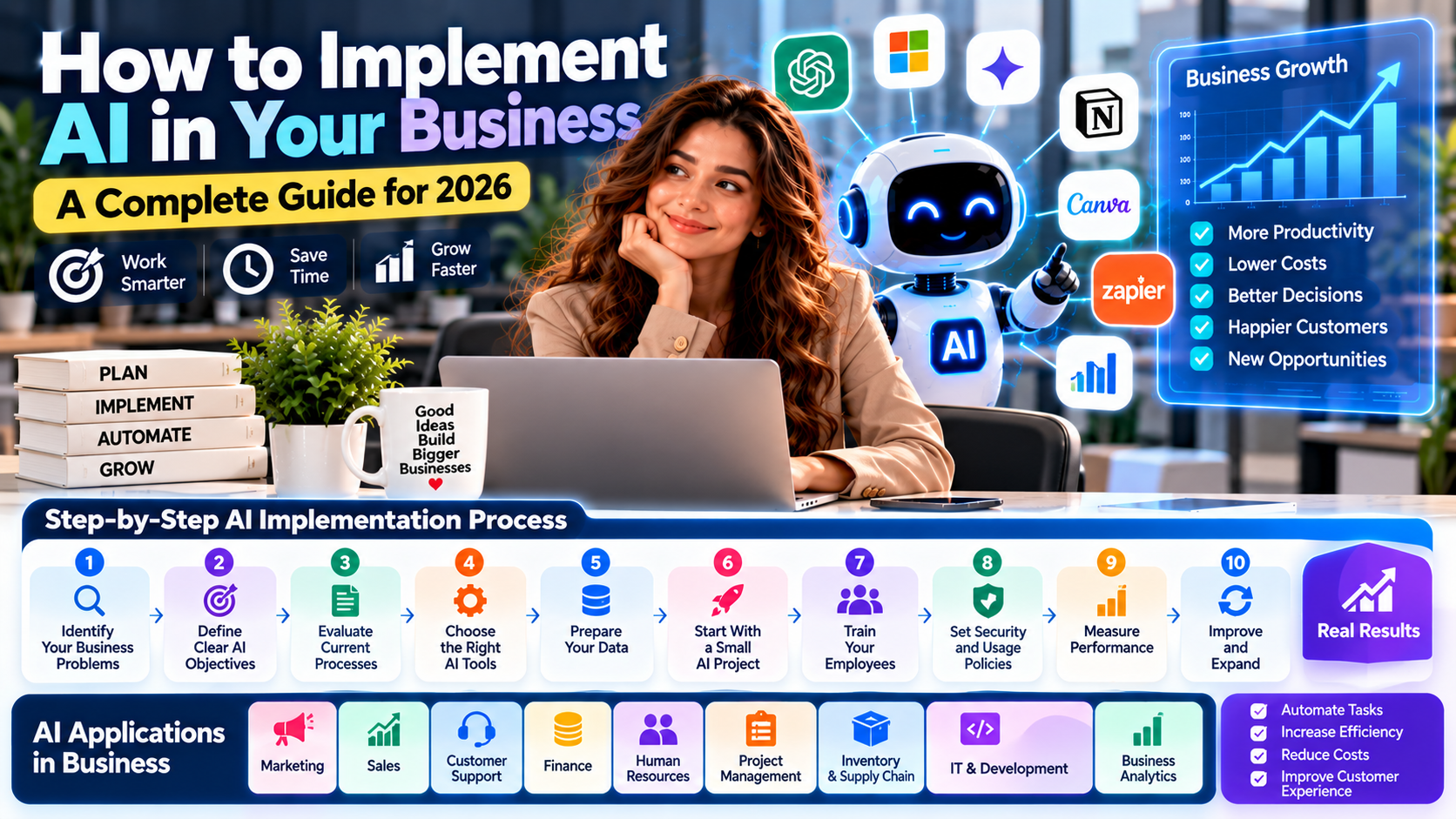
Step 1: Identify Repetitive Tasks
Review daily operations and identify activities that consume time without requiring significant human judgment.
Examples include:
Copying information between applications
Sorting incoming emails
Preparing routine reports
Sending reminders
Organizing customer inquiries
Processing standard forms
Start with a task that has a clear process and measurable outcome.
Step 2: Map the Existing Workflow
Document each stage of the process, including who performs the task, which software is used, what information is required, and where delays occur.
This helps identify opportunities for improvement before automation is introduced.
Step 3: Define Clear Objectives
Decide what the business wants to achieve.
Possible objectives include reducing processing time, improving response speed, minimizing manual data entry, or improving reporting accuracy.
Establish measurable performance indicators before implementation.
Step 4: Select the Right Automation Platform
Compare platforms based on integrations, features, security, usability, scalability, and cost.
A small business may need a simple no-code platform, while a larger organization may require enterprise integrations and more advanced controls.
Step 5: Start With a Small Pilot
Automate one workflow before expanding across the organization.
For example, begin with routing customer support emails instead of attempting to automate the entire customer service department.
A small pilot makes it easier to identify problems and measure results.
Step 6: Add Human Oversight
Determine which actions can happen automatically and which require approval.
For sensitive activities, include review checkpoints, access restrictions, and clear escalation procedures.
Step 7: Train Employees
Explain how the workflow operates, what the AI system can and cannot do, and how employees should handle incorrect outputs or unusual situations.
Step 8: Measure Performance
Compare the results with the original process.
Useful performance indicators include:
Average task completion time
Manual hours saved
Error frequency
Customer response time
Cost per transaction
Workflow completion rate
Employee satisfaction
Step 9: Improve and Expand
Use the results to improve the workflow before automating additional processes.
Regular reviews help businesses identify changing requirements, software issues, and new opportunities.
Real-World Examples of AI Workflow Automation
AI workflow automation can be applied across industries, although the exact systems and results vary.
E-commerce: An online retailer can classify customer messages, summarize product feedback, and route return requests to the appropriate team.
Healthcare administration: An organization may use document automation to organize administrative forms and appointment-related information, with suitable privacy controls and human oversight.
Financial services: A financial institution can use automation to classify documents and flag transactions for further review. Regulated decisions require appropriate controls.
Manufacturing: A manufacturer may analyze equipment data to identify maintenance patterns and notify technicians when inspection is needed.
Professional services: An accounting or consulting firm can automate document collection, organize client information, and prepare draft reports for professional review.
These examples illustrate possible applications, not guaranteed performance improvements.
How Much Does AI Workflow Automation Cost?
The cost of AI workflow automation depends on the tools selected, number of users, workflow complexity, integration requirements, and level of technical support.
Common cost categories include:
Cost category | What it covers |
|---|---|
Software subscriptions | Monthly or annual platform charges |
AI usage | Model or API consumption charges |
Integration | Connecting existing business systems |
Development | Building custom workflows |
Training | Teaching employees to use the system |
Maintenance | Monitoring, updates, and troubleshooting |
Security | Access controls, compliance, and risk management |
Some businesses can begin with low-cost automation tools, while complex enterprise deployments may require significant investment.
A useful approach is to estimate the total cost of ownership and compare it with measurable improvements in time, productivity, and operational efficiency.
The Future of AI Workflow Automation
AI workflow automation is likely to become more integrated into everyday business software.
Several developments are shaping its evolution.
AI Agents and Multi-Step Workflows
AI agents are systems designed to pursue defined goals by selecting actions and using connected tools. In suitable environments, they may coordinate multiple steps in a workflow rather than responding to a single instruction.
However, agent-based systems need clear permissions, monitoring, and limits on what actions they can perform.
More Natural Language Interfaces
Employees may increasingly use conversational interfaces to interact with business systems, retrieve information, and initiate approved workflows.
Greater Integration Across Departments
Automation platforms are connecting more applications, making it easier to coordinate processes across sales, finance, HR, and customer service.
Stronger Focus on Governance
As AI systems become more involved in business operations, organizations will need stronger approaches to privacy, security, accountability, and model evaluation.
Human-AI Collaboration
The most effective business workflows are likely to combine automated processing with human expertise, especially for decisions involving customers, money, employees, and compliance.
Frequently Asked Questions
What is AI workflow automation?
AI workflow automation uses artificial intelligence and automation software to perform, coordinate, or improve business tasks. It can analyze information, classify requests, generate content, and trigger actions across connected applications.
How does AI workflow automation help businesses?
It can reduce repetitive work, improve workflow speed, organize information, support decision-making, and help employees focus on more valuable activities.
What are the best AI workflow automation tools?
Popular options include Zapier, Make, Microsoft Power Automate, n8n, UiPath, and Workato. The best platform depends on the business's software, technical requirements, budget, and security needs.
Can small businesses use AI workflow automation?
Yes. Small businesses can start with relatively simple workflows such as email sorting, appointment reminders, customer inquiry classification, and invoice data extraction.
Is AI workflow automation expensive?
Costs vary. Some tools offer entry-level plans, while advanced systems may involve subscriptions, integrations, development, and maintenance expenses. Businesses should calculate total costs before implementation.
What is the difference between AI and automation?
Automation performs tasks according to configured instructions or conditions. AI adds capabilities such as language understanding, pattern recognition, and prediction. Combining both can support more flexible business workflows.
Can AI replace employees through workflow automation?
AI can automate certain tasks, but it does not eliminate the need for human expertise. Employees remain important for judgment, relationship management, problem-solving, accountability, and oversight.
Is AI workflow automation secure?
It can be secure when properly designed, but no system is risk-free. Businesses should use appropriate access controls, protect sensitive information, review vendor security, and monitor automated activity.
How long does it take to implement AI workflow automation?
Simple workflows may be implemented relatively quickly, while complex integrations can take considerably longer. The timeline depends on system compatibility, data quality, testing, and approval requirements.
What business processes should be automated first?
Start with repetitive, predictable, and measurable processes, such as data entry, email classification, report preparation, appointment reminders, and routine customer inquiries.
Final Thoughts
AI workflow automation is changing how businesses manage daily operations by combining intelligent software with automated processes. From customer service and marketing to accounting, HR, and supply chain management, organizations can use AI to reduce repetitive work and improve operational efficiency.
However, successful automation requires more than selecting an AI tool. Businesses need clear objectives, reliable data, secure integrations, employee training, and appropriate human oversight.
The best starting point is to identify one repetitive business process, measure its current performance, and introduce automation gradually. As the workflow becomes reliable, organizations can expand automation to other departments.
Businesses that approach AI automation strategically can build more efficient operations while keeping human expertise at the center of important decisions.
Disclaimer: This article is for educational and informational purposes only. AI tools, features, pricing, and capabilities may change. Businesses should evaluate vendor terms, data protection practices, security requirements, and applicable regulations before implementing automation systems.